Design Transfer and Compatibility
57
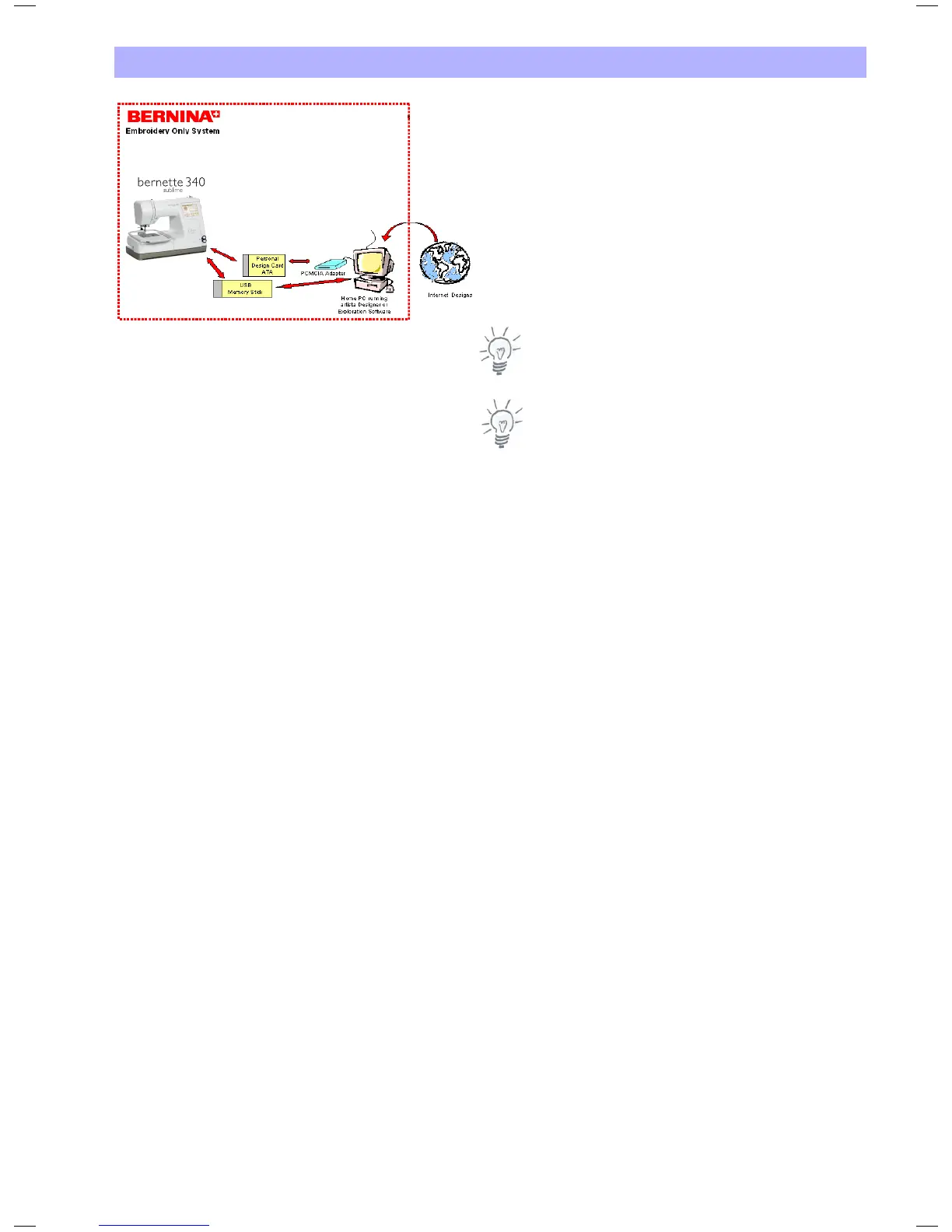
Embroidery Designs from the Internet
Embroidery designs from the Internet, i.e. from www.
embroideryonline.com either
1. download as .ART file. Using BERNINA Embroidery Software or
OESD Explorations software write as .EXP+ file to USB Stick or
ATA Personal Design Card
2. or download as .EXP file and copy with BERNINA Embroidery
Software or OESD Explorations software to a USB Stick or an
ATA Personal Design Card in the subdirectory «Emb5».
.EXP files do not carry colour info. Please print from the internet
for your reference.
Note:
If you don't use a Laptop PC you may require a BERNINA Card
Reader.
Important Note:
This overview only briefly describes the possible operations. Please
refer to the documentation supplied with the respective products to
learn more about their installation and use. This concerns mostly the
BERNINA Embroidery Software, the PC Card Reader, the Reader/
Writer Box, the OESD Explorations Software as well as the OESD
Magic Box
TM
.


 To Next Page