• “Grill +”
Select the “Standard” symbol and then
confirm by pressing OK. “Standard” starts to
flash. You can access the “Grill+” function by
pressing the < and > buttons and confirming.
This function lets you finish your cooking
programme by browning the dish for the last
five minutes of the cooking time.
This function is represented by a flashing
grill on the screen when it is activated five
minutes before the end of cooking.
Note
: The “Grill +” option can be used only
with the following functions: TURBO GRILL,
CIRCULATING HEAT, CONVENTIONAL and
COMBINED HEAT.
EN
2 / USING YOUR APPLIANCE
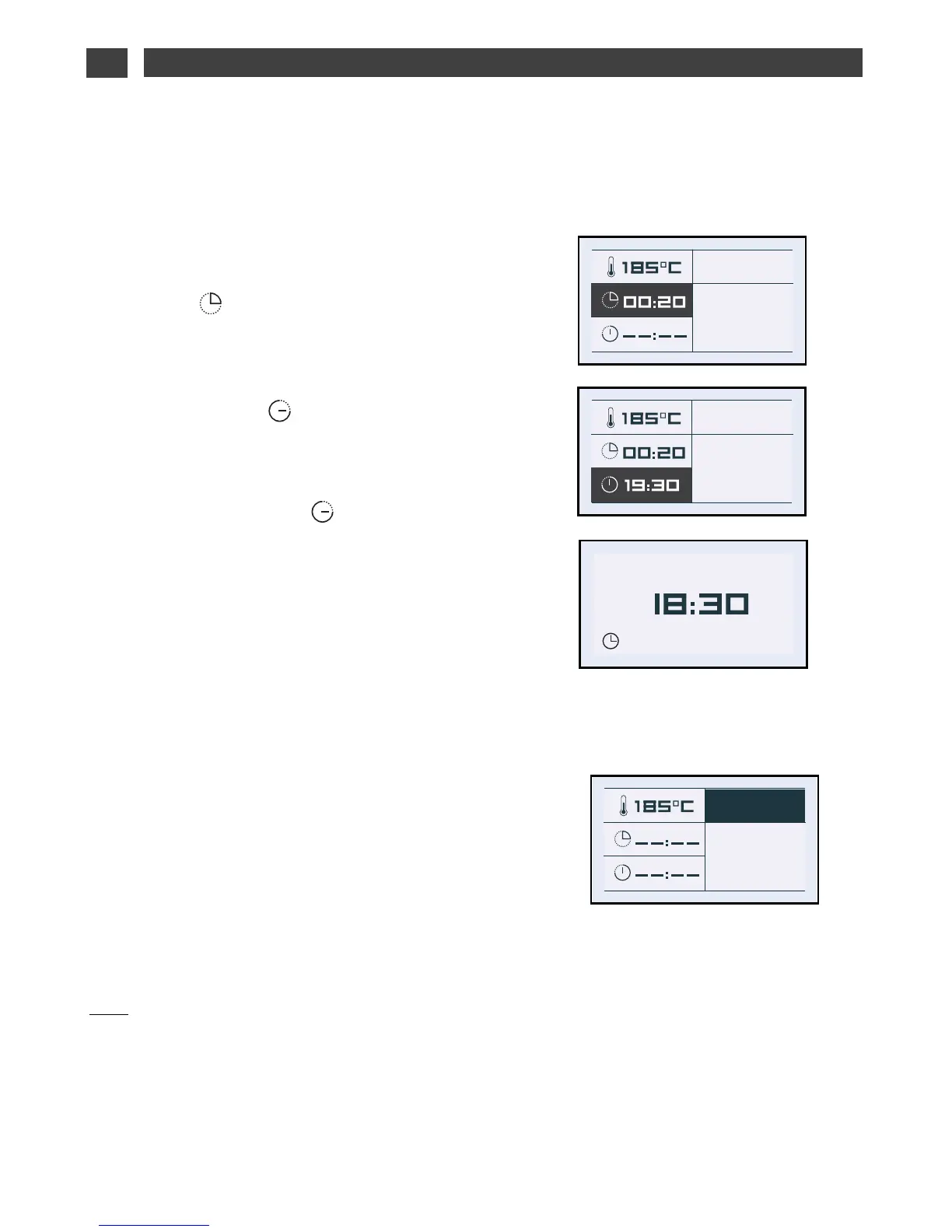
• Cooking time and end of cooking
time.
Enter the cooking time for your dish by
selecting the symbol.
Press < or > and then
confirm so that the symbol flashes. Enter the
cooking time by pressing < and > and then
confirm. When you set the cooking time, the
end of cooking time ( field) automatically
adjusts.
You can change the end of cooking time, if
you want to delay the programme start.
In this case, select the symbol and
proceed as described for
setting the cooking time.
Once you have selected the cooking end
time, confirm.
Your oven will display the time and the end of
cooking time symbol until cooking starts.


 To Next Page
 Loading...