IM-Inst-RF360en v0.4
Dedrone
11
Installation
Type Cat-6 patch cable, shielded, suitable for outdoor use
Recommendation: Cat-7 patch pable, shielded, suitable for
outdoor use
Maximum Length 328 ft (100 m)
For longer distances a PoE extender is required
External Diameter 3.5 mm – 7.5 mm
• Power over Ethernet via the supplied patch cable.
` Make sure, that your network has activated active PoE+ (802.3at).
6.2 Cable Requirements
To connect the sensor with another cable as the supplied, note the following requirements.
6.3 Cable Preparation for LAN connection
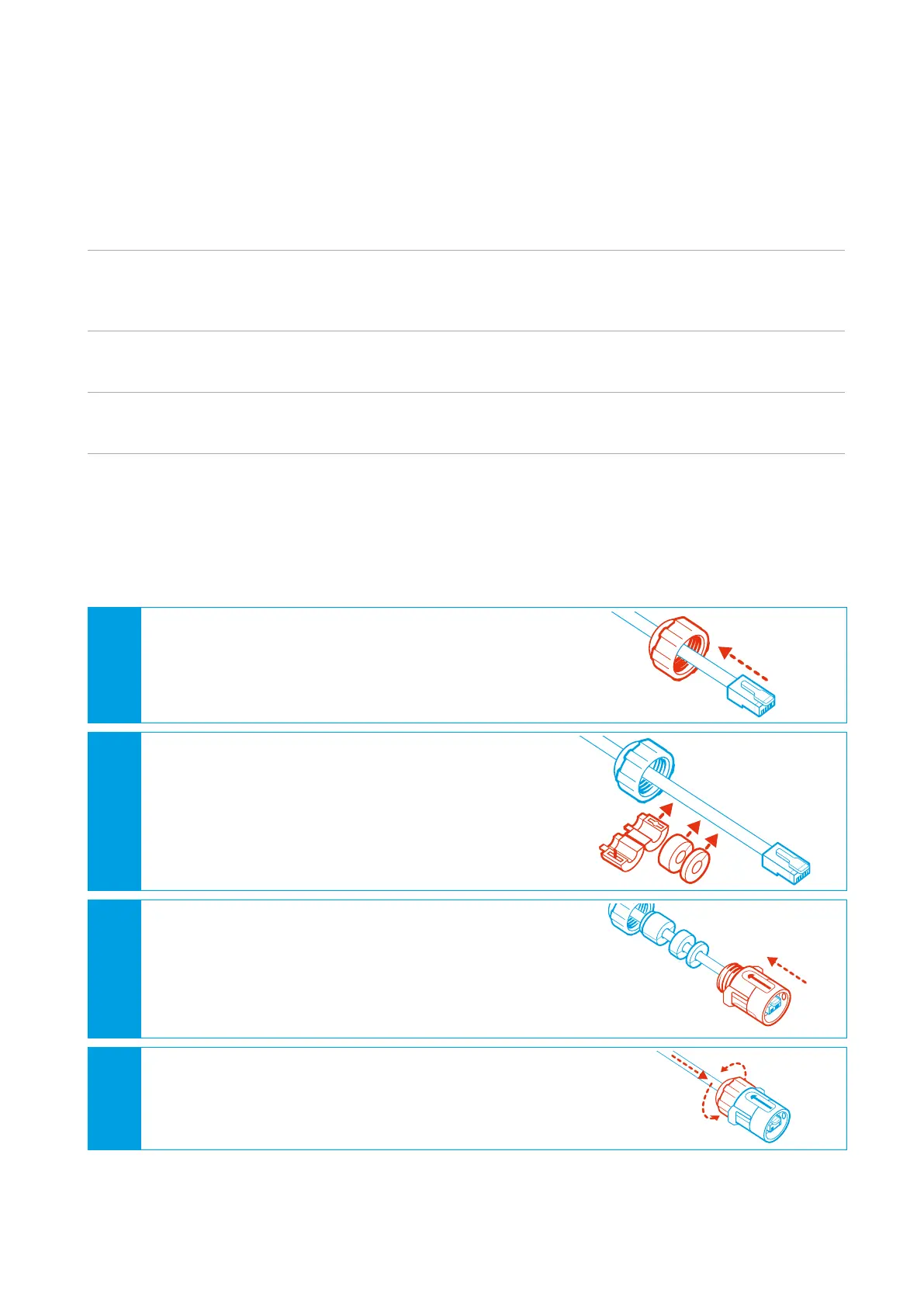
For a weather resistant connection to the RF-360, it is necessary to put on the supplied outdoor
housing to the prewired RJ45 cordset.
Procedure:
1
Put the gland nut onto the cable. Thereby make
sure that the thread shows to the plug.
2
• Open the sleeve and close it around the
cable. Thereby make sure that the closer ring
shows to the gland.
• Put the sealing ring and the plastic ring over
the cable. Thereby make sure that the se-
quence of the elements is correct.
3
Thread the connector body over the plug.
The plug clicks in and gets fixed in the
connector body.
4
Slide the gland to the connector body and screw
down the gland nut on the connector body.


 To Next Page