6
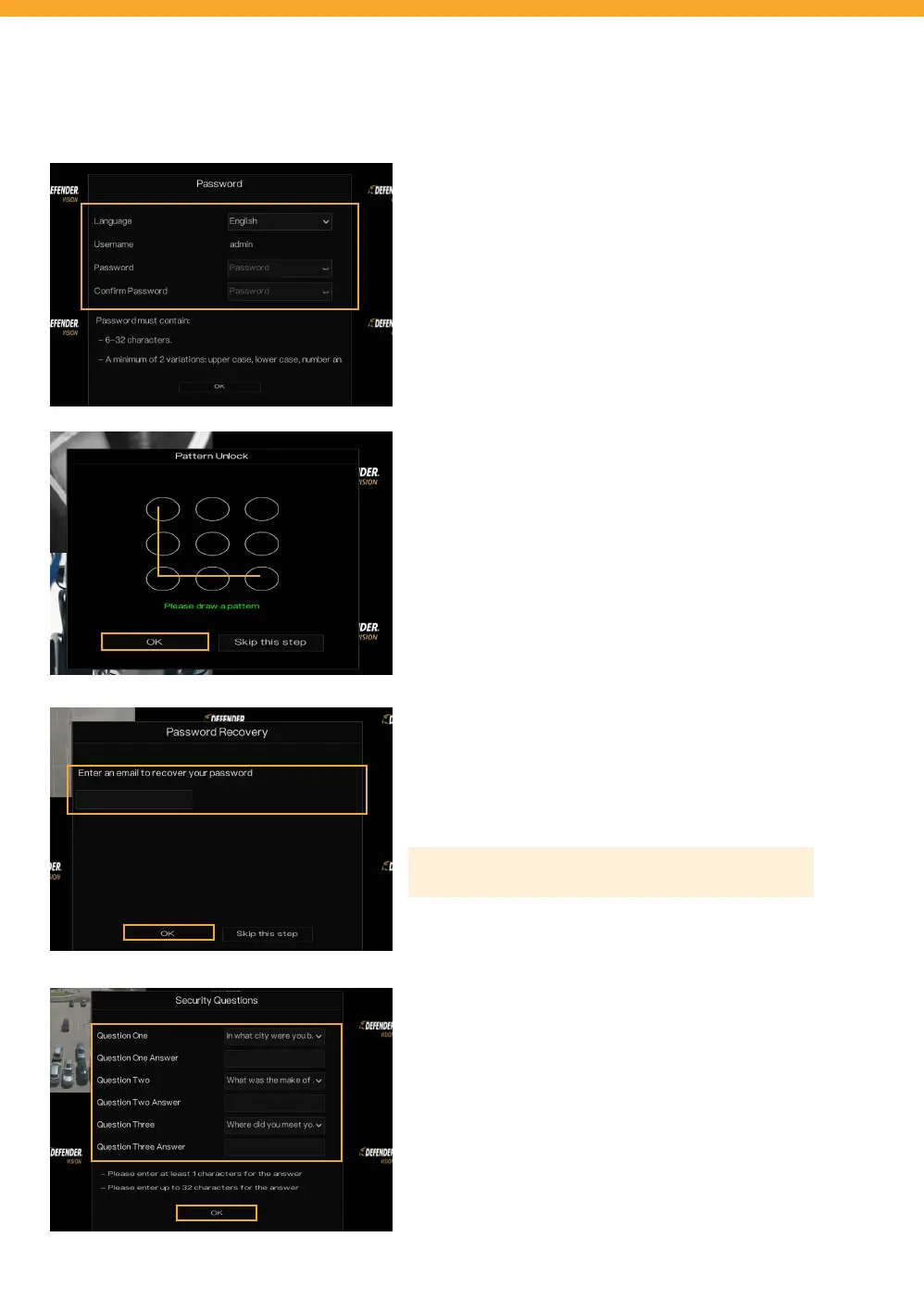
ADMIN PASSWORD
• Select your language.
• Create a new password – PLEASE REMEMBER YOUR
PASSWORD! Defender cannot access the DVR remotely
to reset your password!
• Conrm the password.
UNLOCK PATTERN
Draw an unlock pattern to access your system in place of a
password. If you do not wish to create a pattern, skip this step.
• Click & drag to draw a pattern – you must connect at least
4 dots.
• Re-enter the unlock pattern to conrm.
• Click “OK”.
PASSWORD RECOVERY
• Enter your email address and click “OK”.
Please Note: We do not recommend skipping this step.
SECURITY QUESTIONS
Security questions are used to reset your password if you forget
your password.
• Select 3 security questions and enter your answers.
• REMEMBER YOUR ANSWERS! We recommend writing
your questions and answers down and keeping them
in a safe place for future reference.
DVR ACTIVATION



 To Next Page