Need Help? Visit DefenderCameras.com/support
7
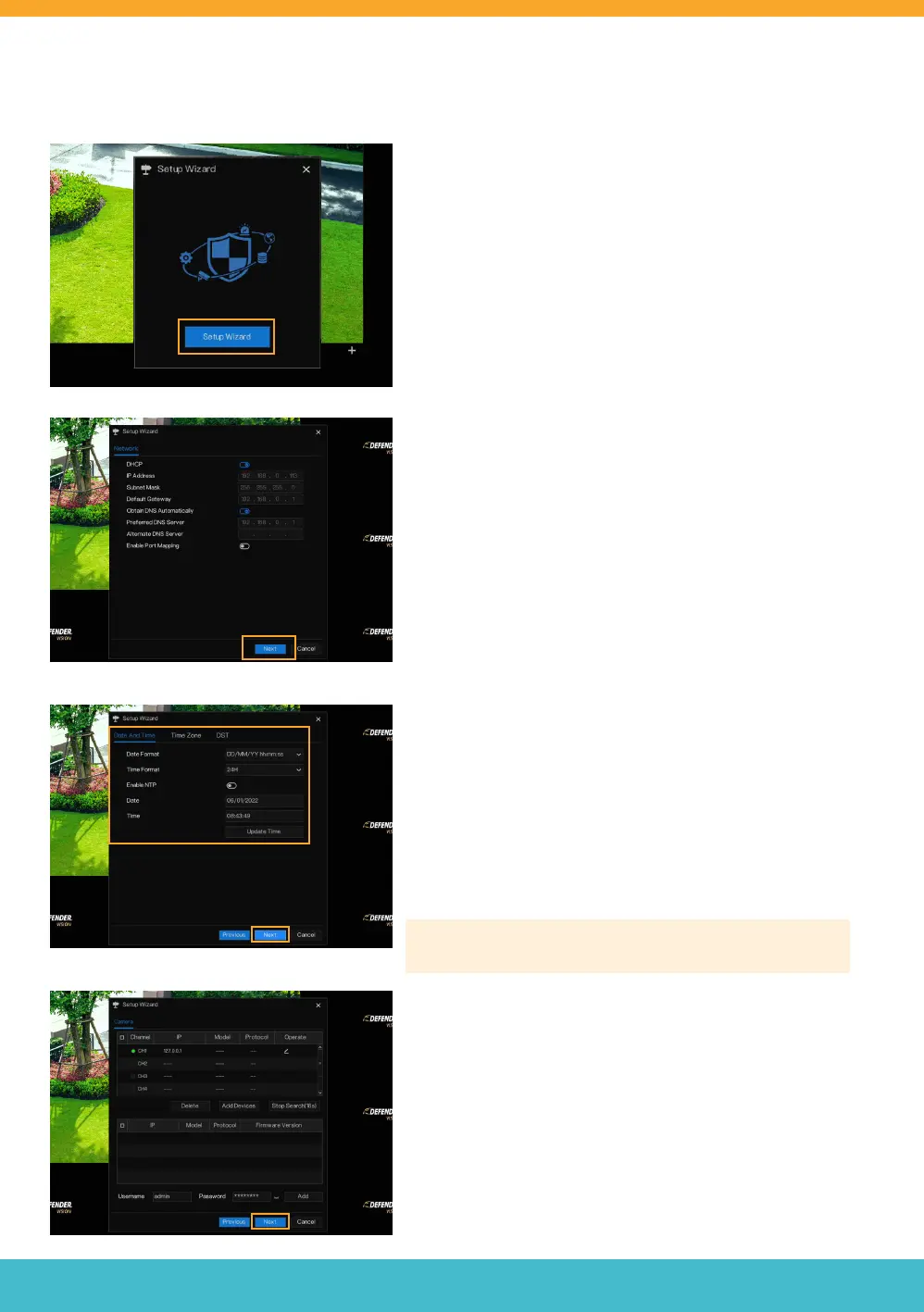
DVR SETUP WIZARD
SETUP WIZARD
• Click “Setup Wizard” to start your DVR setup.
NETWORK
• If you have a static IP address, make all necessary
changes otherwise, no change is required.
• Click “Next”.
DATE AND TIME
• Select your Date and Time format.
• When NTP (Network Time Protocol) is enabled, your DVR
system will automatically synchronize your date and time
to your selected time zone. To manually enter your date
and time, make sure Enable NTP is deselected.
• Select your Time Zone.
• Schedule your DST (Day Light Savings). This is optional.
• Click “Next”.
Please Note: We recommend making no change to the NTP
Server or Sync Time Frequency
CAMERA
• Displays the type of camera that can be connected
to the DVR.
• No changes are necessary on this screen.
• Click “Next”.



 To Next Page