PAGE 6 OF 8
WARNING In the unlikely event of the Ceran sustaining
accidental damage or cracks, switch off the appliance at the
mains to avoid electric shock and have the panel replaced
before further use.
Caring for the Ceran hob
x Ceran is a tough, durable material, which provides a
beautiful, functional and long lasting cooking surface.
To keep it looking good, it needs to be treated with care
and cleaned regularly.
x Wipe spillage off as soon as possible with a damp cloth,
preferably while the hob is still warm.
x Clean the hob with a nylon pad and a suitable smooth
top cleaning solution, which is available from all Defy
Service Centres. Remove calcium stains (yellow stains)
by applying a small amount of lime remover such as
vinegar or lemon juice. Other suitable commercially
available products can also be used.
x If necessary stubborn spills may be removed using a
blade scraper.
x Do not use metal scourers or coarse abrasive powders
as these could scratch the Ceran.
x Regular cleaning after use will prevent dirt build up and
ensure that the hob remains bright and attractive.
x Wipe the hob surround with a damp hot soapy cloth and
dry.
x DO NOT USE A STEAM CLEANER.
Recommendations (see also the enclosed
‘CERAN’ leaflet)
x Use only pots with a solid level base. An uneven base
will prolong cooking time and waste energy.
x Use pots with a base diameter slightly larger than that
of the thermal area. This will ensure even heat
distribution and prevent spillage from dripping onto and
staining the hot zone.
x Always cover the pot with a lid. This will conserve
energy and minimize spillage.
x Save energy by switching the plate off 5 to 10 minutes
before the end of a lengthy cooking period. The Ceran
hob will retain sufficient residual heat to complete the
cooking process.
Hob control
x The hob is fitted with electronic sensors which are
activated when the relevant circular touch pad is
pressed for at least one second.
x Each sensor activation is followed by an audible tone.
x To avoid false touch pad activations do not place any
objects on the touch pad area.
x Always keep the touch pad surface area clean.
Switching a cooking zone on
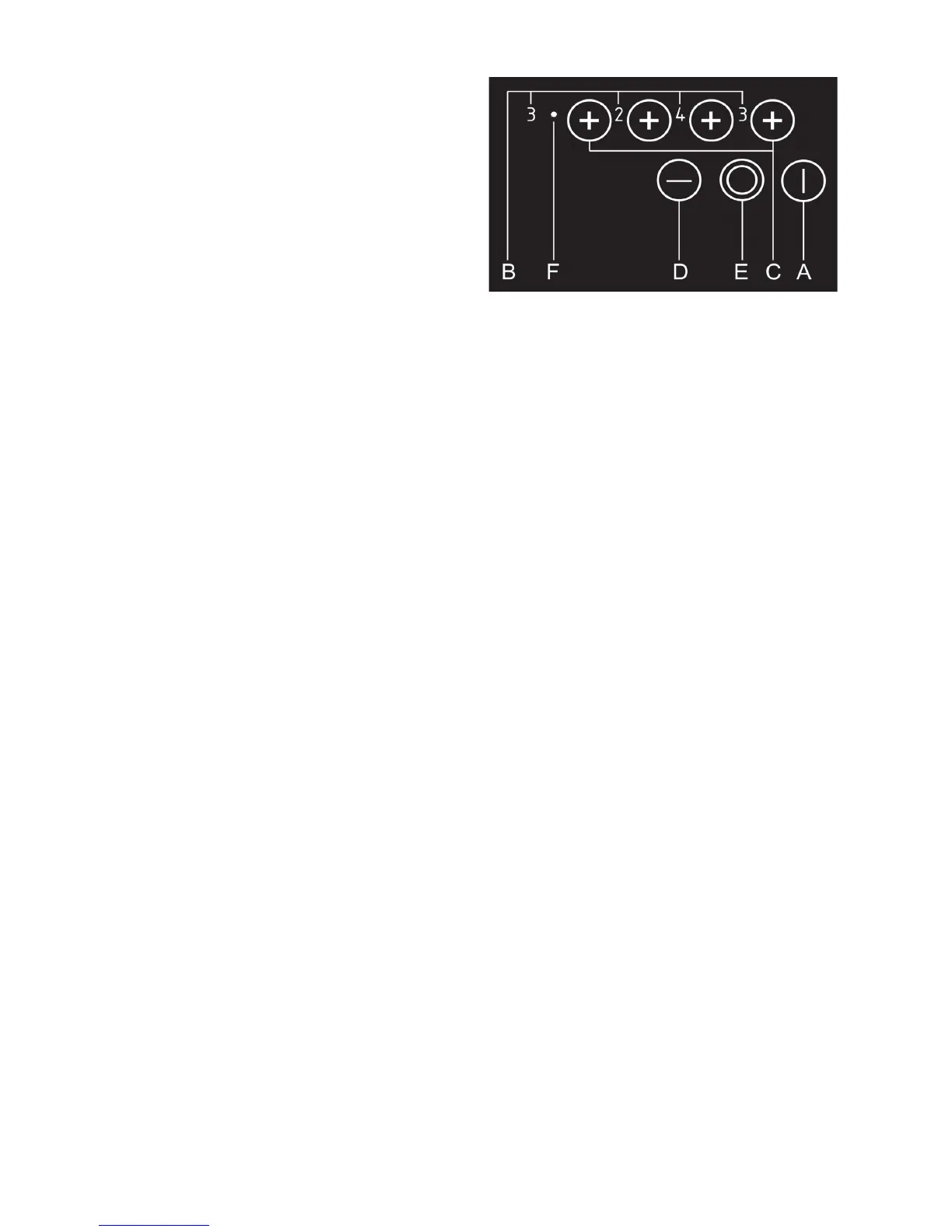
x Press the on/off sensor (A) for at least one second to
switch the hob on, all hotplate power indicators (B)
indicate ‘0’. The next setting must be selected within
20 seconds to prevent the hob from switching off.
x Activate the required cooking zone by pressing the
relevant (+) sensor (C)
x Set the desired cooking power from 1- 9, using the (+)
or (-) sensors (C and D )
x Continuous pressing of + (C) or - (D) increases or
reduces the power level.
x Alternatively, power levels may be sequentially
adjusted by pressing (C or D) for at least 1 second.
x Note that settings are only possible for one hotplate at a
time.
Switching a cooking zone off
x Press the (-) sensor (D) and set the power level to ‘0’,
the hotplate will switch off after 10 seconds. Shortly
thereafter the hot surface indicator light on the hob
will switch on, display (H) and remain on for 20 to 30
minutes after the plate is switched off. This is a remind-
er that the hob surface is still too hot to touch.
x Fast deactivation. Press both + and — (C and D)
touchpad sensors simultaneously to switch the hotplate
off immediately.
Switching the hob off
x Switch the hob off by pressing the On / Off sensor (A).
Ceran® smooth top
Remaining heat indicator
The remaining heat may be used for warming food as long
as the symbol ‘H’ remains on after the cooking zone has
been switched off.
Caution!
Even when the symbol ‘H’ disappears the cooking zone
may still be hot. Do not touch the cooking zones.
Extended cooking zone
x Both cooking zones switch on when switching the top
left cooking zone on.
x Pressing extension zone sensor (E) switches the outer
circuit of the cooking zone off.
x Pressing the extension zone sensor (E) again will
reactivate the outer circuit.
x An indicator light (F) shows when the outer zone is
active.
For improved safety your hob is fitted with a temperature
limiter preventing the zone from overheating should a pot
boil dry etc.


 To Next Page
 Loading...