Page 14
The maximum adjustable cooking
time in modes (except warming) is
limited to 5 hours 59 minutes for
safety reasons. The programme
will be cancelled in case of power
failure, if so reprogramme the
oven.
While making any adjustment,
related symbols on the display will
flash. Wait for a short period of
time for the settings to take effect.
The current time cannot be set
while the oven is operating in any
of the functions, or if semi-
automatic or full automatic
programming is made on the oven
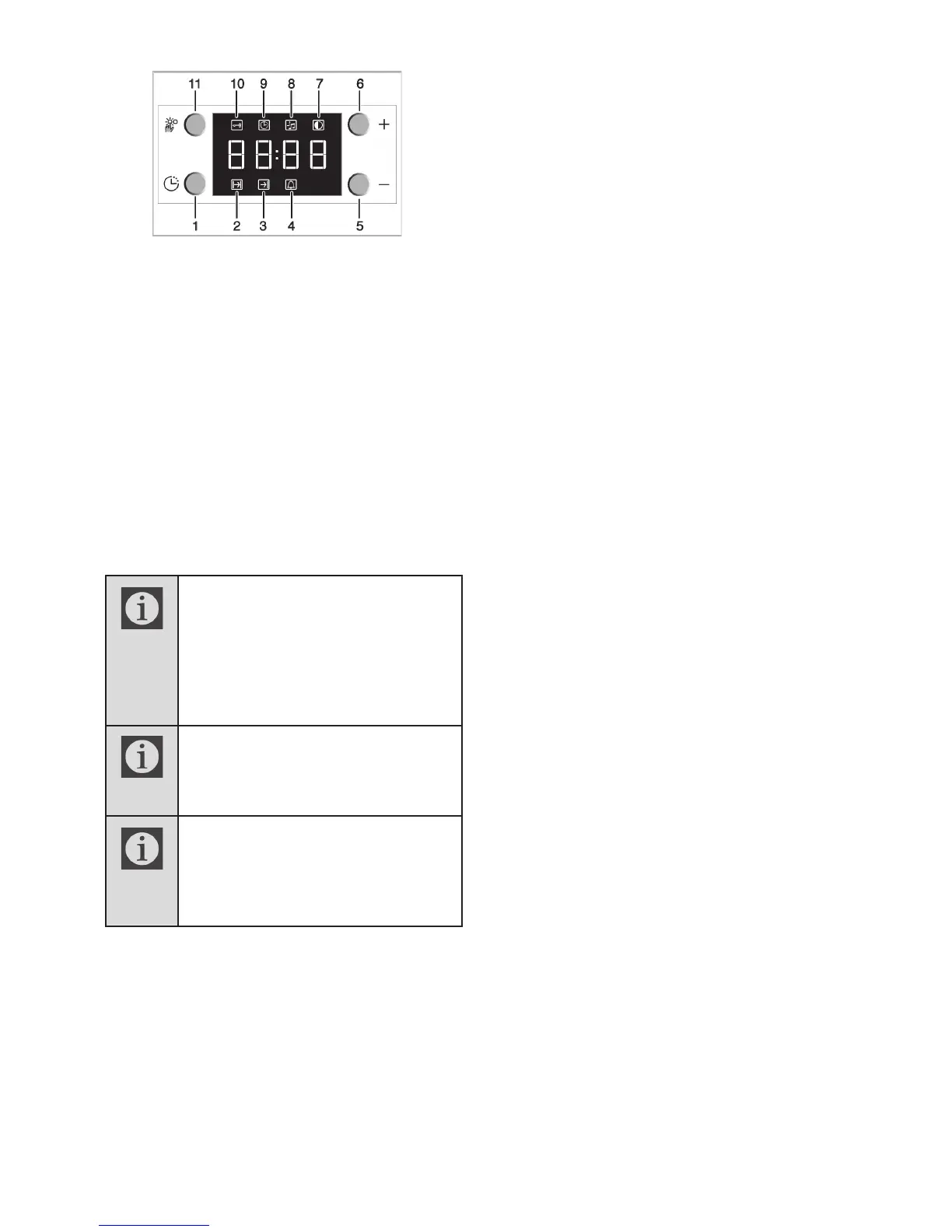
1
Programme key
2
Cooking time
3
End of cooking time
4
Alarm symbol
5
Minus key
6
Plus key
7
Screen brightness setting
8
Alarm volume
9
Current time
10
Keylock
11
Adjustment key
Cooking by specifying the cooking time:
You can set the oven so that it will stop at
the end of the specified time by setting the
cooking time on the clock.
1. To adjust the cooking time, Press
Programme key (1) and activate the Cooking
Time symbol (2).
2. Press '–' / '+' (5/6) keys to set the
cooking time.
» Once the Cooking Time is set, Cooking
symbol will be displayed continuously.
If you want to set the end of cooking time to
a later time:
After setting the cooking time on the clock,
you can set the end of cooking time to a later
time.
1. To adjust the cooking time, press
Program key (1) and activate the Cooking
Time symbol (2).
2. Adjust the cooking time with Minus (5)
and Plus (6) keys.
» Cooking Time symbol remains lit
(displayed continuously) after setting the
cooking time.
3. To set the End of Cooking Time, Press
Program key (1) twice and activate the
Cooking Time symbol (3).
4. Press - (5) and + (6) keys to set the
end of cooking time.
» Once the End of Cooking Time is set, End
of Cooking symbol and Cooking symbol will
be displayed continuously. The End of
Cooking Time symbol (3) will disappear as
soon as the cooking starts.
5. Put your dish into the oven.
6. Select operation mode and
temperature.
» Oven timer automatically calculates the
startup time for cooking by using the end of
cooking time and the cooking period you
have set. Selected operation mode is
activated when the startup time of cooking
has come and the oven is heated up to the
set temperature. It maintains this
temperature until the end of cooking time.
7. After the cooking process is completed,
"End" appears on the displayed and the
alarm will sound.
8. Alarm signal will sound for 2 minutes.
To stop the alarm signal, just press any
key. Alarm will be silenced and current
time will be displayed.



 To Next Page