Page 15
If you mute the alarm by
pressing any key, the oven will
restart operating.
If you press any button at the
end of the alarm period, the
oven will restart operating.
9. Turn off the oven with the Temperature
knob and Function knob.
Using the keylock
Activating the keylock
You can prevent oven from being used by
activating the Keylock function.
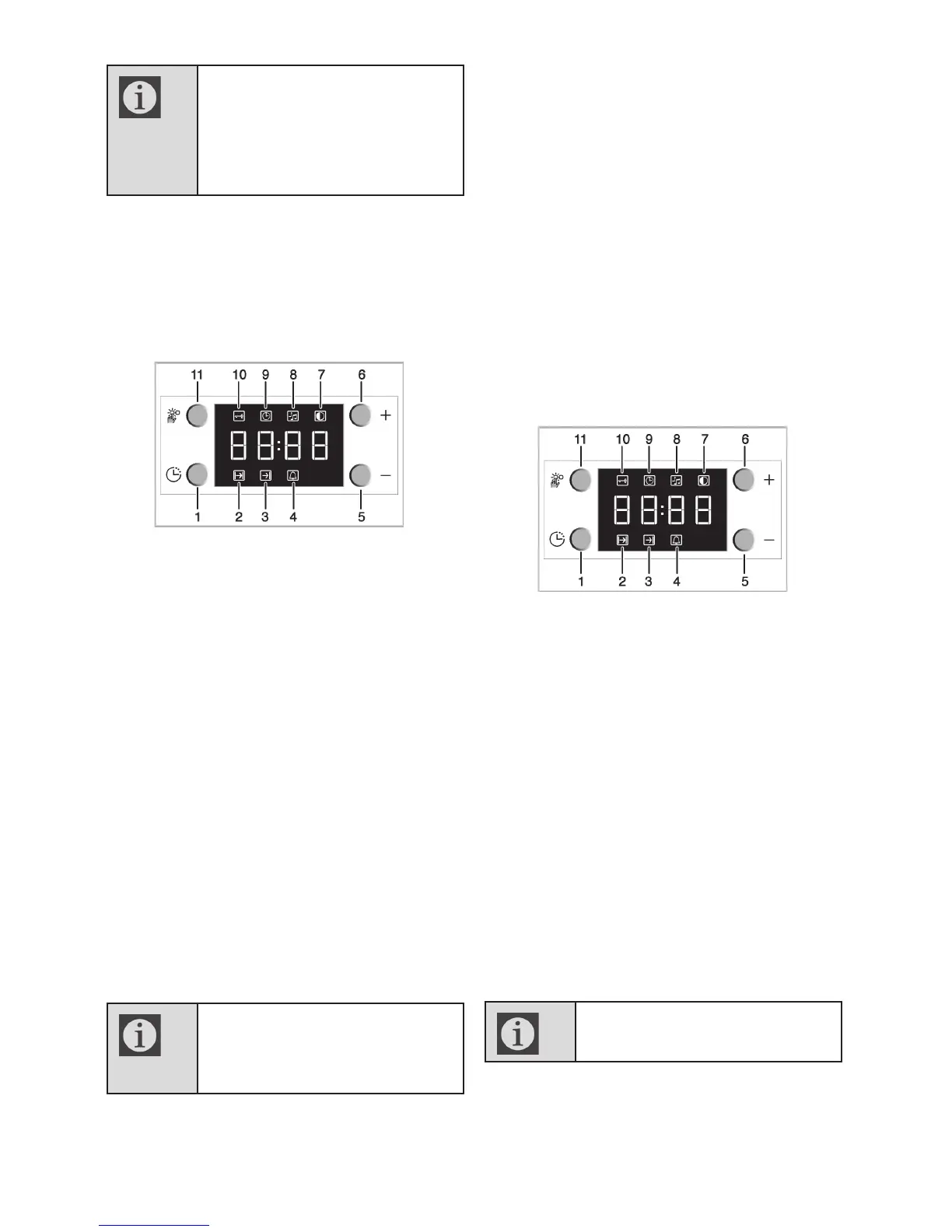
1
Programme key
2
Cooking time
3
End of cooking time
4
Alarm symbol
5
Minus key
6
Plus key
7
Screen brightness setting
8
Alarm volume
9
Current time
10
Keylock
11
Adjustment key
1. Press the key (11) to activate Keylock
symbol (10).
» "OFF" will appear on the display.
2. Press '+' key (6) to activate the keylock.
» Once the keylock is activated, "On"
appears on the display and the Keylock
symbol (10) remains lit.
When the Keylock function is
activated, control panel buttons
except for the key (11) cannot
be used.
Deactivating the keylock
1. Press Adjustment key (11) to activate
Keylock symbol (10).
» "On" will appear on the display.
2. Press '–' (5) to deactivate the keylock.
» "OFF" will be displayed once the keylock is
deactivated.
Using the clock as an alarm
You can use the clock of the product for any
warning or reminder apart from the cooking
programme.
The alarm clock has no influence on the
functions of the oven. It is only used as a
warning. For example, this is useful when
you want to turn food in the oven at a certain
point of time. Alarm clock will give a signal
once the time you set is over.
1
Programme key
2
Cooking time
3
End of cooking time
4
Alarm symbol
5
Minus key
6
Plus key
7
Screen brightness setting
8
Alarm volume
9
Current time
10
Keylock
11
Adjustment key
Setting the alarm clock
1. Press Program key (1) twice to activate
the alarm time symbol (4).
Maximum alarm time can be 23
hours and 59 minutes.
2. Adjust the alarm time using „+“ /„–
“ (5/6) keys.



 To Next Page