MUSIC PLAY
MUSIC P LAY
In r adio offm ode,i nsert a micro SD/TF card that
with MP3/WMA/WAV format music files.
Then turn on the unit and select [Music] in Main
menu, press <MENU> to enter music playing
mode, the display will show the information of
the song.
In Radio mode, press <Radio/MP3> to directly
switch to Music mode .
Music m ode
NOTES:
Please insert or pull out the micro SD/TF card when
radio is off. Do not operate them when the music are
being played.
If Music mode can not be entered, please check if the
card was inserted correctly.
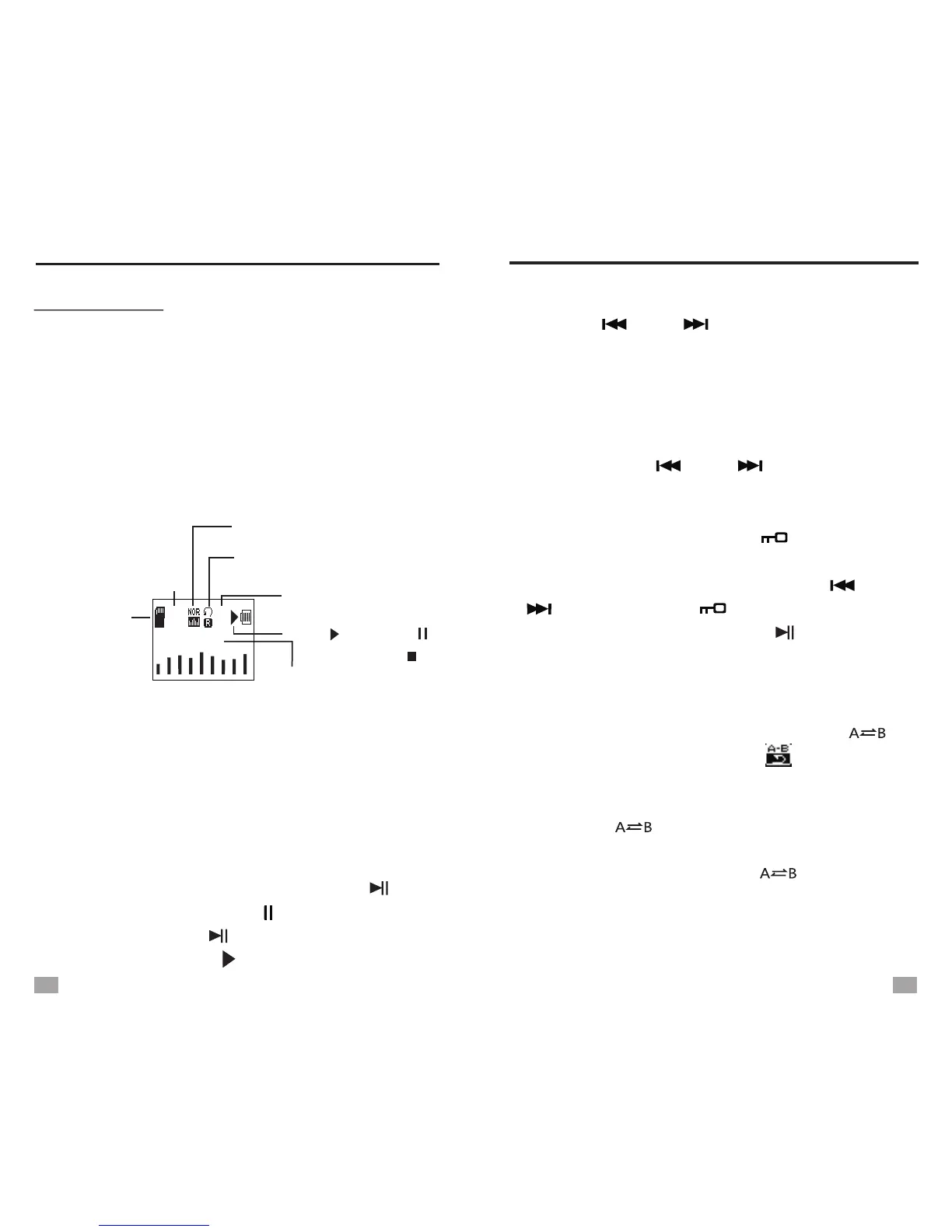
File source
(Micro S D/TF
card)
Playing p rocess
Length of the song
Song information
Total a mount of f iles
No. o f t he song
Repeat mode
EQ
000:06
003:55
0009
0025
Blow.mp3
Play( ), Pause( ),
Stop ( )
PLAY AND PAUSE
SELECT MUSIC FILES
When the music is playing, press <FM/ > to
pause, the pause symbol “ ” will show on the
display. Press < > again to resume playing
and the play symbol “ ” appears.
FM/
1. Press < > or < > to select music files,
press and hold them to fast rewind or fast
forward.
2. When pause, press <MENU> to open the sub-
menu and select “File browser”, press <MENU>
to enter the folder and find the particular file
by pressing < > or < >.
A-B REPEAT
When the music is playing, press < >
once to set the start point A, [ ] shows on
the display and “B” starts flashing. When the
playing process reaches your desired location,
press < > again to set the ending point
B. Now the unit will repeat playing from A to B.
While repeating, press < > can cancel
the repeating and go on playing the file
normally.
MW/
MW/
MW/
MUSIC PLAY
15
16
SONG SELECTION
When playing music, press < /Song Selection>
to enter song selection. Input 4 digit of the music
file no. from right to left by pressing < > or
< > to adjust and < /Song Selection> to
move cursor. Then press <FM/ > to play the
selected file.


 To Next Page