FIRMWARE UPGRADE
When the alarm is activated, [ ] appears on
the display, the radio will alarm with the selected
mode when reaching the preset time.
If the selected mode is [Ring Embedded], you can
press any button to turn off the ringtone when the
alarm goes off.
RESET
RESET
Select [Restore factory settings] in System
Settings, press <MENU> and notice [Restore
factory sett, NO] shows on the display. Press
< > or < > to make [NO] or [YES] shows
alternately. Select [YES] and press <MENU> to
confirm reset.
Card folder: Auto turn on the radio with the
music file in the micro SD/TF card that selected.
Exit
- Exit
The radio supports firmware upgrade, if there is
an updated firmware or the radio system breaks
down, you can update the radio system with the
below steps: (Unload the battery before upgrade)
1. Download the upgraded firmware and update
tool from our website to a computer.
2. Use the provided USB cable to connect the
radio and computer.
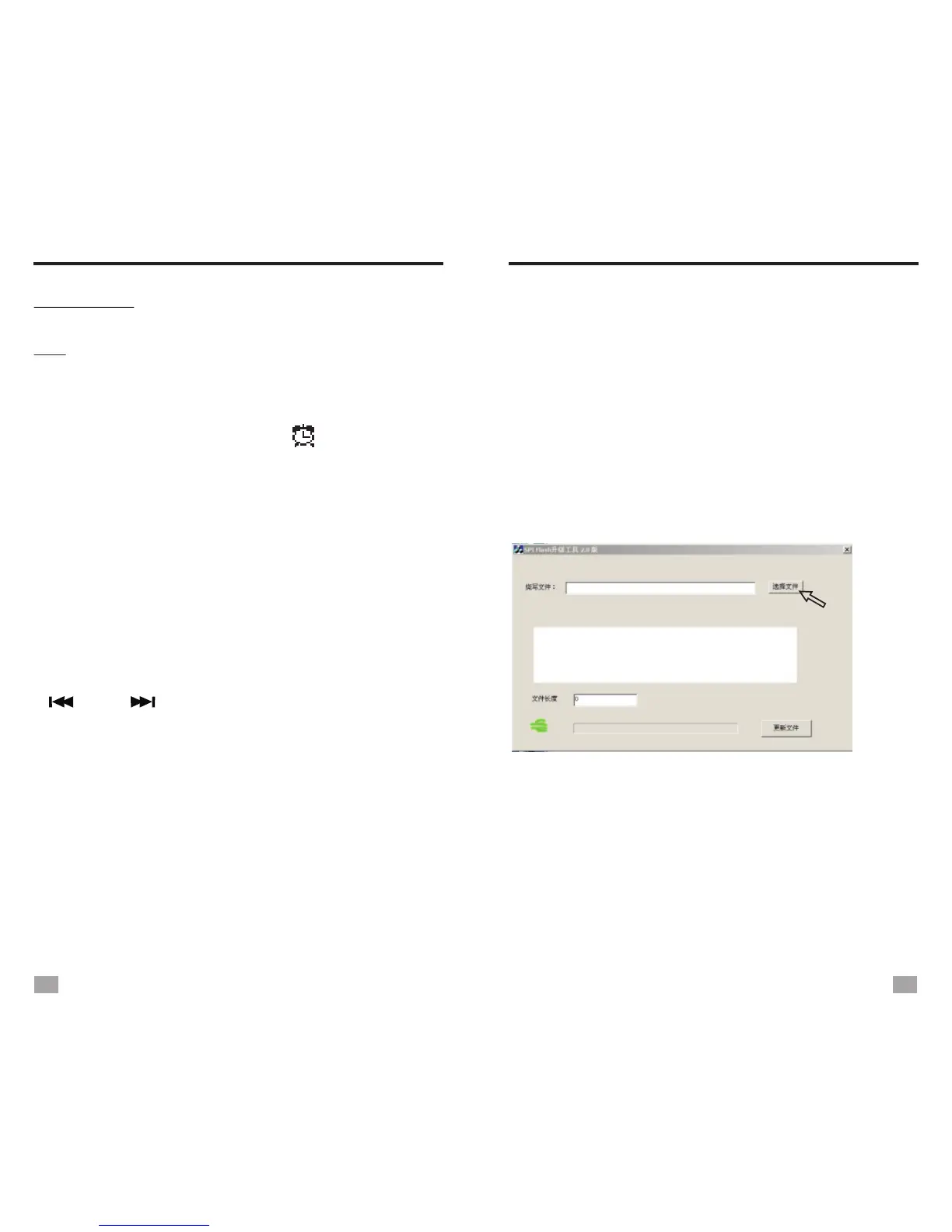
3. Open the downloaded update tool, the below
program appears on the screen. (Picture 1-1)
FIRMWARE UPGRADE
4. Click [Select file] (as the arrow pointed to) and
find the downloaded upgraded firmware in your
computer (Picture 1-2), import the file to the
tool. Click [Update file] to start updating. (See
picture 1-3)
5. The process bar will turn from red to green
once the updating finishes. (Picture 1-4)
1-1
23
24


 To Next Page