This document describes the DEIF WSI, WSDI, WSS, or WSS-L ultrasonic wind measuring system, a fast-responding and accurate system designed for measuring wind speed and direction on board ships. It is classified for residential, commercial, light industry, and industrial environments. The system indicates relative wind speed and direction; absolute values must be calculated separately.
The wind measuring system consists of three main components: a wind sensor, an interface box, and one to three displays for indicating wind speed and direction.
Wind Sensor (Type WSS or WSS-L)
The sensor operates on an ultrasonic principle, using three transducers arranged in a triangle to measure wind speed and direction. It determines these values by measuring the time it takes for ultrasound to travel between the transducers.
Two versions of the wind sensor are available:
- WSS: This version includes a built-in heating element that automatically activates when there is a risk of icing at low temperatures.
- WSS-L: This version does not have a heater and is intended for applications in geographic areas where the risk of icing is very low, or where occasional data dropouts due to icing are acceptable.
Interface Box (Type WSI)
The interface box connects between the wind sensor and the display. It requires an 18-32V DC supply (0.9A at 24V DC or 1.25A at 18V DC). The interface box then supplies power to the ultrasonic transducers and the built-in heating element (if present in the WSS version). Simultaneously, it converts the data signal for wind direction and speed into a TTL signal suitable for the WSDI display(s). This design allows for the replacement of an older wind sensor (type 879.3c) with the new WSS sensor while retaining the existing WSDI display and sensor cable.
Display (Type WSDI)
The display features a digital readout for wind speed and a circular array of red LEDs to indicate wind direction. Each display also provides an output for NMEA communication, allowing serial transfer of measured values to the ship's navigation computer.
Usage Features
The system offers several user-friendly features:
- Multiple Readout Locations: Measuring results can be read from several locations on board, such as control desks on the bridge and bridge wings.
- NMEA Data Output: Displays are equipped with data output for serial transfer of measuring values to the ship's navigation computer via NMEA protocol.
- Adjustable Light Intensity: Three push-buttons on the front panel allow users to set the light intensity to an adequate level. The "▲" and "▼" buttons increase or decrease the light intensity, respectively, with each press changing the level by one of eight available settings.
- Selectable Units: The "MODE" key switches between measuring modes, enabling readings in either meters per second (m/s) or knots (KTS). A red LED below the speed indication indicates the selected unit.
- Configurable NMEA Communication: The display's NMEA communication type can be switched between NMEA 1.5 and NMEA 2.x-3.0 by adjusting a jumper on the rear side of the display PCB.
- Adjustable Wind Direction Readout: The indication of wind direction on the display can be adjusted by 180° (meaning 360° pointing astern of the ship) by short-circuiting two pins on the JP1 header. This adjustment does not affect the NMEA output.
- Flexible Auxiliary Supply: The WSDI display can be supplied from either 220V AC or 110V AC. The supply voltage can be changed by adjusting jumpers on the power/input PCB after removing the rear plate.
Maintenance Features
The system is designed with maintenance and protection in mind:
- Sea-waterproof Construction: The device is built to withstand marine environments.
- Grounding Recommendations: Proper grounding of the WSS wind sensor and its stainless steel mounting base to the ship's earth cable (or steel hull) is crucial for safety and performance.
- Lightning Protection: To protect the wind sensor and personnel from lightning strikes, it is recommended to install a lightning rod with its tip at least one meter above the wind sensor. The lightning rod must be properly grounded according to safety regulations.
- Cable Protection: For additional protection of the cable between the wind sensor and the connection box, and between the connection box and the interface box, using a metal conduit pipe is recommended. If the instrument is installed in a metal panel, the panel and instrument must be carefully earthed.
- Cleaning Instructions: For cleaning the wind sensor, only water with a small amount of dish soap should be used.
- Paint Avoidance: It is important to avoid getting paint on the plastic parts of the wind sensor, especially the three ultrasonic sensors, as this will prevent correct function.
- Troubleshooting Guide: The manual provides a detailed fault-finding guide to help locate issues such as missing supply voltage, blown fuses, or defective components. This guide covers scenarios like no light in the instrument, flashing display, inaccurate readings, and issues with the NMEA output.
- Fuse Replacement: The display's internal 5V DC supply is protected by two fuses (F1 for aux. supply, F2 for internal 5V DC supply). The manual provides instructions for checking and replacing these fuses if they blow.
- Voltage Level Checks: The troubleshooting section details how to check voltage levels at various points in the system (display, interface box, wind sensor) to diagnose problems related to power supply, wind speed, and direction inputs.
- Cable Integrity Checks: The guide helps identify cable breaks or short circuits, which can cause zero wind speed readings or erratic direction indications.
- Wind Sensor Alignment Check: An arrow printed on the bottom of the wind sensor indicates the correct alignment (towards the ship's stem or north for land-based installations), which is crucial for accurate wind direction readings.

 Need help?
 General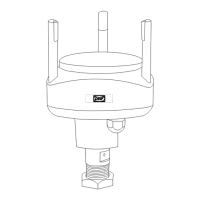

 To Next Page