Service Manual
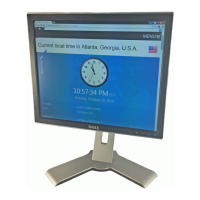
1. Click “browse” icon to choose 1707_A_6736.bin or 1907_A_6738.bin from the PC/Notebook.
2. Input the Monitor Serial Number:
Input the serial number in the corresponding field. For example, 20 digits are required for DELL serial number,
such as “12345678901234567890”. After typing the digits, be sure to press “Enter” on the Keyboard to begin
writing the EDID.





 To Next Page