See Solving Problems for more information.
Using the Dell Soundbar (Optional)
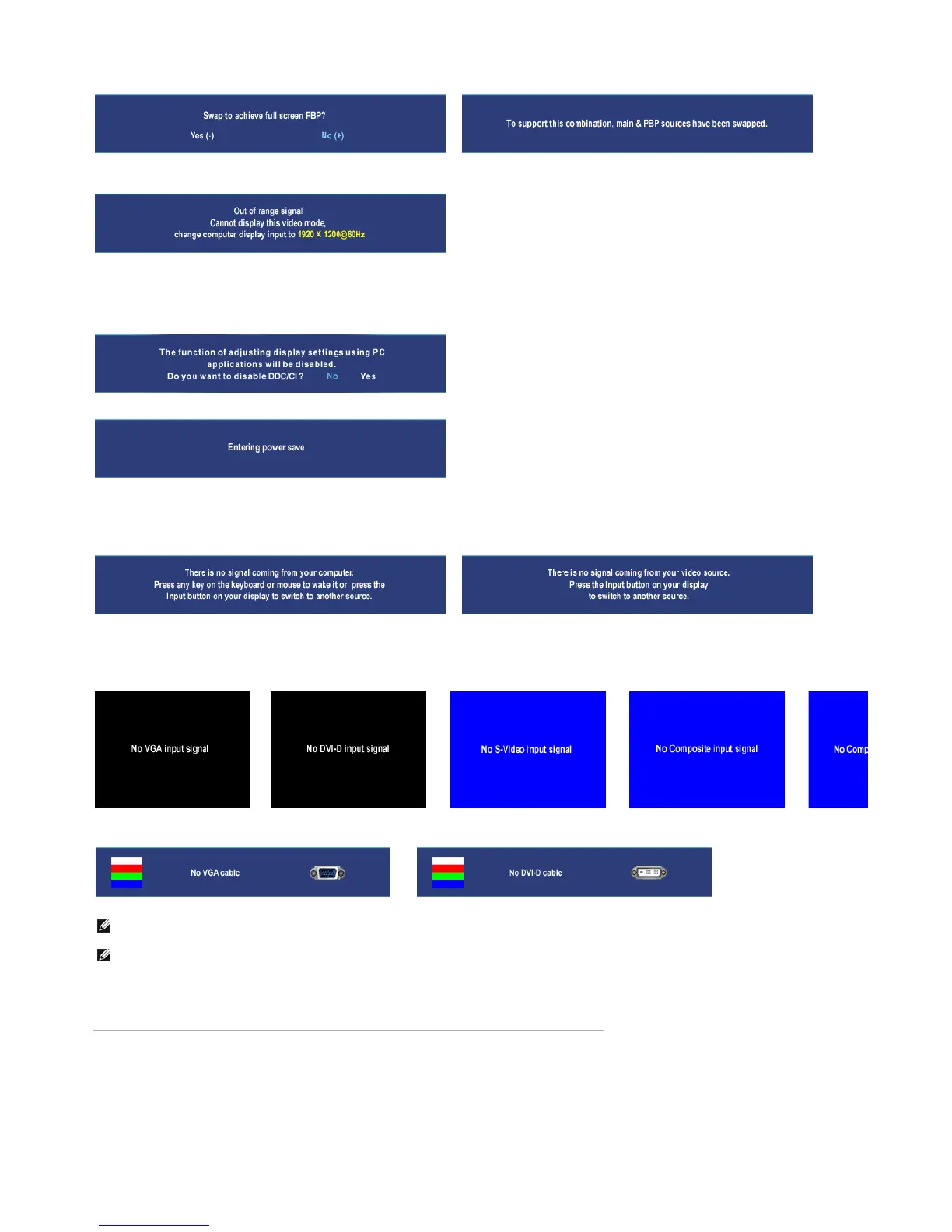
When the monitor does not support a particular resolution mode you will
see the following message :
This means that the monitor cannot synchronize with the si
nal that it is receivin
from the computer. See Monitor Specifications for the Horizontal and
Vertical frequency ranges addressable by this monitor. Recommended mode is
1920 X 1200.
You will see the following message before the DDC/CI function is disabled.
When monitor enters Power Save mode, the following message appears :
Activate the computer and wake up the monitor to gain access to the OSD
If you press any button other than the power button one of the following messages will appear depending on the selected input:
VGA / DVI-D input Video Input
or
In PIP mode, when the monitor does not sense the selected second signal input, one of the following messages will appear depending upon the selected input as
long as the OSD screen is closed.
1. VGA 2. DVI-D 3. S-Video 4. Composite 5.
or
or
or
or
If either VGA or DVI-D input is selected and both VGA and DVI-D cables are not connected, a floating dialog box as shown below appears.
or
NOTE: When the cable is connected back to the input of the monitor, any active PIP/PBP window will disappear. Please enter PIP/PBP submenu to bring back the PIP/PBP windo
NOTE: The PIP/PBP functions can bring up a picture from a second image source. Thus you can watch images from 1 PC source (D-Sub or DVI) and 1 Video Source (Composite
functions will not allow for 2 PC sources or 2 Video sources to perform PIP/PBP.
Pa
e 12 of 14Documentation
12/10/2007htt
://su
ort.dell.com/su
ort/edocs/monitors/2407WFP/en/setu
.htm











 To Next Page