OSD Warning Messages
Back
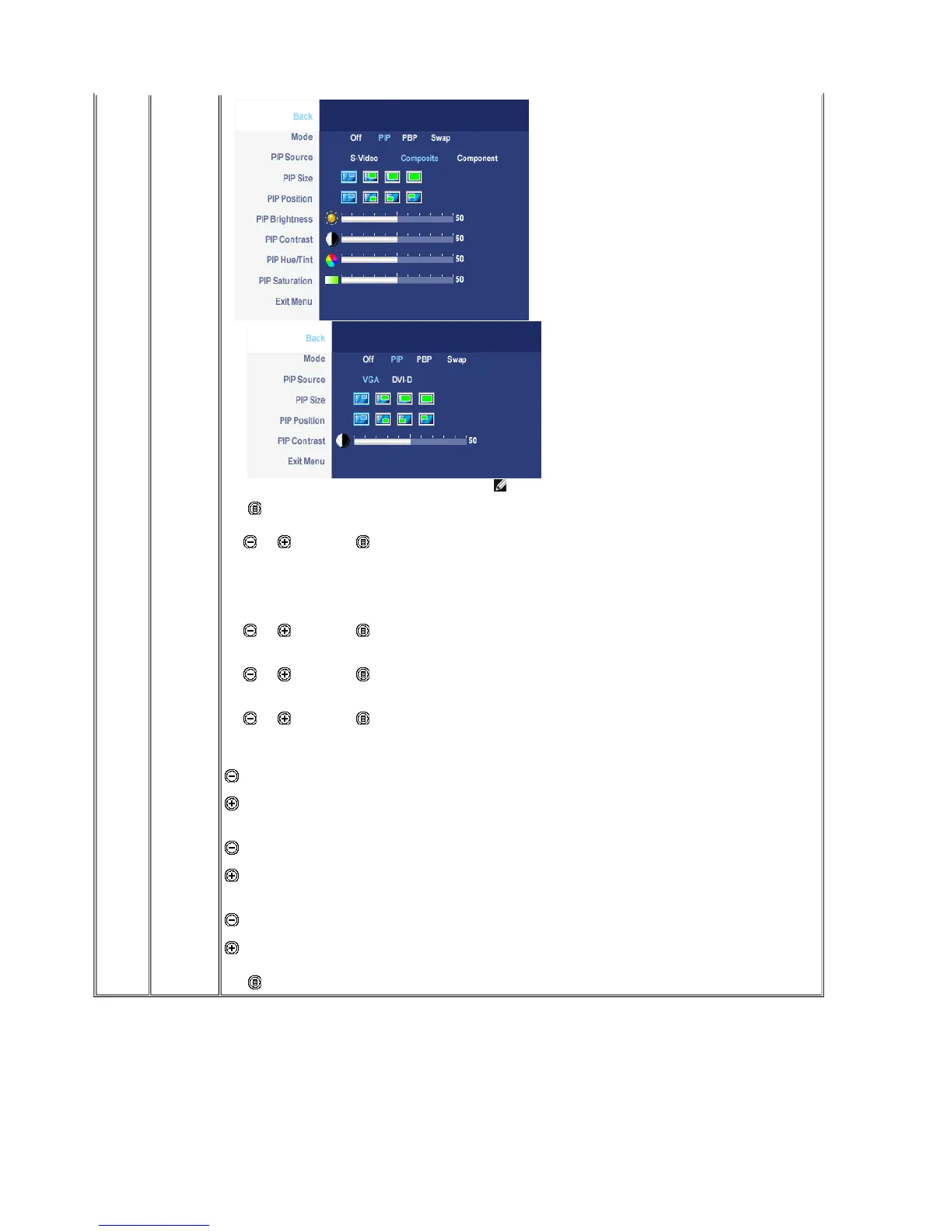
Mode
When
PIP/PBP
activated
PIP/PBP Sour
ce
PIP Position
PIP Size
PIP/PBP Contr
ast
PIP/PBP
Hue/Tint
PIP/PBP
Saturation
Exit Menu
or
NOTE: When using DVI source, the contrast adjustment is not available.
Push to go back to the main menu.
There is two modes: PIP (Picture in Picture) and PBP (Picture By Picture)
Use and to browse and to select "Off", "PIP" or "PBP".
When PIP/PBP
is activated, select "Swap" to exchange the input source for the main screen and PIP/PBP window.
Select an input signal for PIP/PBP. (VGA/DVI/S-Video/Composite/Component)
Use and to browse and to select.
Select PIP window position.
Use and to browse and to select.
Select PIP window size.
Use and to browse and to select.
Adjust the contrast level of the picture in PIP/PBP Mode.
reduce the contrast
increases the contrast
This function shifts the color of PIP/PBP image to green or purple. This is used to adjust for desired flesh tone color.
shifts image color towards green
shifts image color towards purple
Adjust the color saturation of PIP/PBP image.
makes the image look more monochrome
makes the image look more colorful
Push to exit the OSD main menu.
Your monitor will prompt you to achieve the best performance when you select PBP. You may see the following messages under certain combinations of input sources
in PBP mode.
or
Pa
e 11 of 14Documentation
12/10/2007htt
://su
ort.dell.com/su
ort/edocs/monitors/2407WFP/en/setu
.htm











 To Next Page