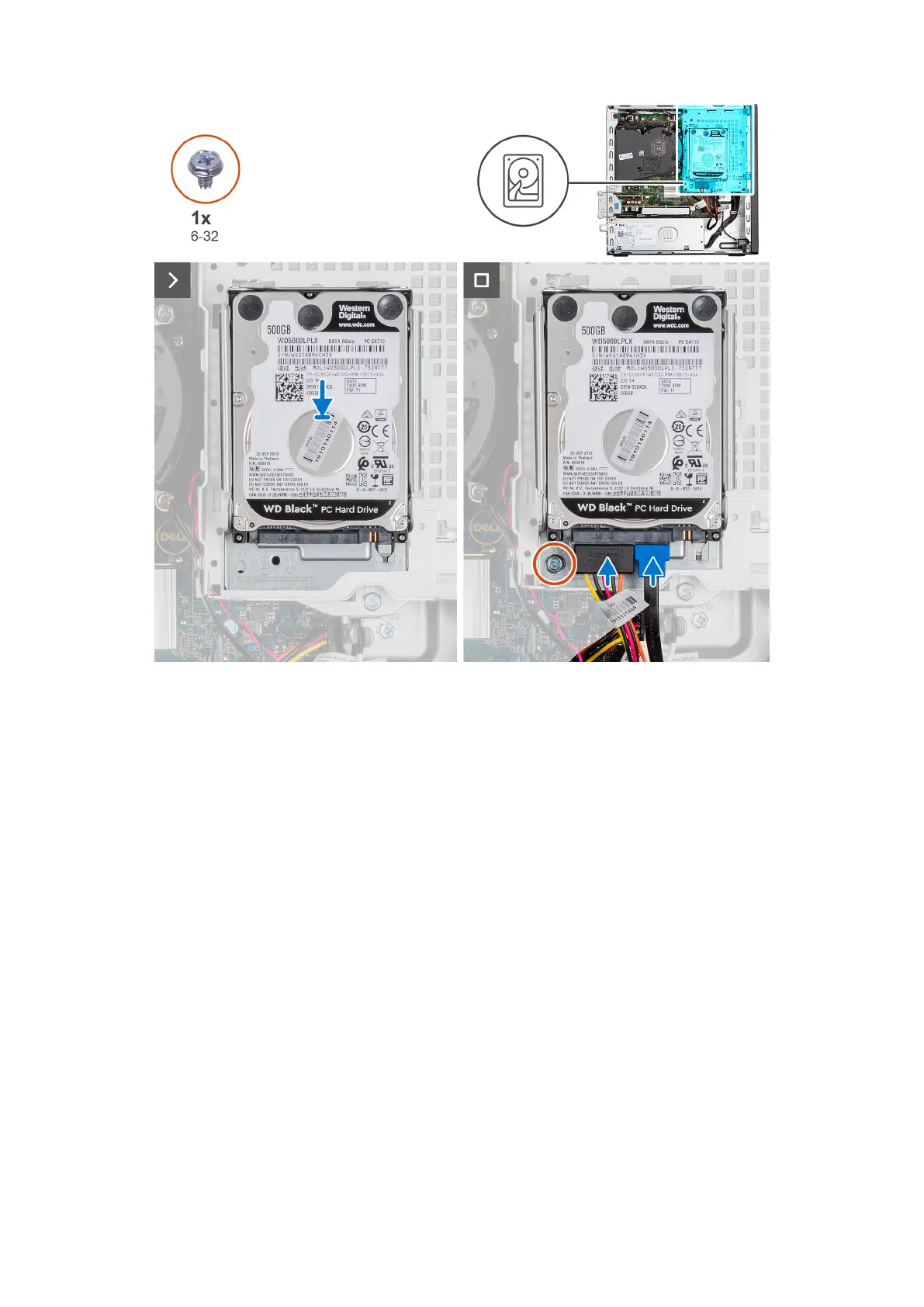
Steps
1. Insert and align the hard drive into the hard-drive carrier.
2. Replace the four screws (M3x3) that secure the hard drive to the hard-drive carrier.
3. Align the tabs on the hard-drive carrier with the slots on the chassis and snap the hard-drive carrier into place.
4. Replace the screw (#6-32) to secure the hard-drive carrier to the chassis.
5. Connect the data and power cables to the connectors on the hard drive.
Next steps
1. Install the side cover.
2. Follow the procedure in After working inside your computer.
disco rigido da 3,5 pollici
Removing the 3.5-inch hard drive
Prerequisites
1. Follow the procedure in Before working inside your computer.
2. Remove the side cover.
About this task
The following image indicates the location of the 3.5-inch hard-drive assembly and provide a visual representation of the
removal procedure.
Rimozione e installazione delle unità sostituibili dal cliente (CRU)
43










 To Next Page