— 14 —
D825TM
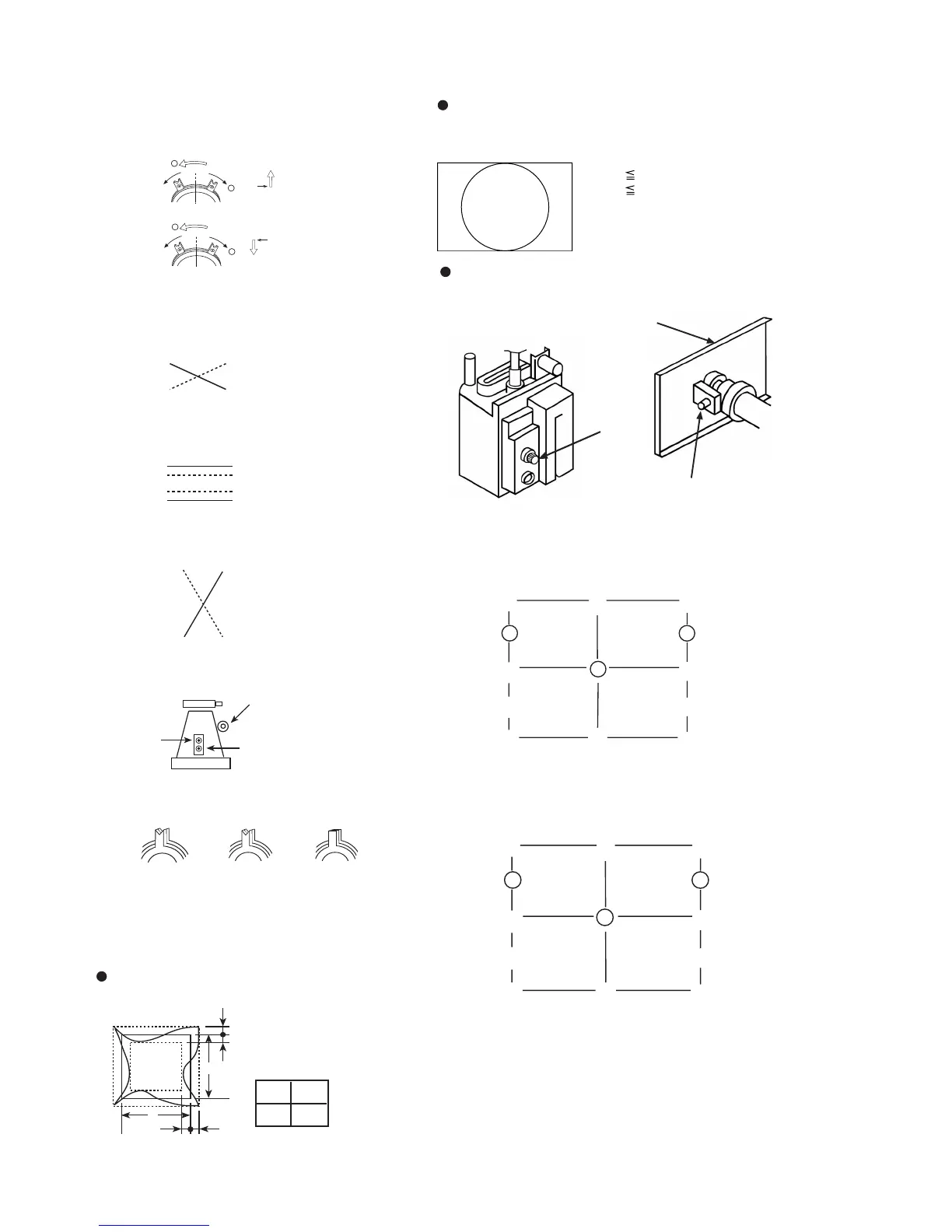
Vertical and Horizontal Position and Size
Specification
2
1
2
1
G
G
R
B
3. Receive White cross-hatch.
4. Adjust HMC and VMC at six-pole magnet.
< 6 Pole Magnet>
5. Receive R.B. cross-hatch.
6. Adjust H.TILT by swinging the DY neck right and left.
7. Adjust XCV with XCV core.
XCV movement
R
B
B
R
RB
bb
a
a
A
B
A 0.24mm
B 0.30mm
B
A
A-BOARD
Focus (H)
Focus (V)
FBT
YCH
TLV
XCV
Horizontal and Vertical
a < 2.5 mm
b < 2.5 mm
A B
202 270
2
7
0
4
615
3
9
8
12
11
YBH-B
YBH-T
CBH-RT
MBH-RT
APH-R
MBH-RB
CBH-RBCBH-LB
MBH-LB
APH-L
MBH-LT
CBH-LT
Adjust each misconvergence point in sequence.
H STAT
11. Digital Convergence Adjustment
A. Horizontal Convergence
2
7
0
4
615
3
9
8
12
11
V STAT-B
V STAT-T
CCV-RT
MCV-RT
XBV-R
MCV-RB
CCV-RBCCV-LB
MCV-LB
XBV-L
MCV-LT
CCV-LT
Adjust each misconvergence point in sequence.
V STAT
8. Adjust V.TILT with TLV VR.
TLV movement
9. Adjust Y.CROSS with YCH VR.
YCH movement
10. Paint lock the four-pole and six-pole Mg.
VR Adjustment on DY
Convergence Specification
Focus adjustment
Adjust focus (V) and focus (H) for optimum focus.
0.30mm
0.30mm
B. Vertical Convergence
C. Repeat the procedure of A and B so that the
convergence of the whole screen is within the
specification.
R
B
B
R
Zero Position NECK Ass'y
Purity 4-Pole Mg 6-Pole Mg











 To Next Page