Home
Dell
Monitor
E193FPc
Page 22
Dell E193FPc - Page 22
78 pages
Manual
Save Page as PDF
To Next Page
To Next Page
To Previous Page
To Previous Page
Loading...
Dell E193FPc
22
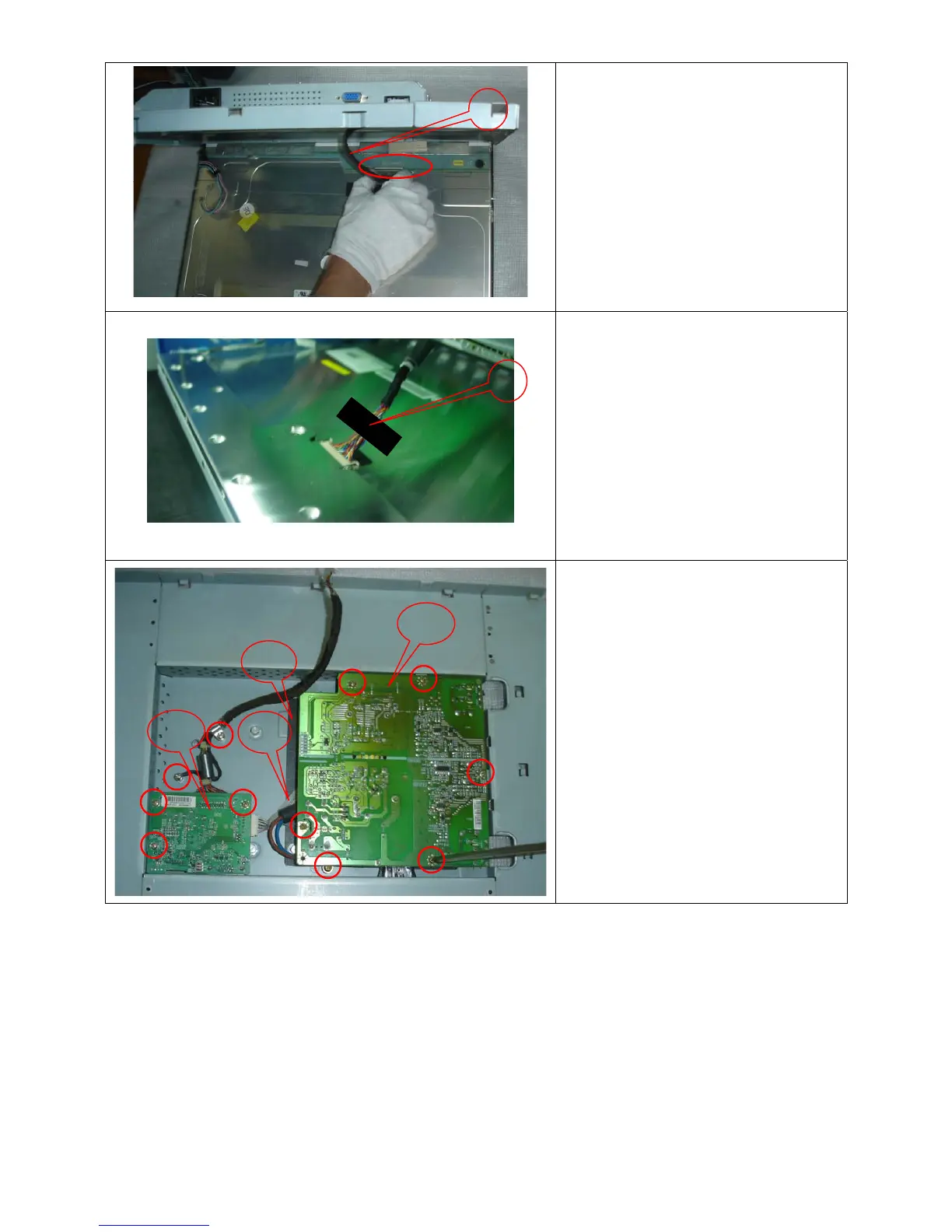
Remove the main frame and at the same
time disconnect the L
VDS connector
Fix the Lvds use Black
Adhesive T
ape
Remove the Power board and main
board
:
Remove the eight screws and remove the
Power board and main boa
rd.
8
10
12
11
13
9
21
23
Table of Contents
Main Page
Default Chapter
1
Service Manual
1
Table of Contents
2
Revision List
3
Important Safety Notice
4
1 Monitor Specifications
5
2 LCD Monitor Description
5
Monitor Block Diagram
5
3 Operation Instructions
6
General Instructions
6
Control Buttons
6
Adjusting the Picture
7
Adjusting the Brightness and Contrast
7
Adjusting Size and Position
8
Setting Language
9
Factory Reset
9
4 Input/Output Specification
10
Input Signal Connector
10
Factory Preset Display Modes
10
Power Supply Requirements
11
Panel Specification
11
5 Block Diagram
14
Monitor Exploded View
14
Software Flow Chart
15
Electrical Block Diagram
17
6 Mechanical Instruction
19
7 Schematic
24
Main Board
24
Power Board
29
8 Layout
31
Main Board
31
Power Board
34
Key Board
35
9 Maintainability
36
Equipments and Tools Requirement
36
Trouble Shooting
37
Main Board
37
Power/Inverter Board
40
Keypad Board
42
10 White Balance, Luminance Adjustment
43
11 EDID Content
44
12 ISP User Manual
45
Connect ISP Writer Preparation Action
45
To Use ISP Writer
46
Executing ISP
50
13 BOM List
51
14 Definition of Pixel Defects
74
Related product manuals
Dell E193FP
2 pages
Dell E190S
29 pages
Dell E1911
34 pages
Dell E1913
3 pages
Dell E1914H
73 pages
Dell E1920H
79 pages
Dell E1912H
32 pages
Dell E1916H
79 pages
Dell E1909W
50 pages
Dell E1910H
29 pages
Dell E1916HV
72 pages
Dell Daily Deal E1909W
2 pages


 To Next Page