22"LCD Color Monitor Dell E228WFPc
26
6. Mechanical Instruction (For TC8SGHHKWDDNHC)
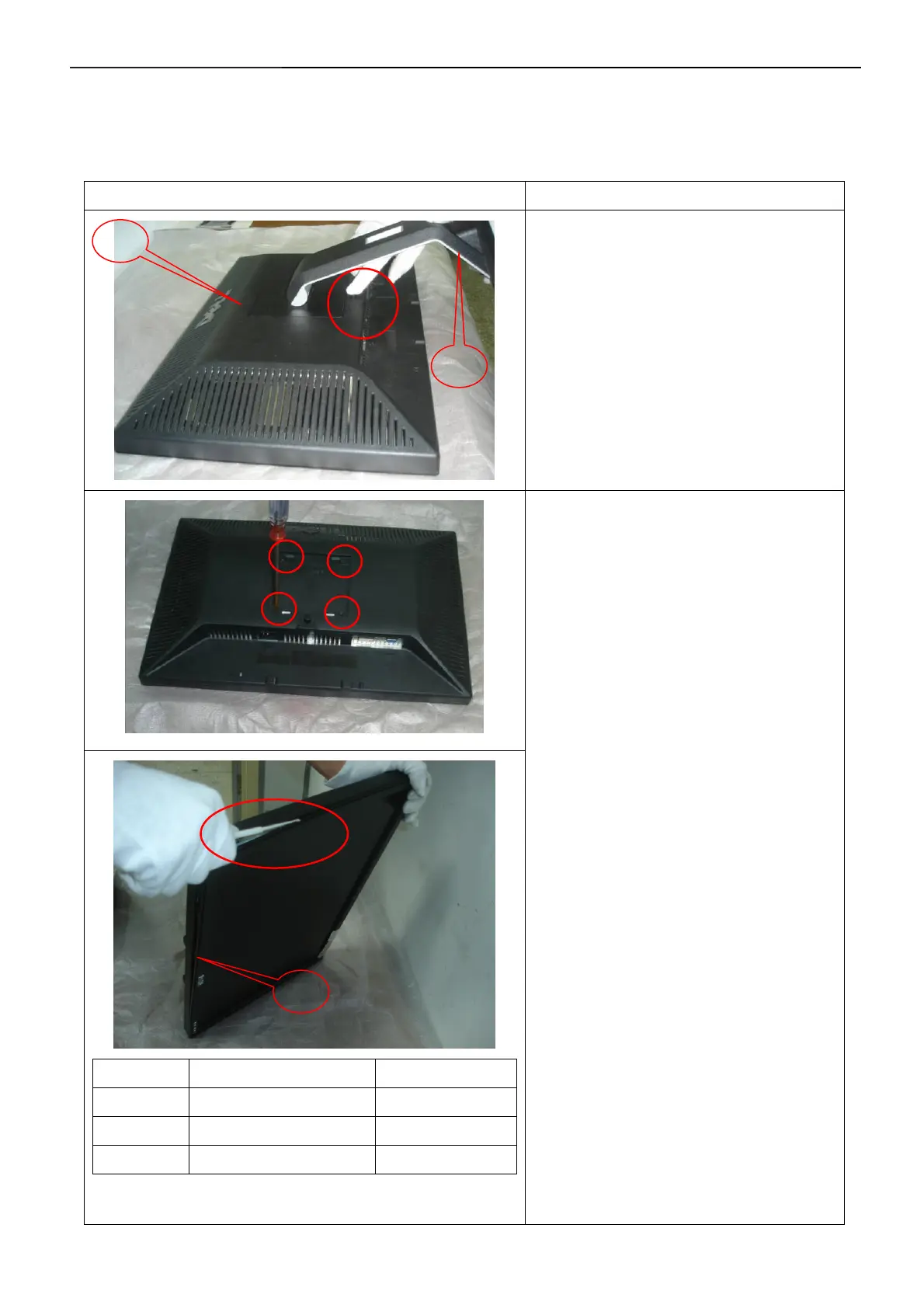
Note: Firstly, put the monitor on a soft, flat and clean surface, wear gloves.
Tools: 2 Power screwdrivers(φ=5mm、L=60mm); 1 small cross screwdriver; turnbuckle driver;
Setting: Power screwdriver torque A=11 kgF. Cm; torque B=6 kgF. Cm
Fig Instruction
Remove stand:
Press the Stand release button and lift up
the Stand and away from the monitor.
Symbol TPV Part Number Description
1 A34G0152 VH 1B 30 Rear Cover
2 705GQCK0P34002 Stand-Base Ass’Y
3 A34G0151 VH 1B Bezel
Remove the cosmetic cover:
1. Remove the 4 screws by
Torque A
2. Pry the monitor up then find out the
hooks’ position, use the tool (like the
picture or other card) to insert into the gap
of bezel and rear cover.
PS: be careful to separate the front cover,
because the keyboard maybe damage.
1
2
3


 To Next Page