EasyManua.ls Logo

Dell Latitude D430 - Page 22

Dell Latitude D430
37 pages
Print Icon
To Next Page IconTo Next Page
To Previous Page IconTo Previous Page
Loading...
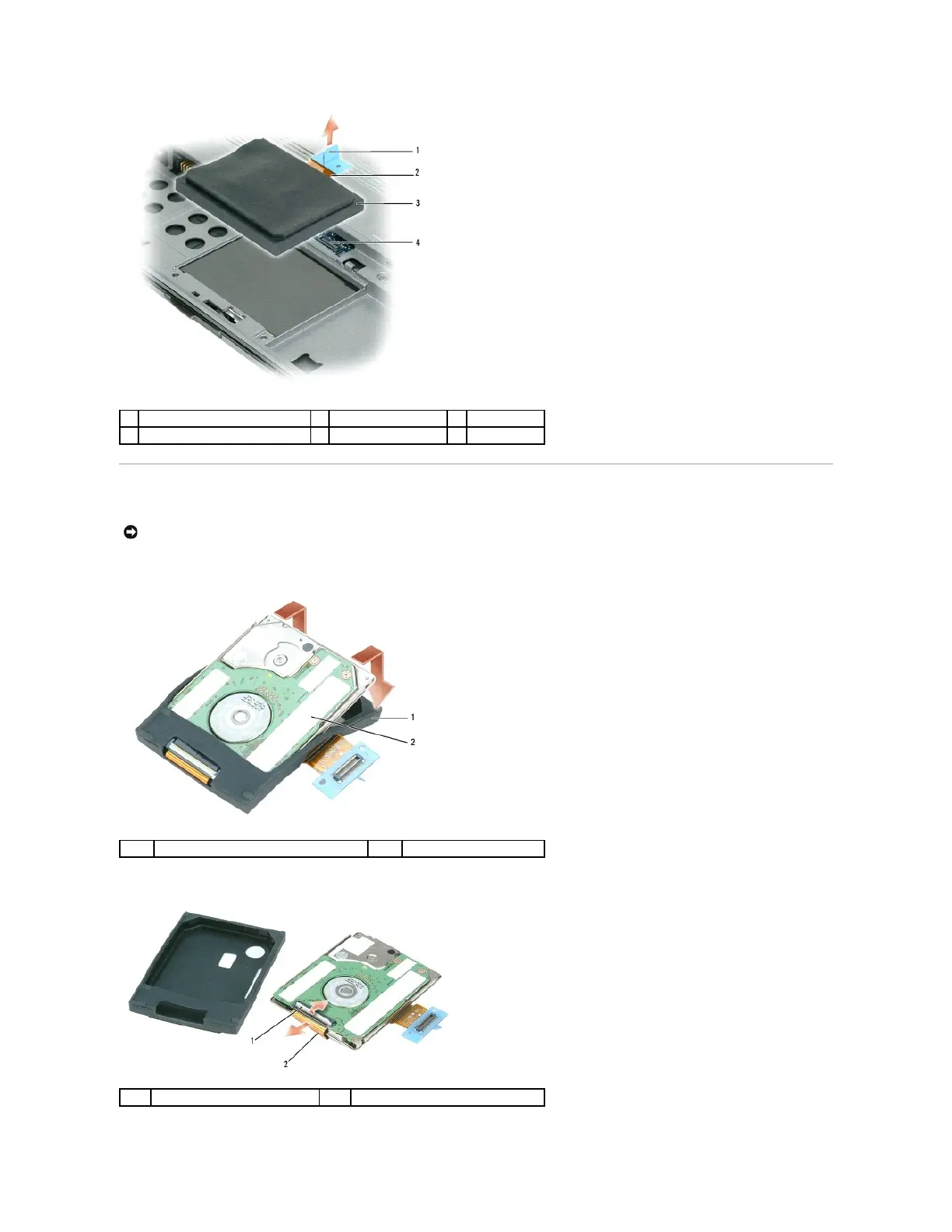
Dismantling the Hard Drive
1. Use your fingers to carefully remove the protective cover from the hard drive.
2. Use a hard drive tool to carefully pry up the ZIF connector that holds the hard drive cable, and remove the cable.
1
pull-tab
2
hard drive cable
3
hard drive
4
system board connector
NOTICE: The replacement hard drive ships with the protective cover and the hard drive cable. Only a certified service technician should dismantle the
hard drive. Damage due to servicing that is not authorized by Dell is not covered by your warranty.
1
protective cover
2
hard drive
1
ZIF connector
2
hard drive cable

Other manuals for Dell Latitude D430

Related product manuals