Back to Contents Page
Palm Rest
Dell™Latitude™D430
Removing the Palm Rest
Replacing the Palm Rest
Removing the Palm Rest
1. Follow the instructions in "BeforeYouBegin"onpage7.
2. Remove any installed PC Cards from the PC Card slot.
3. Remove any installed memory modules or Mini PCI cards (see Memory and Mini-Cards).
4. Remove the hard drive (see Hard Drive).
5. Remove the hinge cover (see Hinge Cover).
6. Remove the keyboard (see Keyboard).
7. Remove the internal card with Bluetooth®wireless technology (see Internal Card With Bluetooth®Wireless Technology).
8. Remove the display assembly (see Display Assembly).
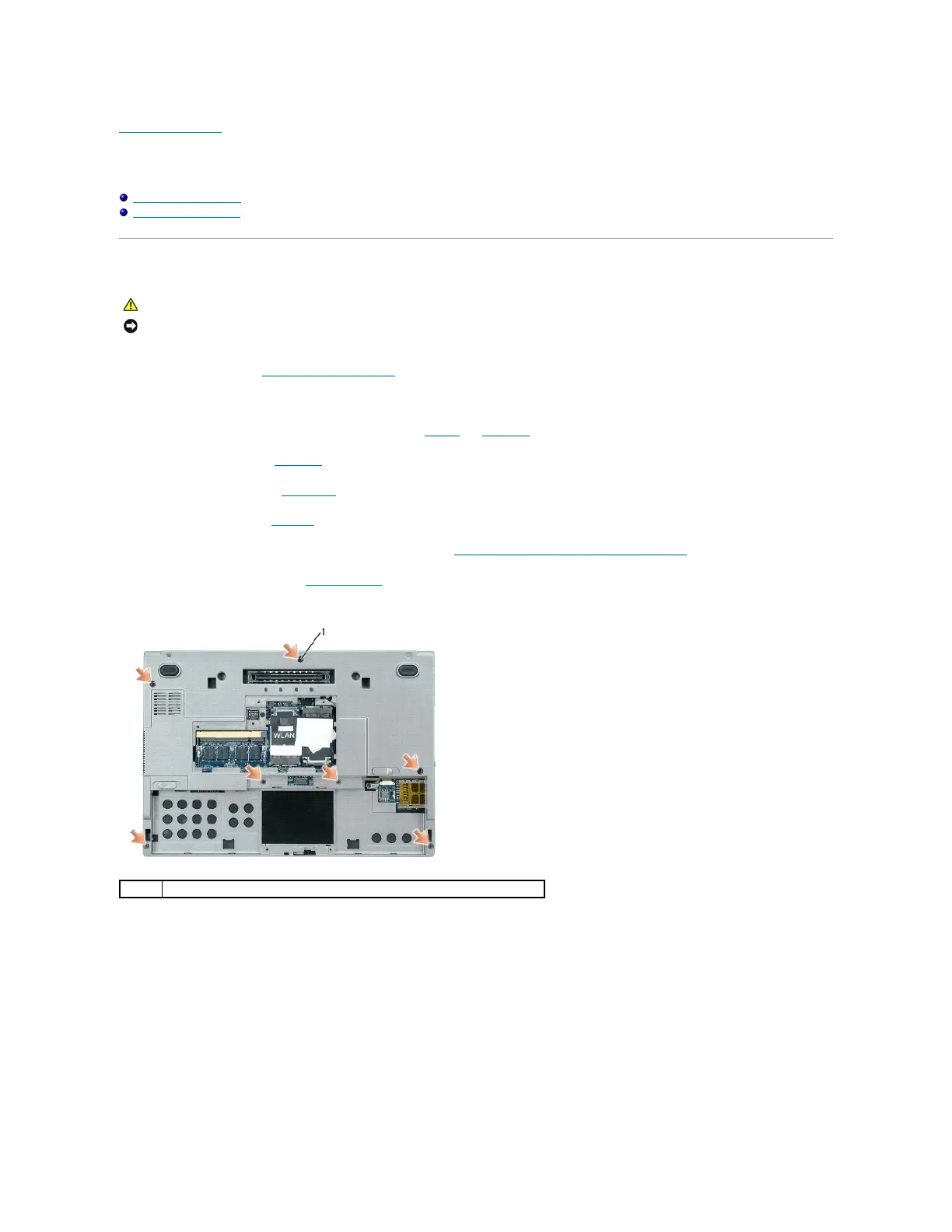
9. Turn the computer upside down and remove the seven M2.5 x 5-mm screws from the computer base.
10. Turn the computer topside up and remove the six M2.5 x 5-mm screws labeled "P" from the top of the palm rest.
NOTICE: To avoid electrostatic discharge, ground yourself by using a wrist grounding strap or by periodically touching an unpainted metal surface (such
as the back panel) on the computer.















 To Next Page