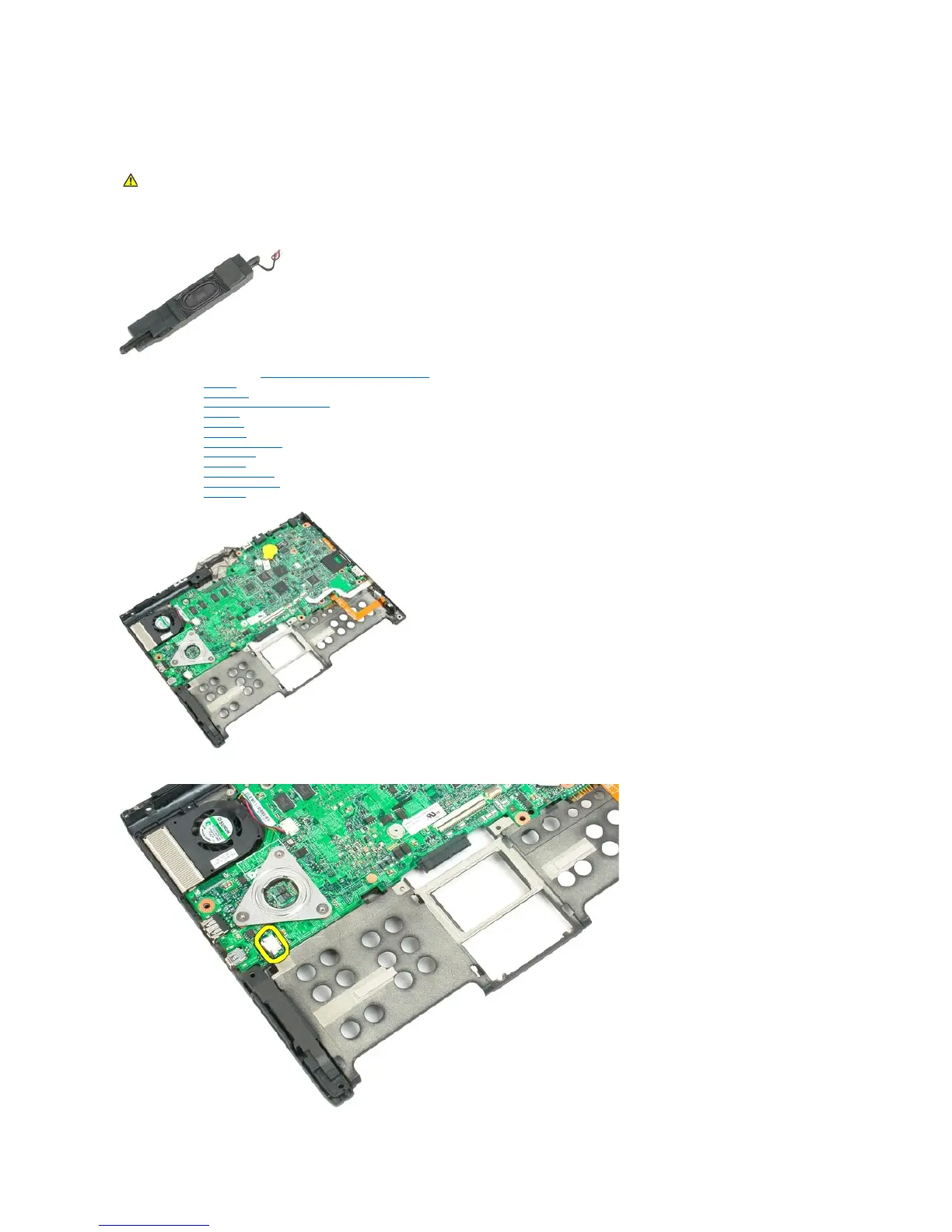
Speaker
Dell™Latitude™XT2ServiceManual
Removing the Speaker
1. Follow the procedures in Before Working Inside Your Tablet-PC.
2. Remove the battery from the Tablet-PC.
3. Remove the hard drive from the Tablet-PC.
4. Remove the memory and mini-card cover from the Tablet-PC.
5. Remove the memory from the Tablet-PC.
6. Remove the mini-card from the Tablet-PC.
7. Remove the BIOS chip from the Tablet-PC.
8. Remove the Bluetooth module from the Tablet-PC.
9. Remove the hinge cover from the Tablet-PC.
10. Remove the keyboard from the Tablet-PC.
11. Remove the coin-cell battery from the Tablet-PC.
12. Remove the display assembly from the Tablet-PC.
13. Remove the palm rest from the Tablet-PC.
14. Disconnect the speaker cable from the system board.
WARNING: Before working inside your Tablet-PC, read the safety information that shipped with your Tablet-PC. For additional safety best
practices information, see the Regulatory Compliance Homepage at www.dell.com/regulatory_compliance.













 To Next Page