Using Your Projector 23
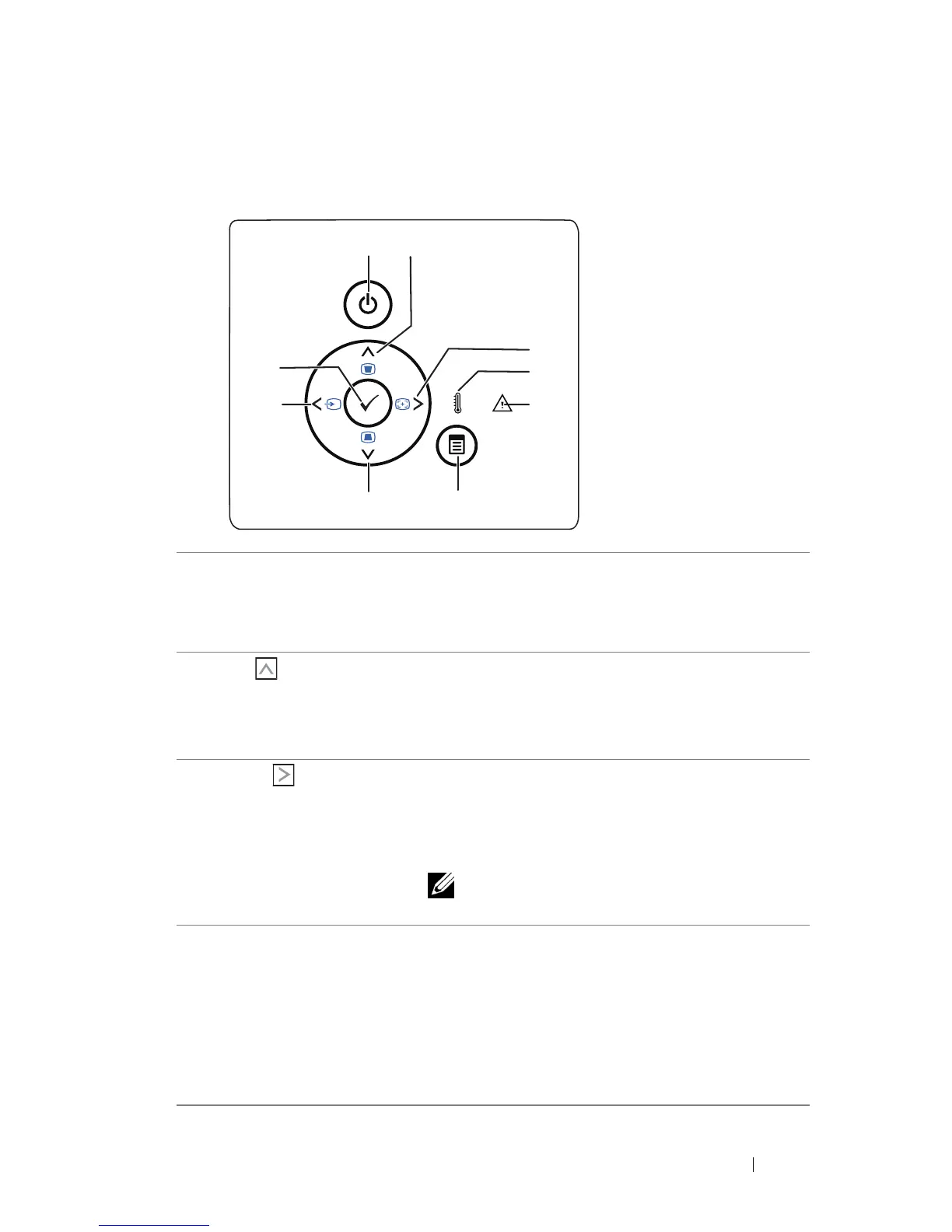
Using the Control Panel
1 Power Turns the projector on or off. For more
information, see "Turning Your Projector On" on
page 18 and "Turning Your Projector Off" on
page 18.
2 Up / Keystone
adjustment
Press to navigate through the On-Screen Display
(OSD) Menu items.
Press to adjust image distortion caused by tilting
the projector (+/-40 degrees).
3 Right / Auto Adjust Press to navigate through the On-Screen Display
(OSD) Menu items.
Press to synchronize the projector to the input
source.
NOTE: Auto Adjust does not operate if the
on-screen display (OSD) is displayed.
4 TEMP LED If the TEMP amber indicator is on or blinking,
one of the following problems could be occurring:
• Internal temperature of the projector is too
high
For more information, see "Troubleshooting Your
Projector" on page 54 and "Guiding Signals" on
page 57.
3
5
2
4
6
7
8
9
1



 To Next Page