Steps
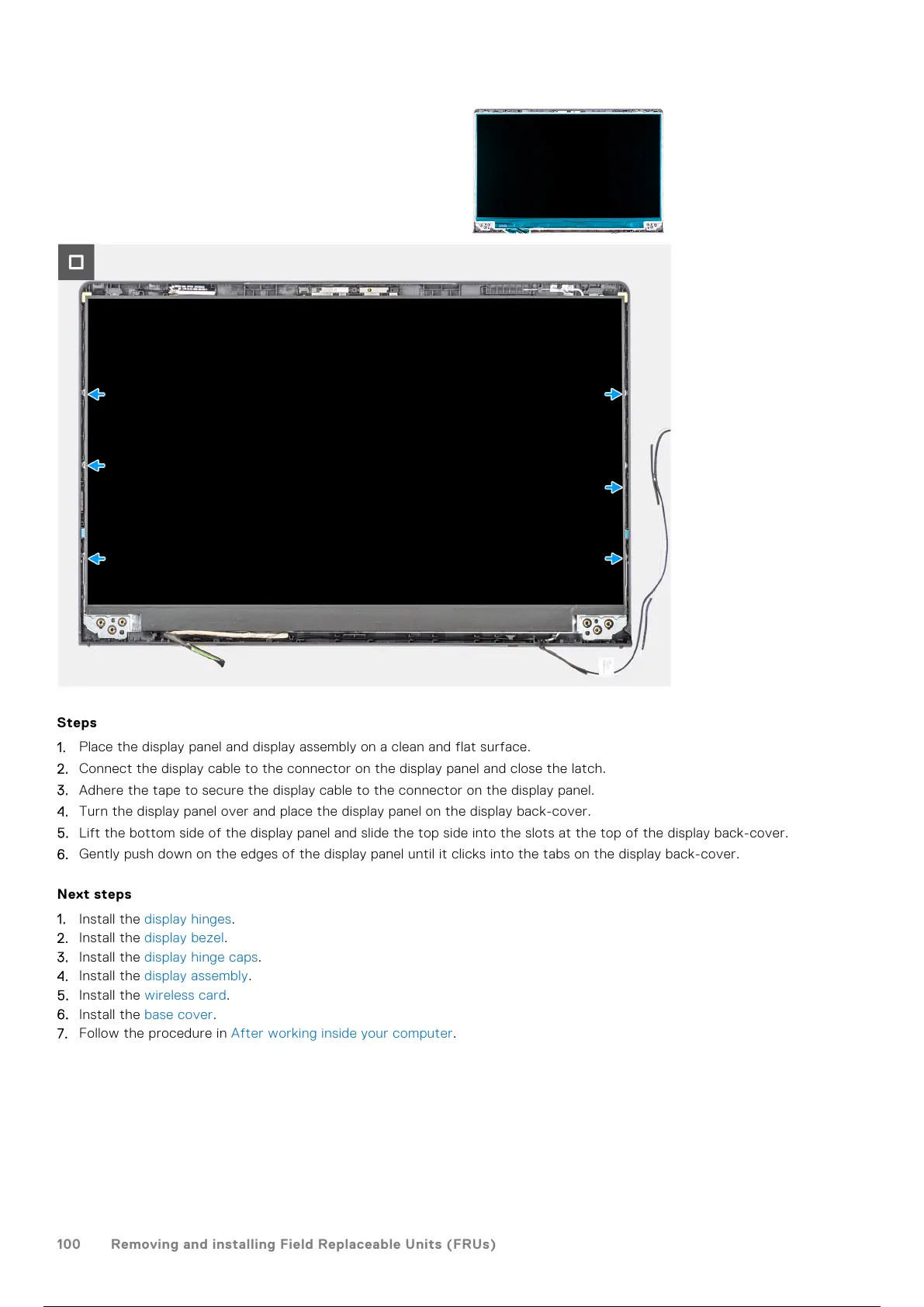
1. Place the display panel and display assembly on a clean and flat surface.
2. Connect the display cable to the connector on the display panel and close the latch.
3. Adhere the tape to secure the display cable to the connector on the display panel.
4. Turn the display panel over and place the display panel on the display back-cover.
5. Lift the bottom side of the display panel and slide the top side into the slots at the top of the display back-cover.
6. Gently push down on the edges of the display panel until it clicks into the tabs on the display back-cover.
Next steps
1. Install the display hinges.
2. Install the display bezel.
3. Install the display hinge caps.
4. Install the display assembly.
5. Install the wireless card.
6. Install the base cover.
7. Follow the procedure in After working inside your computer.
100
Removing and installing Field Replaceable Units (FRUs)
101 / 136 100 / 134 101 / 136



 To Next Page