Notes, cautions, and warnings
NOTE: A NOTE indicates important information that helps you make
better use of your product.
CAUTION: A CAUTION indicates either potential damage to hardware
or loss of data and tells you how to avoid the problem.
WARNING: A WARNING indicates a potential for property damage,
personal injury, or death.
Contents [ hide
1 Set up your OptiPlex 5090 Micro
2 Views of OptiPlex 5090 Tower
2.1 Front
2.2 Back
3 System board layout
4 Specifications of OptiPlex 5090 Micro
4.1 Dimensions and weight
4.2 Processor
4.3 Chipset
4.4 Operating system
4.5 Memory
4.6 Intel Optane Memory H10 with Solid State Storage
(optional)
4.7 External ports
4.8 Internal slots
4.9 Communications
4.10 Audio
4.11 Storage
4.12 Hard drive preloaded bracket matrix
4.13 Power adapter
4.14 GPU—Integrated
4.15 Hardware Security
4.16 Environmental
4.17 Energy Star, EPEAT and Trusted Platform Module (TPM)
4.18 Operating and storage environment
5 Getting help and contacting Dell
6 File Downloads
7 Related Manuals
Set up your OptiPlex 5090 Micro
The images in this document may differ from your computer depending on the configuration you ordered.
Steps
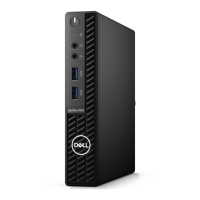
1. Connect the keyboard and mouse.
2. Connect to your network using a cable, or connect to a wireless network.
3. Connect the display.
4. Connect the power cable.










 To Next Page