— 12 —
P792
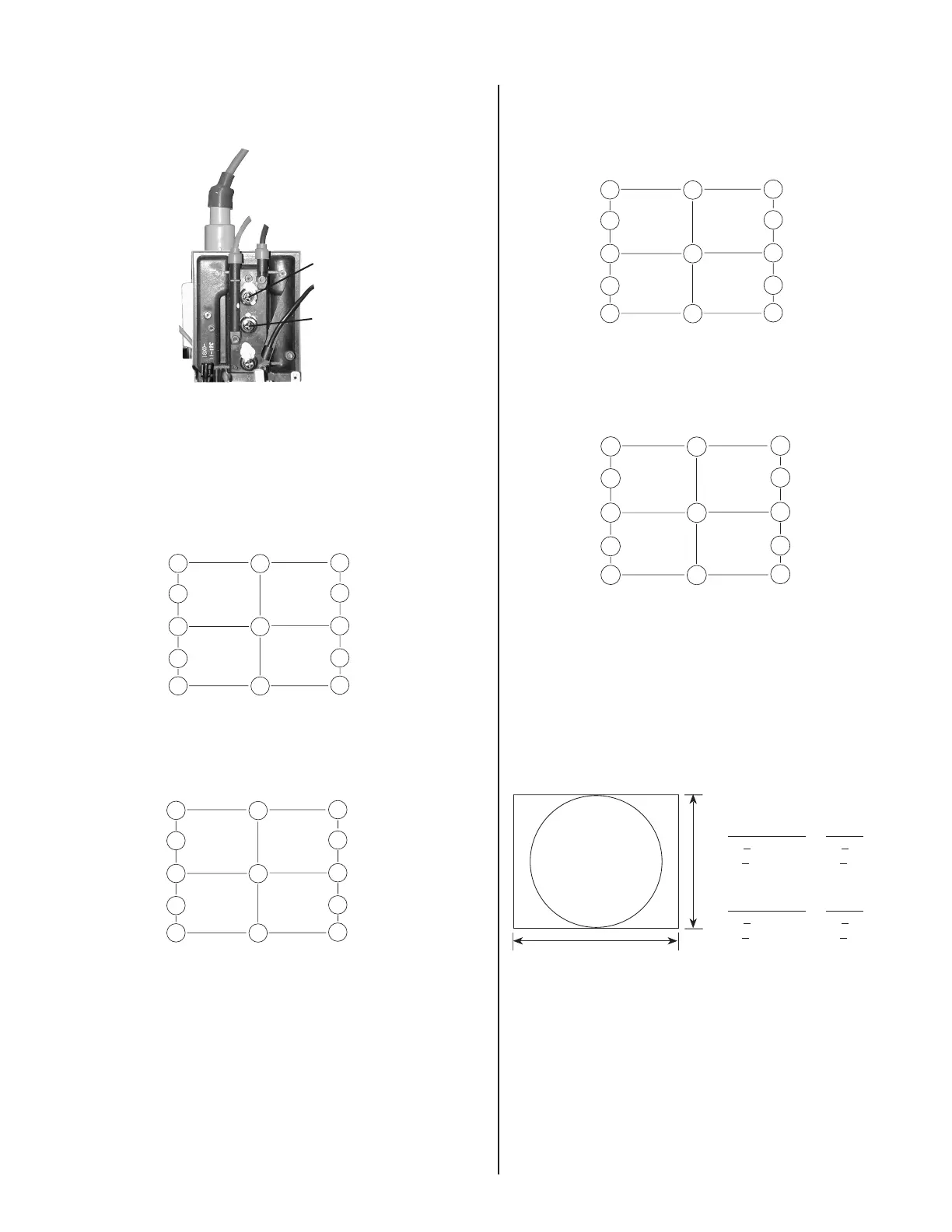
3-6. FOCUS ADJUSTMENT
1. Adjust Focus (V) and Focus (H) for optimum focus.
Focus (V)
Focus (H)
3-7. DIGITAL CONVERGENCE ADJUSTMENT
Convergence (Low) Mode
1. Adjust the H.STAT and V.STAT with "HSTAT" and "VSTAT".
2. Change "CONV_SW" to "7".
A. Horizontal Convergence
9
17
1
19
11
5
6
10
18
2
20
12
CBH-T-LO
MBH-T-L-LO
APH-L-LO
MBH-B-L-LO
CBH-B-L-LO
CBH-T-R-LO
MBH-T-R-LO
APH-R-LO
MBH-B-R-LO
CBH-B-R-LO
YBH-B-LO
HSTAT
YBH-T-LO
Adjust each misconvergence point in sequence.
B. Vertical Convergence
13
21
3
23
15
7
8
14
22
4
24
16
CCV-T-L-LO
MCV-T-L-LO
XBV-L-LO
MCV-B-L-LO
CCV-B-L-LO
V STAT-B-LO
V STAT
V STAT-T-LO
CCV-T-R-LO
MCV-T-R-LO
XBV-R-LO
MCV-B-R-LO
CCV-B-R-LO
Adjust each misconvergence point in sequence.
3. Repeat the procedure of A and B so that the convergence of the
entire screen is within the specifi cation.
Convergence (High) Mode
1. Adjust the H.STAT and V.STAT with "HSTAT-HI" and "VSTAT-HI".
A. Horizontal Convergence
9
17
1
19
11
5
6
10
18
2
20
12
CBH-T-HI
MBH-T-L-HI
APH-L-HI
MBH-B-L-HI
CBH-B-L-HI
CBH-T-R-HI
MBH-T-R-HI
APH-R-HI
MBH-B-R-HI
CBH-B-R-HI
YBH-B-HI
HSTAT-HI
YBH-T-HI
Adjust each misconvergence point in sequence.
B. Vertical Convergence
13
21
3
23
15
7
8
14
22
4
24
16
CCV-T-L-HI
MCV-T-L-HI
XBV-L-HI
MCV-B-L-HI
CCV-B-L-HI
V STAT-B-HI
V STAT-HI
V STAT-T-HI
CCV-T-R-HI
MCV-T-R-HI
XBV-R-HI
MCV-B-R-HI
CCV-B-R-HI
Adjust each misconvergence point in sequence.
2. Repeat the procedure of A and B so that the convergence of the
entire screen is within the specifi cation.
3. Change "MCR2" to "170".
3-8. CONVERGENCE SPECIFICATION
B
A
312 mm
234 mm
A Zone:
Primary Mode Others
H:
<
0.25 mm H:
<
0.3 mm
V:
<
0.25 mm V:
<
0.3 mm
B Zone:
Primary Mode Others
H:
<
0.3 mm H:
<
0.4 mm
V:
<
0.3 mm V:
<
0.4 mm



 To Next Page