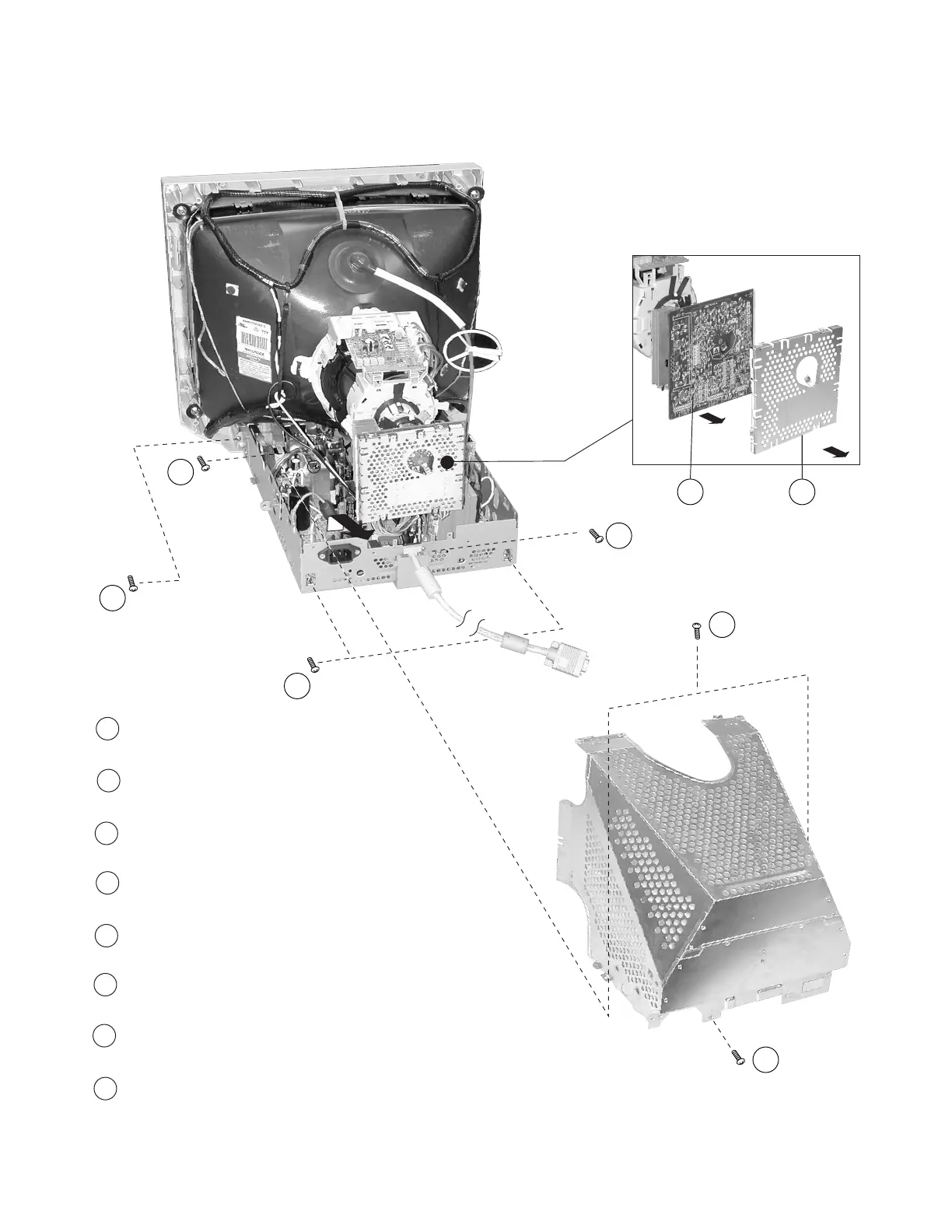
1-3. A & D BOARD REMOVAL
1
2
4
3
8
5
6
7
— 7 —
P792
Remove (1) screw (+BVTP 3 x 8) from the rear
of the EMI shield.
Remove (2) screws (+BVTP 3 x 8) from the sides of the
EMI shield. Lift and remove.
Remove (1) screw (+BVTP 3 x 8) from the cable holder
at the rear of the chassis base to release the cable.
Remove (2) screws (+BVTP 3 x 8) from the rear of the
chassis base and remove.
Remove (2) screws (+BVTP 4 x 16) from the chassis
base and slide out to remove.
Remove (7) screws (+BVTP 3 x 8) from the D Board. Lift
the board up and out to remove.
Carefully remove the solder connections, and remove
the shield cover from the A Board
Gently wiggle the A Board back and forth, and pull it
to remove.
1
2
3
4
5
6
7
8



 To Next Page