Steps
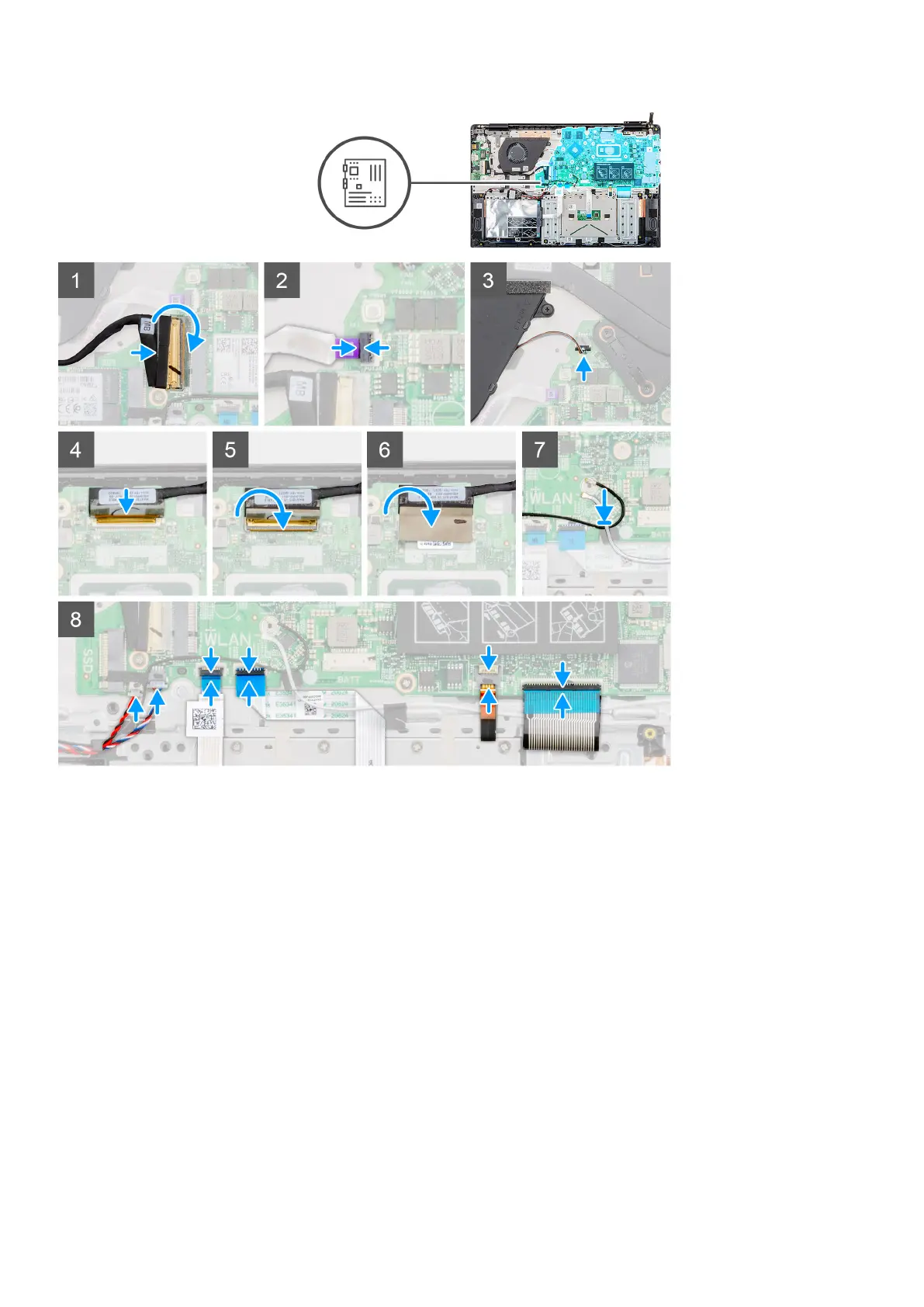
1. Locate the system board slot on your computer.
2. Align the screw holes on the system board with the screw holes on the palmrest assembly.
3. Replace the five (M2x4) and two (M2x5) screws to secure the system board to the palmrest assembly.
4. Connect the input and output board cable to the connector on the system board and close the latch.
5. Connect the power button cable to the connector on the system board and close the latch.
6. Connect the display cable to the connector on the system board and close the latch.
7. Adhere the adhesive tape above the display cable connector.
8. Connect the coin-cell battery cable and the speaker cable to the connectors on the system board.
9. Connect the hard drive cable, touchpad cable, keyboard backlit cable and the keyboard cable to the connectors on the
system board and close the latch.
Next steps
1. Install the power-adapter port.
2. Install the heatsink-discrete or heatsink-UMA.
3. Install the WLAN card.
4. Install the memory.
5. Install the M.2 2230 SSD or M.2 2242 SSD or M.2 2280 SSD.
6. Install the battery.
50
Removing and installing components



 To Next Page