5
Define Policy
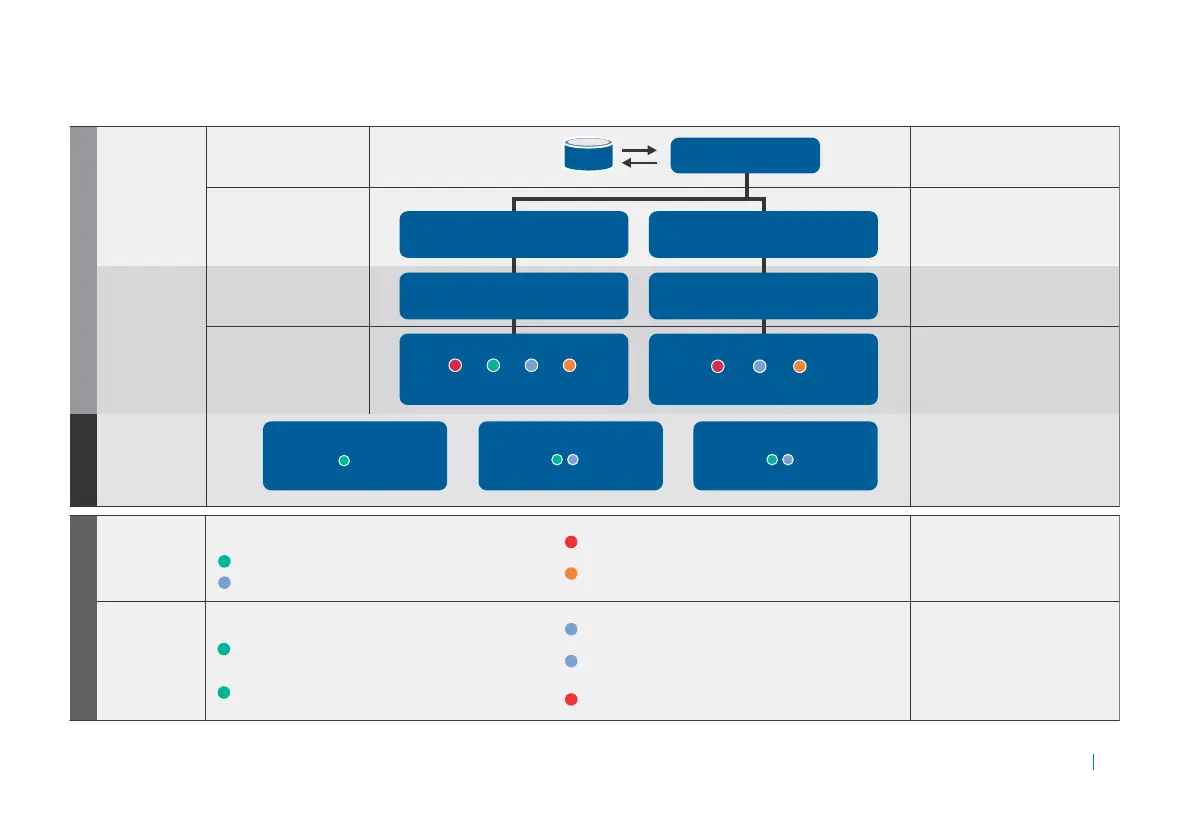
How do you
define zones
and trust
levels?
Lets you allow, quarantine, or deny
access based on matching device
proles and optionally require
data protection.
How do you
define device
profiles?
Device proles enable you to identify
and determine the integrity of access
devices based on device attributes—
such as registry keys, processes running,
or anti-virus state—and associate
devices to Allow and Deny Zones.
You can create as many device proles
as necessary.
1
2
3
4
Allow access —
Trusted: all access to all resources; could use device proles 1 and 2.
Semi-trusted: allow limited access to resources; could use device proles 3 and 4.
IT-issued laptop —
Running McAfee® AntiVirus Corporate Edition with current updates and scanned
within the last 14 days, member of the company domain, encrypted text le
named “itlaptop.txt”.
IT-issued mobile device —
Device watermarked with a company-issued user certicate, encrypted text le
named “itpocketpc.txt”.
Home Macintosh® —
Running either McAfee or Kaspersky® anti-virus program.
Home PC —
Running a McAfee, Symantec,® or Kaspersky anti-virus program, running
either McAfee or Kaspersky spyware program, and running Microsoft®
Windows® Firewall.
Running Google® Desktop Search — Deny access.
Deny access —
Not trusted: deny access to resources; could use device prole 5.
Quarantine —
Suspends access until user completes remediation steps needed to
match device proles.
How do
you dene
trust level
for user?
How are users
authenticated?
Who is authenticating?
A realm allows users to authenticate
using credentials stored on an
external authentication server.
Communities allow you to group realm
members based on dierent security
needs as well as what access agents the
user will use to interact with the network.
WorkPlace sites determine what
Web-based interface the user will
interact with.
Security zones are used to allow or
deny access to members of each
community.
What WorkPlace Site will
the users access?
What zones are available
for each community?
How do
you dene
trust level
for device?
How do you dene
what resources
individual users
can access?
Authentication server
AD.example.com
Access control rules dene which
resources can be accessed by which
users, when, and in which zones.
Admission ControlAccess Control
Access Control Rule
Inventory Applications
Device trust:
User trust: Finance and Sales
Access Control Rule
Outlook Web Access
Device trust:
User trust: Marketing, Finance and Sales
Access Control Rule
Order Entry Application
Device trust:
User trust: Partners, Sales
Realm Company XYZ
Employee’s Community
Group = “Marketing/Finance/Sales”
Partner’s Community
Group = “Partners”
Employee Portal
Corporate layout, Corporate Style
Partner Portal
Corporate layout, Partner Style
Zones enabled for employee community
Devices that don’t fall into the rst three zones will
automatically be assigned to the quarantine zone.
Partner devices that don’t match the rst two zones will
automatically be assigned to the quarantine zone.
Zones enabled for partner community
Dene trust levels
Device Prole Examples











 To Next Page