Home
Dell
Monitor
U3011
Page 20
Dell U3011 - Page 20
38 pages
Manual
Save Page as PDF
To Next Page
To Next Page
To Previous Page
To Previous Page
Loading...
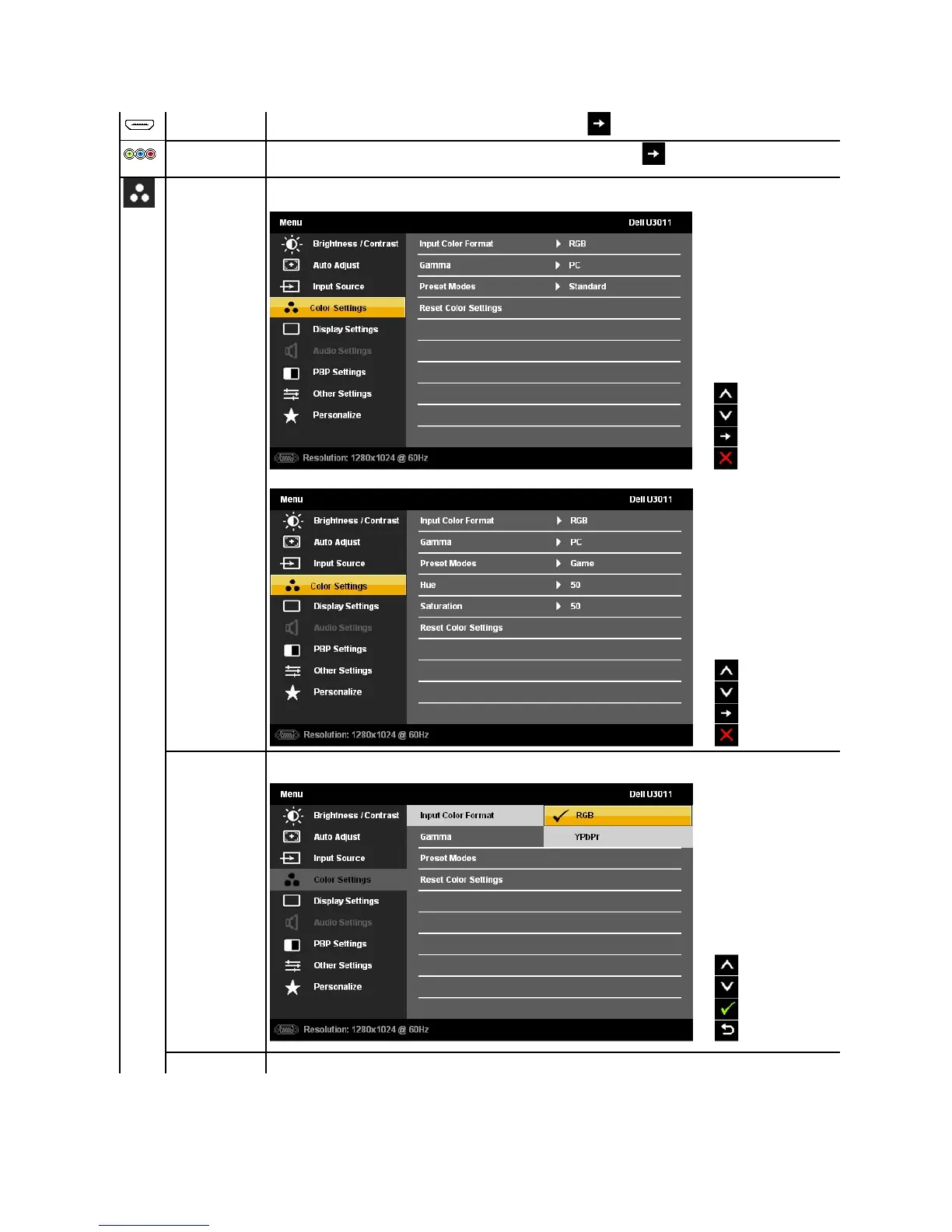
HDMI
Select
HDMI input
when you are using the HDMI connector. Touch the
button to select the HDMI input source.
Component
Select
Component
input
when you are using the Component connector. Touch the
button to select the Component input
source.
Color Setting
s
Use the
Color Settings
to adjust the color setting mode and color temperature.
Color Settings submenu for Standard, Warm, Cool, Adobe RGB, sRGB, xv Mode and Custom Color modes:
Color Settings submenu for Multimedia, Game and Movie modes:
Input Color Format
Choose
the RGB option if monitor is connected to a PC or a DVD using a VGA or a DVI cable. Choose the YPbPr option if monitor
is
connected to a DVD by a YPbPr cable
.
Gamma
To achieve the different color mode for PC and Mac.
19
21
Table of Contents
Main Page
About Your Monitor
2
Package Contents
2
Product Features
3
Identifying Parts and Controls
3
Front View
3
Back View
4
Side View
4
Connectors and Ports
5
Bottom View
5
Monitor Specifications
5
Flat Panel Specifications
5
Resolution Specifications
6
Supported Video Modes
6
Preset Display Modes
6
Electrical Specifications
6
Physical Characteristics
7
Environmental Characteristics
7
Power Management Modes
8
Pin Assignments
8
Vga Connector
8
Universal Serial Bus (USB) Interface
11
Plug and Play Capability
11
Card Reader Specifications
12
LCD Monitor Quality and Pixel Policy
12
Maintenance Guidelines
12
Cleaning Your Monitor
12
FCC Notices (U.S. Only) and Other Regulatory Information
14
Contacting Dell
14
Setting up Your Monitor
15
If You Have a Dell™ Desktop or a Dell™ Portable Computer with Internet Access
15
If You Have a Non Dell™ Desktop, Portable Computer, or Graphics Card
16
Operating the Monitor
17
Using the Front Panel Controls
17
Accessing the Menu System
18
Using the On-Screen Display (OSD) Menu
18
OSD Warning Messages
25
Setting the Maximum Resolution
27
Using the Tilt, Swivel, and Vertical Extension
28
Setting up the Monitor
32
Connecting the Monitor
32
Organizing Your Cables
33
Removing the Stand
34
Attaching the Stand
34
Troubleshooting
35
Built-In Diagnostics
35
Common Problems
36
Product Specific Problems
37
Universal Serial Bus (USB) Specific Problems
37
Dell™ Soundbar Problems
38
Other manuals for Dell U3011
Setting Up
38 pages
Warranty And Support Information
26 pages
Supplement Sheet
20 pages
Related product manuals
Dell U3014
2 pages
Dell U3014t
71 pages
Dell UltraSharp U3011
2 pages
Dell UltraSharp U3023E
5 pages
Dell U3223QE
91 pages
Dell U3223QZ
115 pages
Dell UltraSharp U3415W
69 pages
Dell UltraSharp U3417W
66 pages
Dell UltraSharp U3421WE
80 pages
Dell UltraSharp U3223QE
5 pages
Dell UltraSharp U3818DW
2 pages
Dell UltraSharp U3821DW
81 pages












 To Next Page