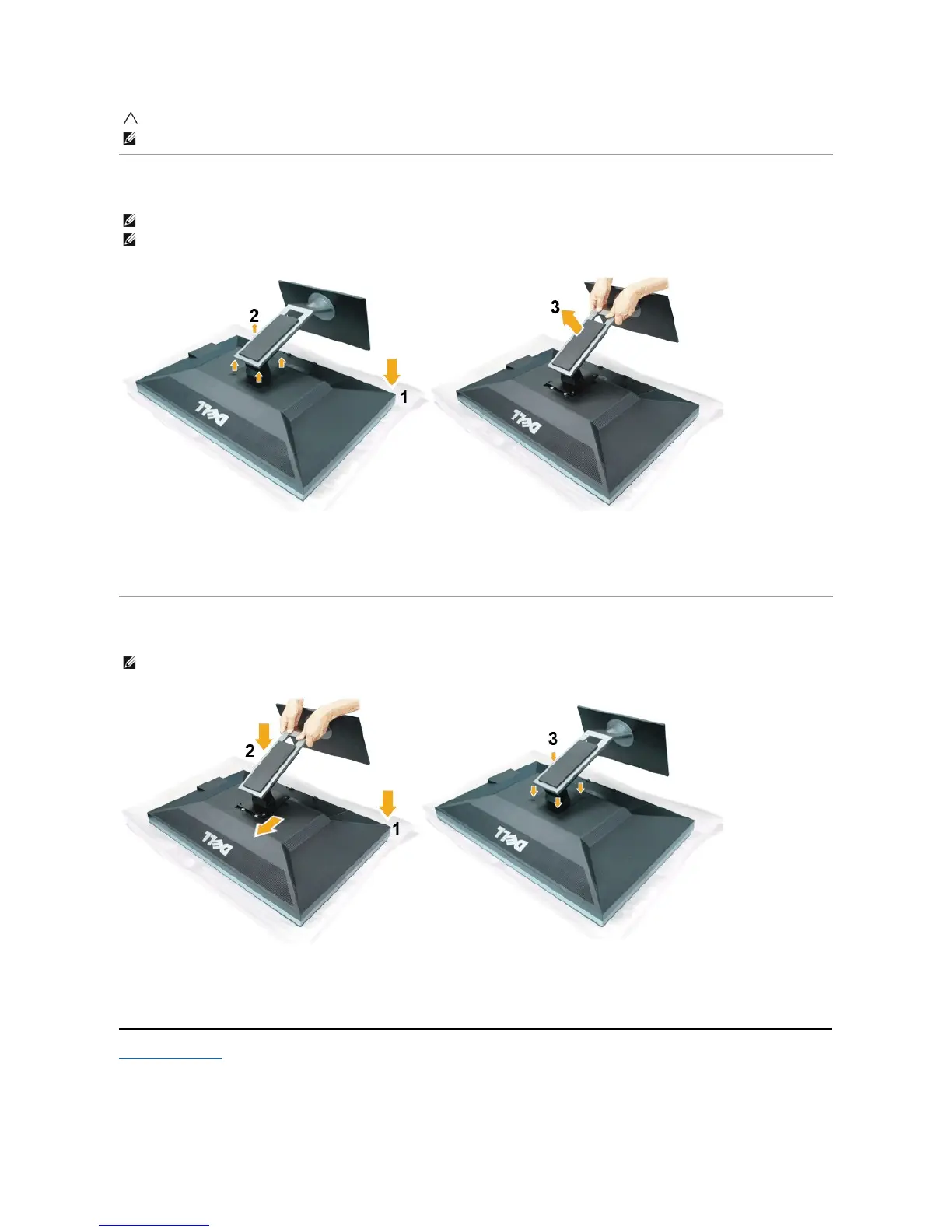
Removing the Stand
To remove the stand:
1. Place the monitor on a flat surface.
2. Remove the four screws from the stand.
3. Lift the stand up and away from the monitor.
Attaching the Stand
To attach the monitor stand:
1. Place the monitor on a flat surface.
2. Fit the two tabs on the upper part of the stand to the groove on the back of the monitor, lower the stand onto the back of the monitor.
3. Tighten the bolts as indicated.
Back to Contents Page
CAUTION: DonotusewithanydeviceotherthantheDellSoundbar.
NOTE: The Soundbar power connector (+12 V DC output) is for the optional Dell Soundbar only.
NOTE: To prevent scratches on the LCD screen while removing the stand,ensure that the monitor is placed on a soft, clean surface.
NOTE: This is applicable for a monitor with a stand. When any other stand is bought, please refer to the respective stand setup guide for setup
instructions.
NOTE: This is applicable for a monitor with a stand. When any other stand is bought, please refer to the respective stand setup guide for setup
instructions.












 To Next Page