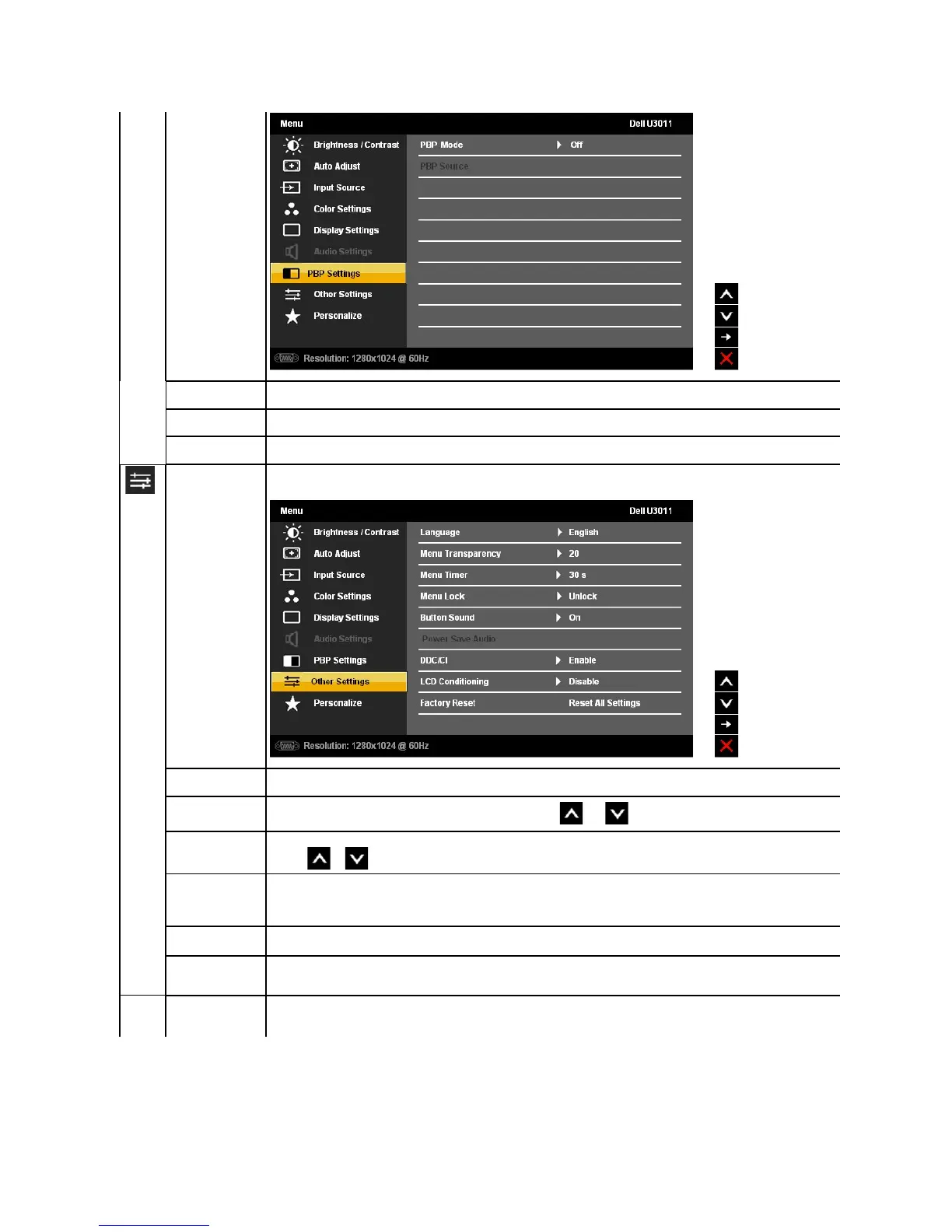
To turn on or off Picture by Picture (PBP).
Select an input signal for Picture by Picture (PBP). (HDMI 1/HDMI 2/Component).
Adjust the contrast level of the picture in PBP Mode.
Select this option to adjust the settings of the OSD, such as, the languages of the OSD, the amount of time the menu remains on
LanguageoptiontosettheOSDdisplaytooneofeightlanguages(English,Español,Français,Deutsch,BrazilianPortuguese,
Russian, Simplified Chinese or Japanese).
Select this option to change the menu transparency by touching and buttons(Minimum:0~Maximum:100).
OSD Hold Time: Sets the length of time the OSD will remain active after the last time you touched a button.
Use the or to adjust the slider in 1 second increments, from 5 to 60 seconds.
This function allows you to restrict the access of the various settings on your monitor.
To lock the menu, select the 'Lock' option.
To unlock the menu, touch and hold the button above the Power button for about 10 seconds.
This function is used to turn on/off the button sound.
To turn on or off Audio Power during Power Save mode.
NOTE: This function is available only when DC power connector is connected to soundbar.
DDC/CI (Display Data Channel/Command Interface) allows your monitor parameters (brightness, color balance etc) to be adjustable
via software on your computer. You can disable this feature by selecting "Disable".
Enable this feature for best user experience and optimum performance of your monitor.












 To Next Page