About Your Monitor | 11
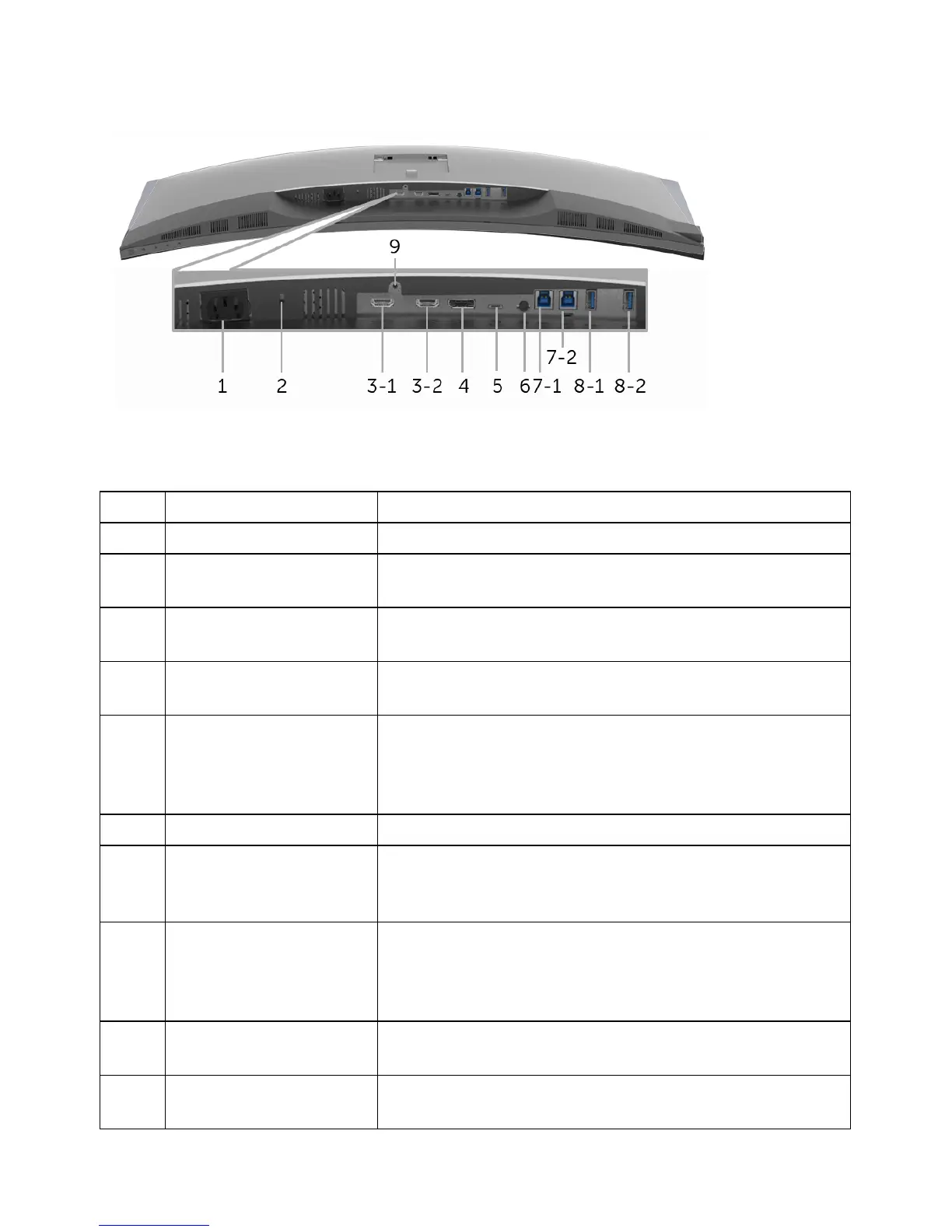
Bottom View
Bottom view without monitor stand
Description Use
1 AC power connector Connect the power cable.
2 Security lock slot Secures monitor with security lock (security lock not
included
).
3
(1
, 2)
HDMI port connector Connect your computer with HDMI cable.
4 DisplayPort in
conn
ector
Connect your computer with DP cable.
5 USB Type-C port Connect the USB Type-C cable that came with
m
onitor with your monitor to the computer or mobile
device. This port supports USB Power Delivery, Data,
and DP video signal.
6 Audio-Line out Connect your speakers.*
7
(1
, 2)
USB upstream port Connect the USB cable that came with your monitor
to the computer. Once this cable is connected, you
can use the USB connectors on the monitor.
8-1 USB downstream port Connect your USB device. You can only use this
conn
ector after you have connected the USB cable to
the computer and USB upstream connector on the
monitor.**
8-2 USB downstream port
with Power
Charging
Connect to charge your device.
9 Stand lock feature To lock the stand to the monitor using a M3 x 6 mm
s
crew (screw not included).
Label













 To Next Page