40 | Operating the Monitor
Display
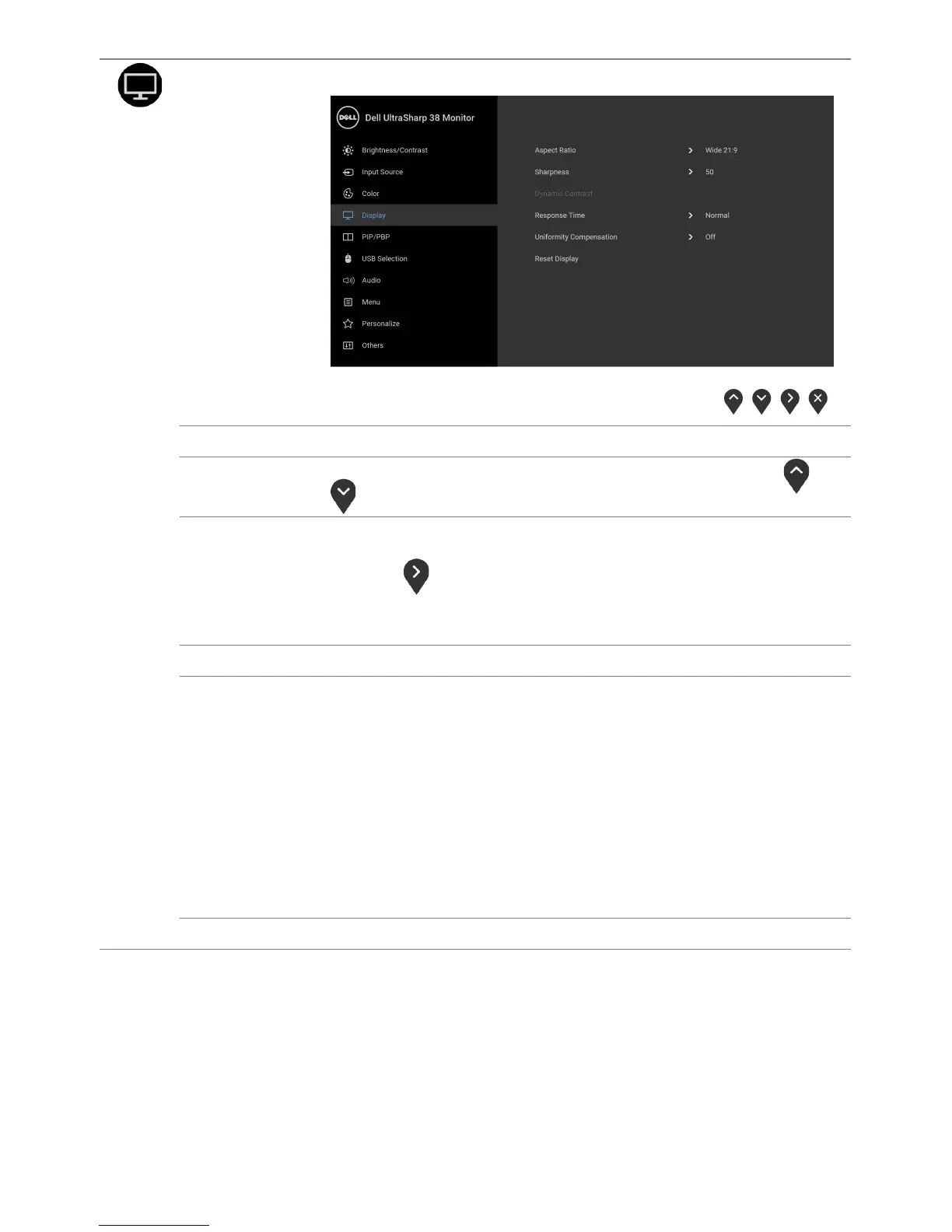
Use Display to adjust images.
Aspect Ratio
Adjusts the image ratio to Wide 21:9, Auto Resize, 4:3, or 1:1.
Sharpness
This feature can make the image look sharper or softer. Use or
to adjust the sharpness from '0' to '100'.
Dynamic
Contrast
Allows you to increase the level of contrast to provide sharper and
more detailed image quality.
Press the
button to select the Dynamic Contrast "On" or "Off".
NOTE: Dynamic Contrast provides higher contrast if you select
Game or Movie preset mode.
Response Time
Allows you to set the Response Time to Normal or Fast.
Uniformity
Compensation
Select screen uniformity compensation settings. Calibrated is factory
calibrated setting by default. Uniformity Compensation adjusts
different areas of the screen with respect to the center to achieve
uniform brightness and color over the entire screen. For optimal
screen performance, Brightness and Contrast for some preset
modes (Standard, Color Temp.) will be disabled when Uniformity
Compensation is turned On.
NOTE: User is advised to use factory default brightness setting when
Uniformity Compensation is turned on. For other brightness level
setting, the uniformity performance may deviate from the data
shown on the Factory Calibration Report.
Reset Display
Select this option to restore default display settings.













 To Next Page