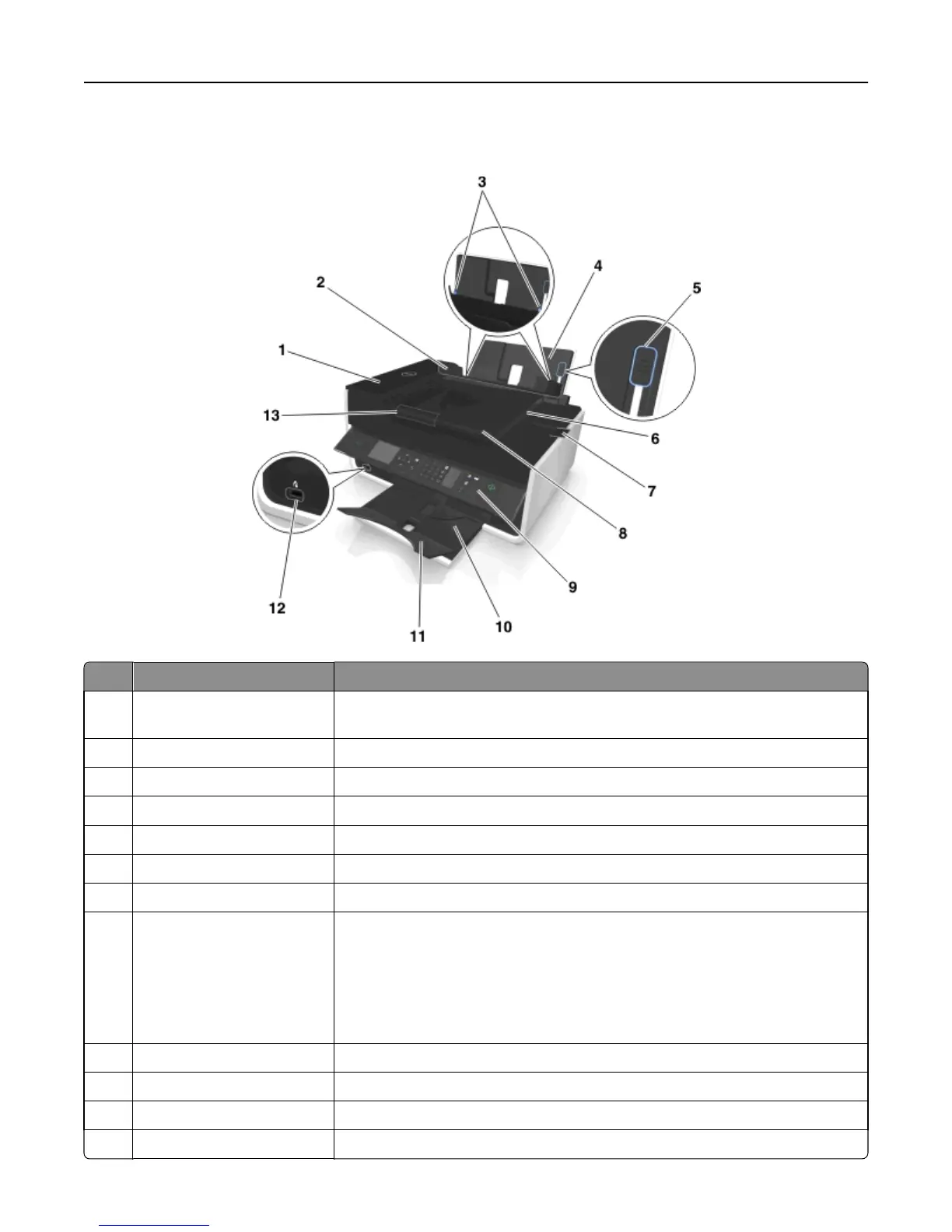
Understanding the parts of the printer
Use the To
1 Automatic Document Feeder
(ADF)
Scan, copy, or fax multiple‑page letter‑, legal‑, and A4‑size documents.
2 Paper feed guard Prevent items from falling into the paper slot.
3 Paper guides Keep paper straight when feeding.
4 Paper support Load paper.
5 Paper guide adjustment lever Adjust the paper guides.
6 ADF exit tray Hold documents as they exit from the ADF.
7 ADF exit tray extension Catch legal‑size paper as it exits from the ADF.
8 ADF tray Load original documents into the ADF.
Notes:
• Use the ADF for scanning, copying, or faxing multiple‑page documents.
• Do not load postcards, photos, small items, or thin media (such as magazine
clippings) into the ADF. Place these items on the scanner glass.
9 Printer control panel Operate the printer.
10 Paper exit tray Hold paper as it exits.
11 Tray extension Keep paper in place as it exits.
12 PictBridge and USB port Connect a PictBridge-enabled digital camera or a flash drive to the printer.
About your printer 11












 To Next Page