Next steps
1. Connect the battery cable to the connector on the system board.
2. Replace the base cover
3. Replace the optical drive assembly
4. Replace the SD memory card
5. Follow the procedure in after working inside your computer
Removing the M.2 2280 Solid-state drive or Intel Optane
memory - Optional
Prerequisites
1. Follow the procedure in before working inside your computer
2. Remove the SD memory card
3. Remove the optical drive assembly
4. Remove the base cover
5. Disconnect the battery cable from the connector on the system board.
Steps
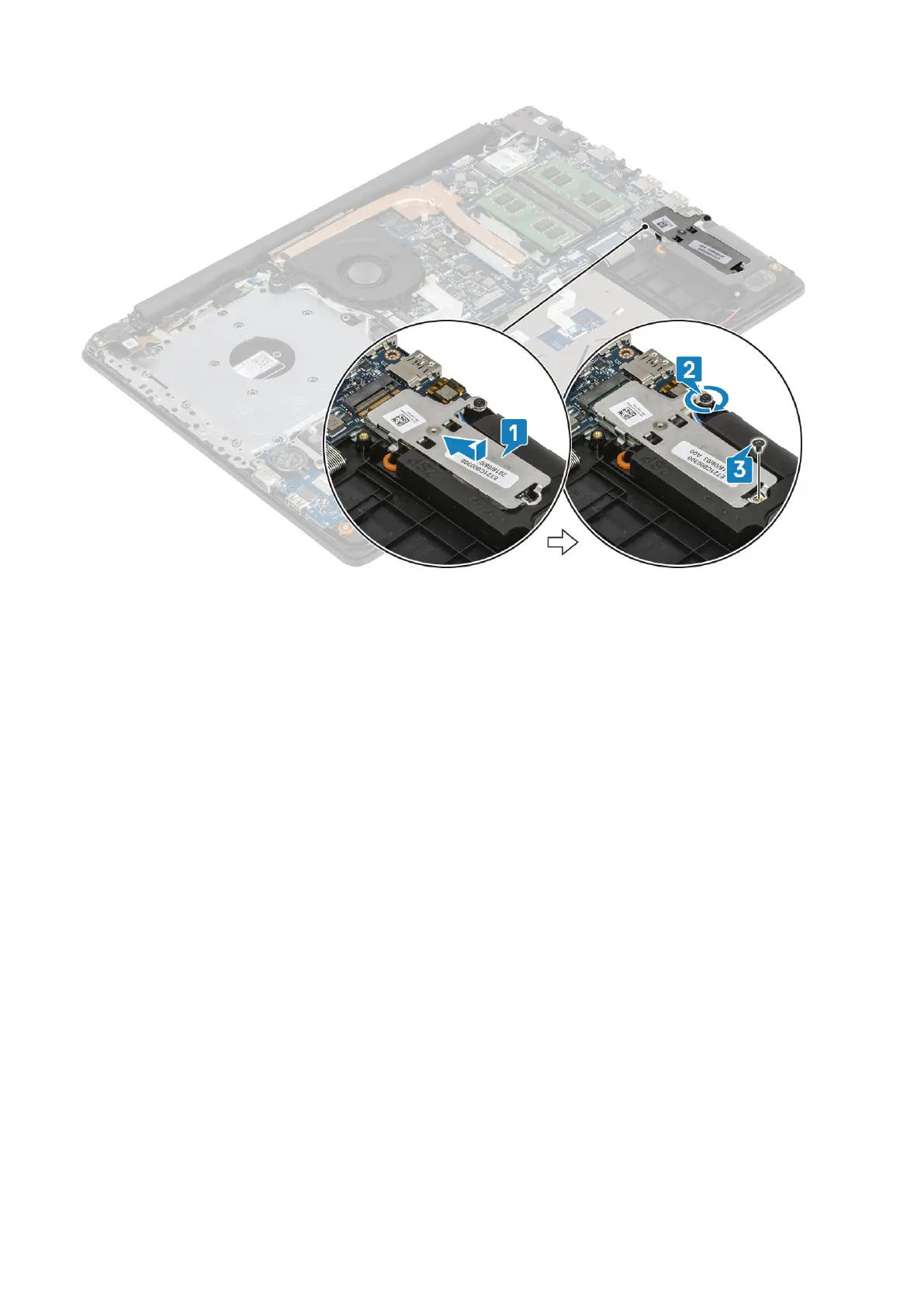
1. Loosen the captive screw that secures the thermal plate to the palmrest and keyboard assembly [1].
2. Remove the single (M2x3) screw that secures the thermal plate to the palmrest and keyboard assembly [2].
3. Slide and remove the thermal plate from the solid-state drive/Intel Optane slot [3].
4. Slide and lift the solid-state drive/Intel Optane off the palmrest and keyboard assembly [4].
Removing and installing components
27


 To Next Page