2. Remove the SD memory card
3. Remove the optical drive assembly
4. Remove the base cover
5. Remove the battery
6. Remove the WLAN
7. Remove the SSD
8. Remove the system fan
9. Remove the heatsink
10. Remove the display assembly
11. Remove the power button board
12. Remove the system board
Steps
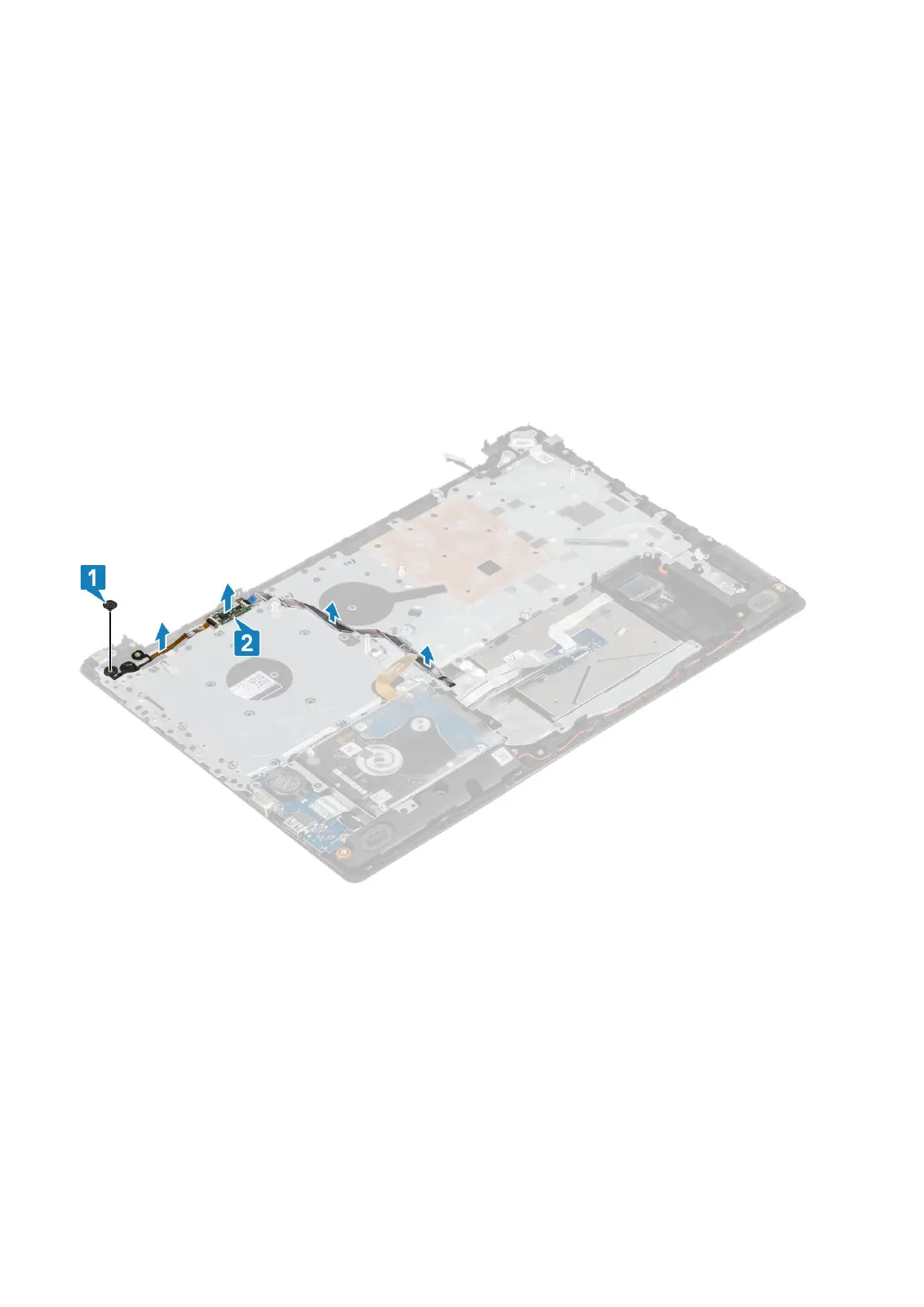
1. Remove the single (M2x2) screw that secures the power button on the palmrest and keyboard assembly [1].
2. Lift the power button with fingerprint reader board off the palmrest and keyboard assembly [2].
3. Peel the fingerprint reader cable off the palmrest and keyboard assembly.
Installing the power button with fingerprint reader
Steps
1. Affix the fingerprint reader cable on the palm rest and keyboard assembly.
2. Using the alignment posts, align and place the power button on the palmrest and keyboard assembly [1].
3. Replace the single (M2x2) screw that secures the power button on the palmrest and keyboard assembly [2].
Removing and installing components
59


 To Next Page