13
Following preparation of milk-based drinks — general
notes:
• In certain cases, the machine will need to heat up before
cleaning can take place.
• Wait for the operation to be completed. The function is
automatic. Do not stop the machine while cleaning is in
progress.
9.7 Customising the quantity in the cup
1. Press the button relative to the milk-based drink being
programmed, and hold for a few seconds. The light blinks
rapidly to indicate that the programming menu is active.
Delivery begins;
2. Once the cup is lled to the desired level, press the drink but-
ton again. Delivery of the rst ingredient stops and delivery of
the second ingredient begins;
3. Once the cup is lled to the desired level, press the button
a second time. Delivery ceases and the quantity is stored
in the memory.
Please note!
To cancel the current setting, press a button corresponding
to any drink
10. DELIVERING HOT WATER
Danger of scalding!
Never leave the machine unattended when hot water is being
released.
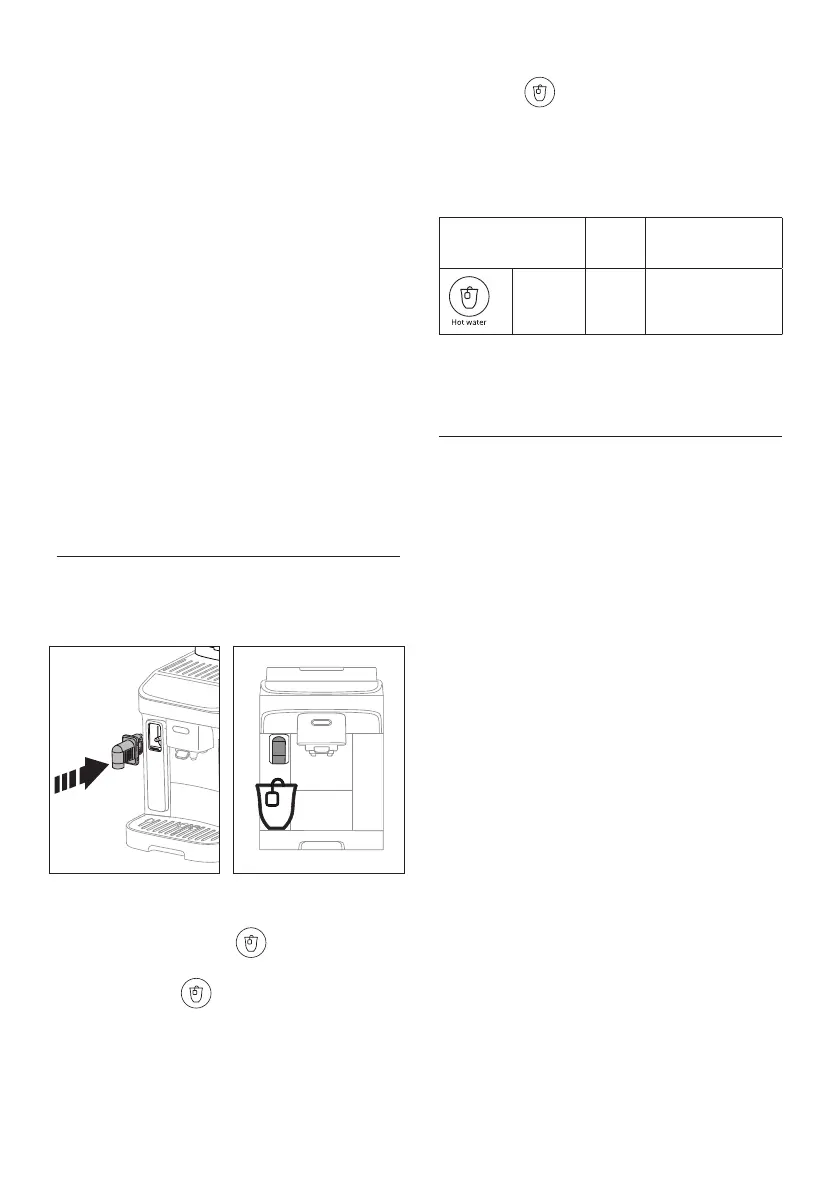
1. Insert the hot water spout (g. 33).
33
34
2. Place a container under the hot water spout (g. 34) (as
close as possible to avoid splashes).
3. Press the Hot water button .
4. Delivery will stop automatically. To terminate the delivery
sooner, press the button a second time.
Please note:
In energy saving mode, a few seconds may elapse before hot
water emerges as the appliance must heat up.
10.1 Customising the quantity of hot water
1. Press the
Hot water button and hold for a few sec-
onds: the light blinks rapidly to indicate that the program-
ming menu is active. Delivery begins;
2. Once the cup is lled to the desired level, press the button
a second time. Delivery ceases and the quantity is stored
in the memory.
Default
(ml)
Programmable (ml)
Hot water 250
from ≃ 20 to ≃ 420
Please note!
To cancel the current setting, press a button corresponding to any
drink
11. TIPS FOR ENERGY SAVING
• To reduce energy consumption, remove the milk carafe
after one or more drinks have been delivered;
• Set auto-o to 15 minutes (see “12. Settings menu”);
• Enable Energy Saving (see “12. Settings menu”);
• Always carry out the descaling cycle when prompted by
the machine.




 To Next Page