14
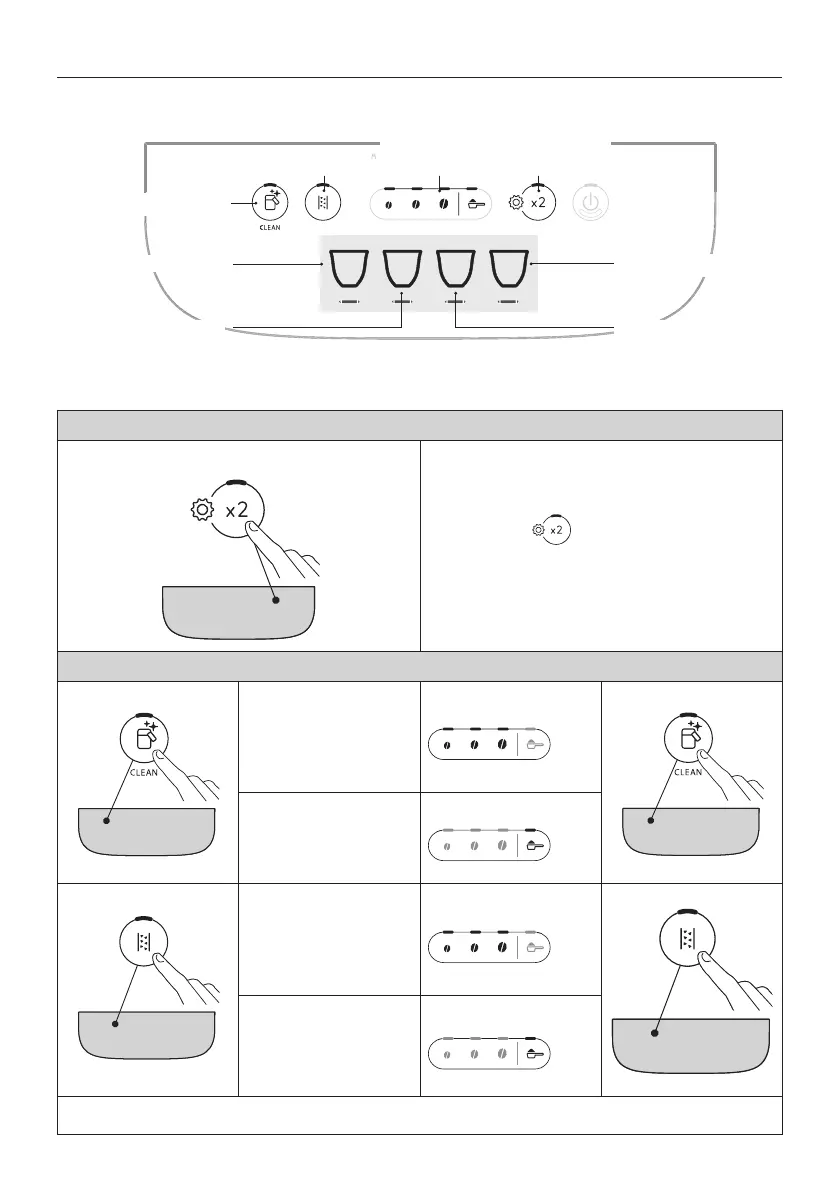
1 2 3 4
(*)
Water softener lter
Coee temperature
Energy saving
Access to
settings menu
Selection of
settings
Beep
Auto-o
Water hardness
12. SETTINGS MENU
Having accessed the menu, the buttons that remain active can be used to select the corresponding functions:
(*)
Drinks diering according to model
1. Access the menu:
x 5 sec
Press and hold the button for a few seconds:
the buttons used for selecting settings will light up.
Proceed by pressing the button for the setting to be adjusted.
2. Adjust the machine settings:
Water softener lter
Press one of the bean
symbols to install or
replace the water softener
lter
INSERTED
Conrm selection
Press the pre-ground
symbol to remove the
water softener lter
REMOVED
Beep
Press one of the bean
symbols to enable the
beep
ON
Conrm selection
Press the pre-ground sym-
bol to disable the beep
OFF
→




 To Next Page