User’s Manual
Bass Multi
-
Effects Pedal
5
Front Panel
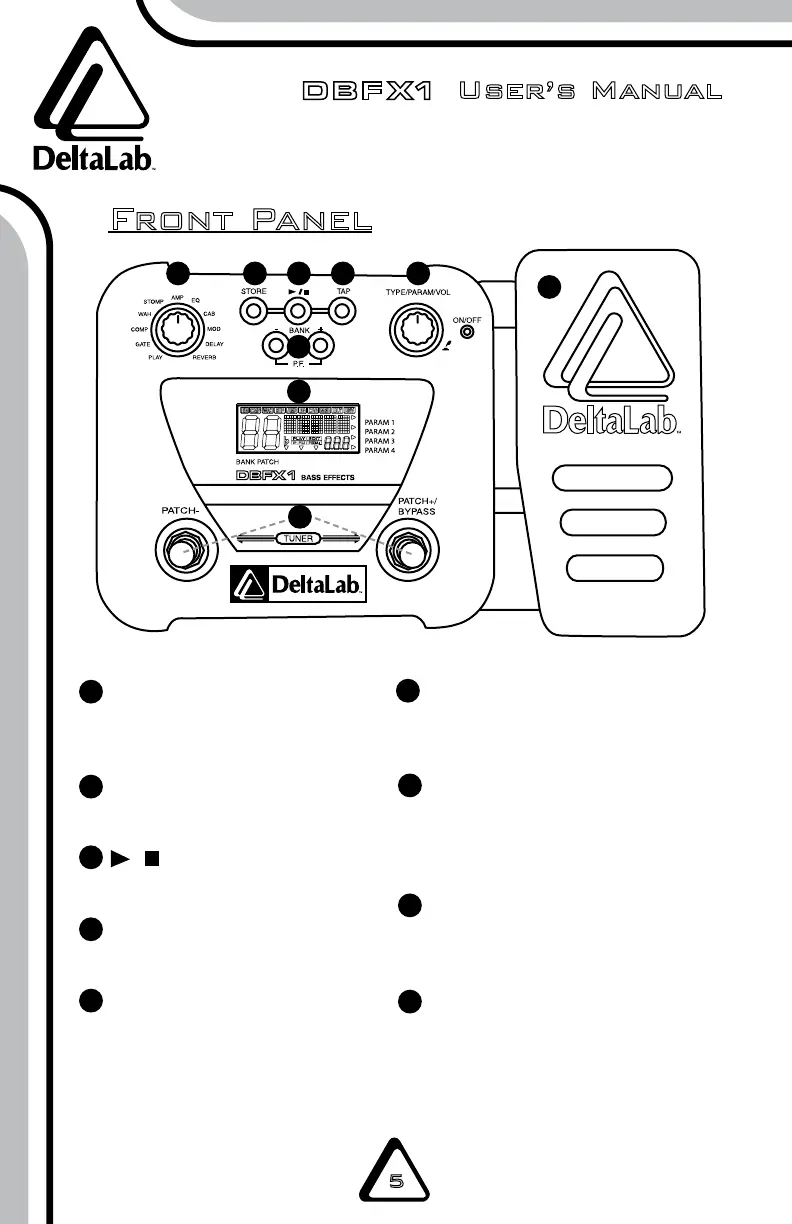
EFFECTSELECTIONKnob
Selects the effect and various
parameters.
STOREButton
Saves your settings.
/Button
Controls rhythm playback.
TAPButton
Adjusts rhythm tempo.
BANK+/–Buttons
Selects bank number and
enters patch function.
1
2
3
4
5
6
7
8
9
TYPE/PARAM/VOLKnob
Adjusts effect type, parameters,
and volume.
PATCH+/–FootSwitches
Selects patches, switches ef-
fect modules on and off, controls
tuner and other functions.
LCDDisplay
Displays current information and
bank number.
ExpressionPedal
Adjusts the volume and various
parameters in real-time.
1
2
3
4
5
6
7
8
9


 To Next Page