11
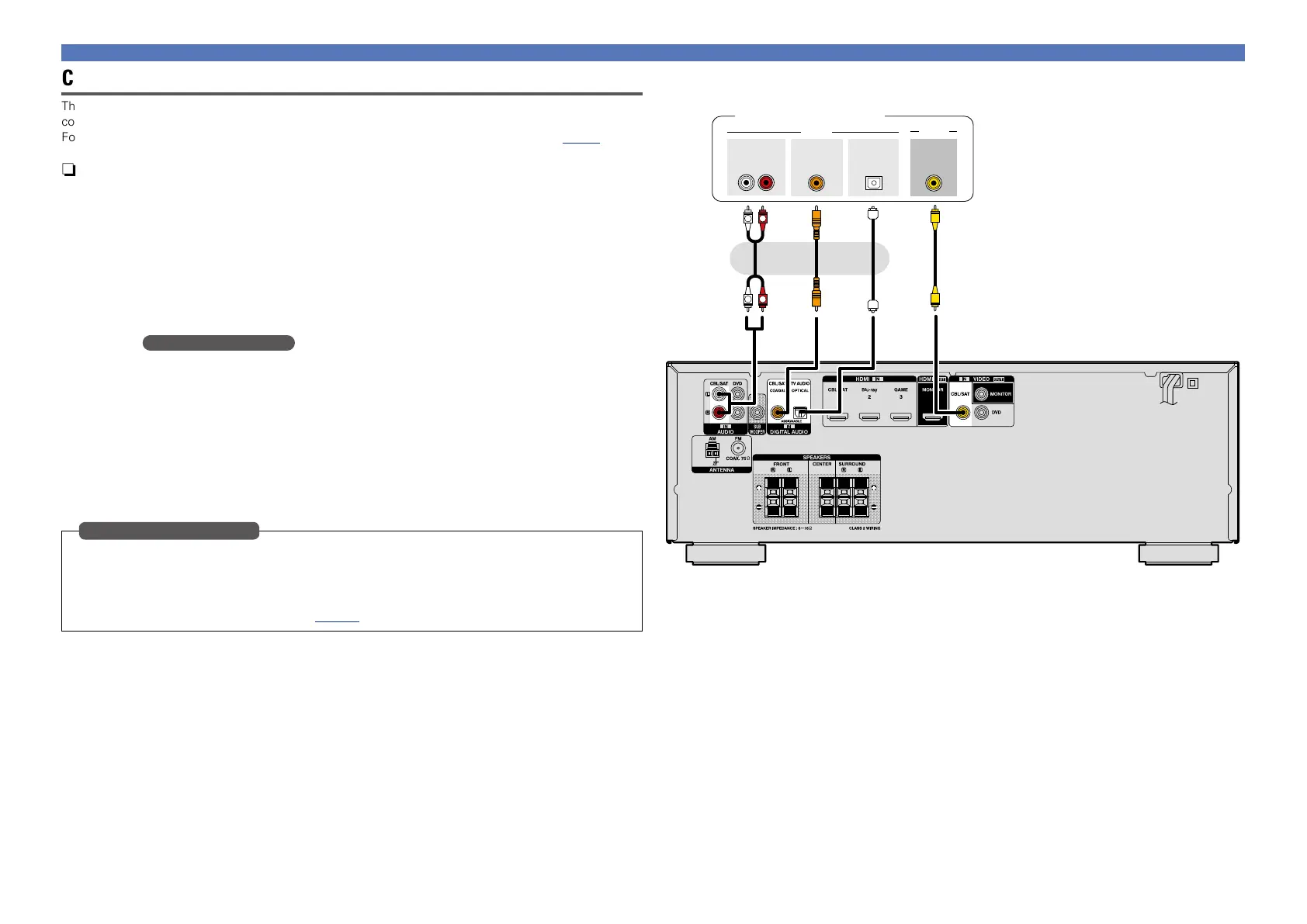
Connecting a set-top box (Satellite tuner/Cable TV)
This section describes how to connect when your satellite tuner or cable TV does not support HDMI
connections.
For instructions on HDMI connections, see “Connecting an HDMI-compatible device” (vpage5).
n Audio connection
The following methods are available for connecting to this unit. Use either of the methods to make
a connection.
The numbers prefixed with connectors indicate the recommendation order. The smaller the number is,
the higher playback quality is achieved.
a DIGITAL AUDIO COAXIAL connector
DIGITAL AUDIO OPTICAL connector z
When a multichannel audio (digital bit stream audio) is input, this unit decodes the audio to play back
surround sound.
z: When making this type of connection, you must change the settings on this unit.
(v Input connector setting )
s AUDIO IN (CBL/SAT) connector
This makes an analog audio connection. This type of connection converts digital audio to analog
audio, so the output audio may be degraded compared to connections a.
n Video connection
The following methods are available for connecting to this unit.
a VIDEO IN (CBL/SAT) connector
This makes an analog video connection.
When making the following connection, you must change the input connector settings.
a DIGITAL AUDIO OPTICAL connector
Change the default “TV AUDIO” to “CBL/SAT”.
For how to change, see “Input Assign” (vpage30).
Input connector setting
Connecting an HDMI-incompatible device
a as
a
R
L
R
L
AUDIO
AUDIO
RL
OUT
OUT
COAXIAL
OPTICAL
OUT
VIDEO
OUT
VIDEO
Satellite tuner/Cable TV
or or


 To Next Page