o
Operating this unit
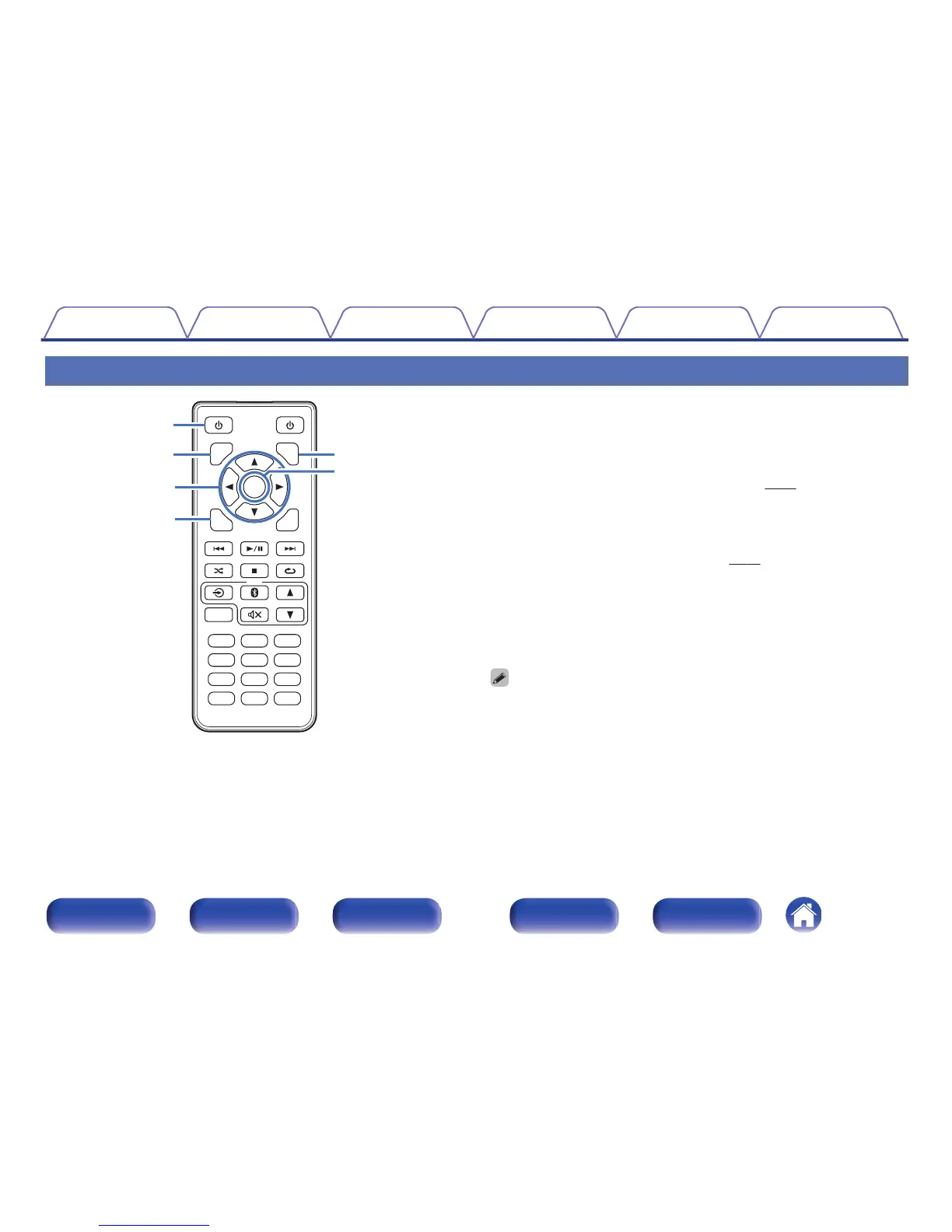
A
Power operation button (X)
This turns the power on/to standby.
B
DIMMER button
Adjust the display brightness of this unit. (v p. 23)
C
Cursor buttons (df0 1)
These select folders or files on a data CD.
D
MODE button
This switches the playback mode. (v
p. 27)
E
INFO button
This switches the track information shown in the display during
playback. This switches the playback time display.
F
ENTER button
This determines the selection.
0
The DIMMER button also controls the Denon's Integrated Amplifier PMA-50, so
the PMA-50 can be operated simultaneously with the DCD-50. When the two units
have different settings, press and hold in the button for lease 2 seconds to reset
them both to the default setting, then make the desired setting.
0
The display brightness is set to “Normal” by default.
Contents Connections Playback Settings Tips Appendix
10
Front panel Display Rear panel Remote Index



 To Next Page