EasyManua.ls Logo

Denon DCD-810 - Advanced CD Playback Modes; Specific Track Selection; Track Navigation; Programmed Playback

Denon DCD-810
32 pages
Print Icon
To Next Page IconTo Next Page
To Previous Page IconTo Previous Page
Loading...
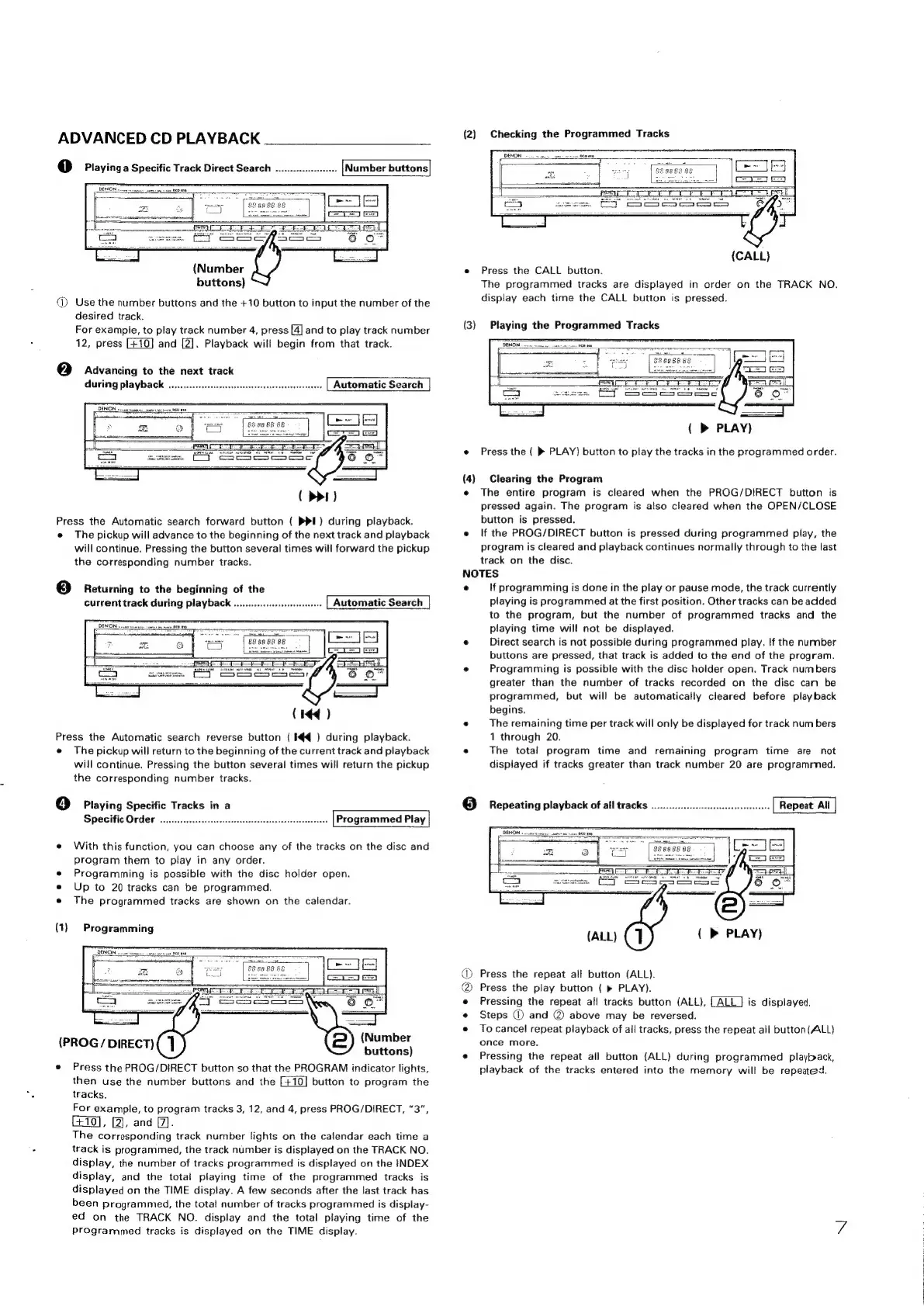
ADVANCED
CD
PLAYBACK
:
1)
Playing
a
Specific
Track
Direct
Search
..
(Number
buttons}
(Use
the
number
buttons
and
the
+10
button
to
input
the
number
of
the
desired
track.
For
example,
to
play
track
number
4,
press
[4]
and
to
play
track
number
12,
press
and
[2].
Playback
will
begin
from
that
track.
(2)
Advancing
to
the
next
track
during
playback
........2:.cccsscsscescesesecssseesesesensesseeees
(
>>I)
Press
the
Automatic
search
forward
button
(
PPI)
during
playback.
e
The
pickup
will
advance
to
the
beginning
of
the
next
track
and
playback
will
continue.
Pressing
the
button
several
times
will
forward
the
pickup
the
corresponding
number
tracks.
(3)
Returning
to
the
beginning
of
the
current
track
during
playback
...........c.0cccseeeee
(14
)
Press
the
Automatic
search
reverse
button
(
IK)
during
playback.
e
The
pickup
will
return
to
the
beginning
of
the
current
track
and
playback
will
continue.
Pressing
the
button
several
times
will
return
the
pickup
the
corresponding
number
tracks.
4]
Playing
Specific
Tracks
in
a
Specific
Order
............ccccessesseseeseeeessesaseesssenserense
Programmed
Play
e
With
this
function,
you
can
choose
any
of
the
tracks
on
the
disc
and
program
them
to
play
in
any
order.
e
Programming
is
possible
with
the
disc
holder
open.
e
Up
to
20
tracks
can
be
programmed.
e
The
programmed
tracks
are
shown
on
the
calendar.
(1)
Programming
(Number
buttons)
e
Press
the
PROG/DIRECT
button
so
that
the
PROGRAM
indicator
lights,
then
use
the
number
buttons
and
the
button
to
program
the
tracks.
For
example,
to
program
tracks
3,
12,
and
4,
press
PROG/DIRECT,
“3”,
C£10],
[2],
and
(7.
The
corresponding
track
number
lights
on
the
calendar
each
time
a
track
is
programmed,
the
track
number
is
displayed
on
the
TRACK
NO.
display,
the
number
of
tracks
programmed
is
displayed
on
the
INDEX
display,
and
the
total
playing
time
of
the
programmed
tracks
is
displayed
on
the
TIME
display.
A
few
seconds
after
the
last
track
has
been
pragrammed,
the
total
number
of
tracks
programmed
is
display-
ed
on
the
TRACK
NO.
display
and
the
total
playing
time
of
the
Programmed
tracks
is
displayed
on
the
TIME
display.
(PROG
/
DIRECT)
(2)
Checking
the
Programmed
Tracks
(CALL)
e
Press
the
CALL
button.
The
programmed
tracks
are
displayed
in
order
on
the
TRACK
NO.
display
each
time
the
CALL
button
is
pressed.
(3)
Playing
the
Programmed
Tracks
PT
DENON
eee
seme
se
sates
ae
rns
OED
OD
_PS
rt
rt
(
>
PLAY
e
Press
the
(
®
PLAY)
button
to
play
the
tracks
in
the
programmed
order.
(4)
Clearing
the
Program
e
The
entire
program
is
cleared
when
the
PROG/DIRECT
button
is
pressed
again.
The
program
is
also
cleared
when
the
OPEN/CLOSE
button
is
pressed.
e
If
the
PROG/DIRECT
button
is
pressed
during
programmed
play,
the
program
is
cleared
and
playback
continues
normally
through
to
the
last
track
on
the
disc.
NOTES
e
lf
programming
is
done
in
the
play
or
pause
mode,
the
track
currently
playing
is
programmed
at
the
first
position.
Other
tracks
can
be
added
to
the
program,
but
the
number
of
programmed
tracks
and
the
playing
time
will
not
be
displayed.
e
Direct
search
is
not
possible
during
programmed
play.
If
the
nummber
buttons
are
pressed,
that
track
is
added
to
the
end
of
the
program.
e
Programming
is
possible
with
the
disc
holder
open.
Track
numbers
greater
than
the
number
of
tracks
recorded
on
the
disc
can
be
programmed,
but
will
be
automatically
cleared
before
playback
begins.
°
The
remaining
time
per
track
will
only
be
displayed
for
track
num
bers
1
through
20.
.
The
total
program
time
and
remaining
program
time
are
not
displayed
if
tracks
greater
than
track
number
20
are
programmed.
(
PLAY)
Press
the
repeat
all
button
(ALL).
Press
the
play
button
(
»
PLAY).
Pressing
the
repeat
al!
tracks
button
(ALL),
is
displayed,
Steps
@)
and
@
above
may
be
reversed.
To
cancel
repeat
playback
of
all
tracks,
press
the
repeat
all
button(ALL)
once
more.
Pressing
the
repeat
all
button
(ALL)
during
programmed
playback,
playback
of
the
tracks
entered
into
the
memory
will
be
repeated.
eee
BO

Related product manuals