11
To rewind or fast-forward, press Search Back/Forward ( / ) on the remote control. Each time you
press the same button, the speed will increase. You can do this up to 5 times before it returns to normal
playback speed. To resume playback, press Play (
) on DN-500BD or the remote control.
To skip to the next chapter, press Skip Forward (
) on DN-500BD or the remote control. If Chapter
Repeat is on (described later), this will skip to the beginning of the current chapter.
To skip to the previous chapter, press Skip Back (
) twice on DN-500BD or the remote control
(though if you are within the first few seconds of the current chapter, you can press it just once.) If Chapter
Repeat is on (described later), this will skip to the beginning of the current chapter.
To return to the beginning of the chapter, press Skip Back (
) once on DN-500BD or the remote
control. If you are within the first few seconds of the current chapter, though, doing this will skip to the
previous chapter.
Additional Functions
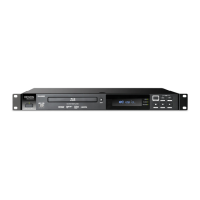
To view the disc menu, press Disc Menu on the remote control. This will stop playback.
To view the title menu without stopping playback, press Title Popup on the remote control.
To select a Repeat mode, press Repeat on the remote control, or press Shift and Skip Back (
) on
DN-500BD. It will cycle through 3 modes:
• Off: Normal operation.
• Chapter Repeat (CH): The current chapter will repeat continuously. In this Repeat mode,
pressing will Skip Back/Forward (
/ ) will skip to the beginning of the current chapter
only.
• Title Repeat (TT): The current title will repeat continuously.
To loop a section of the video:
1. Set the desired starting point by pressing A-B on the remote control, or press Shift and Skip Forward
(
) on DN-500BD. A- will appear on the screen.
2. Set the desired ending point by pressing A-B again or pressing Shift and Skip Forward (
) on DN-
500BD again. A-B will appear on the screen, and the loop will start and repeat continuously.
3. To stop the loop, press A-B on the remote once more, or press Shift and Skip Forward (
) on DN-
500BD once more. A-B will disappear from the screen, and playback will continue normally.
To jump to a specific chapter of the disc:
1. Use the number buttons (0–9) on the remote control to select the number of the desired chapter.
2. To confirm your choice, press OK or wait a few seconds. The desired chapter will start playing.
To cancel, press Clear.
CH
TT


 To Next Page