5
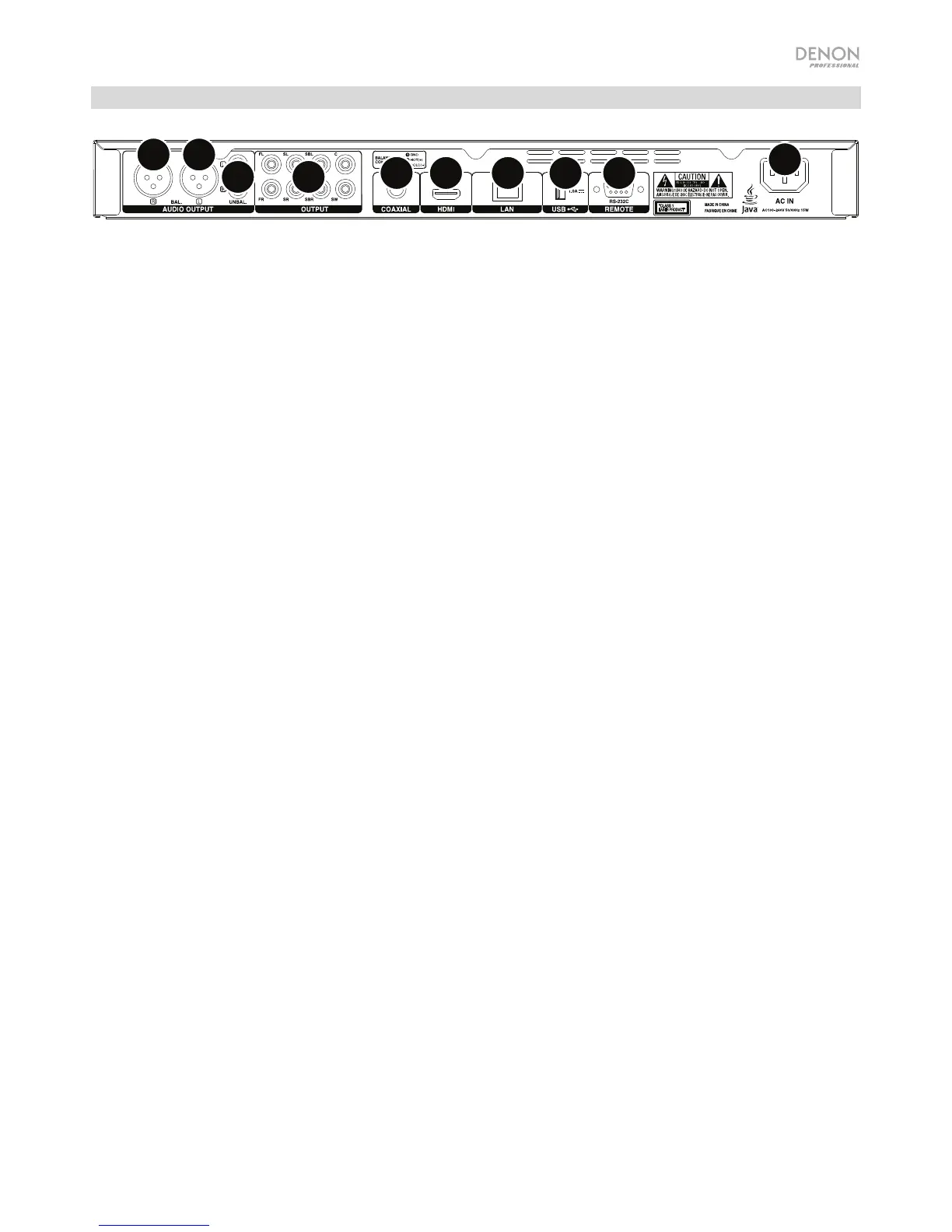
Rear Panel
7.1
11
2
3
45 6 7 8
9
1. Audio Outputs (balanced, XLR): These outputs send the audio signal to your external speakers,
receiver, etc. Use XLR cables to make these connections. See Setup > Connections for more
information.
2. Audio Outputs (unbalanced, RCA): These outputs send the audio signal to your external speakers,
receiver, etc. Use RCA cables to make these connections. See Setup > Connections for more
information.
3. 7.1 Outputs (unbalanced, RCA): These 8 outputs send the audio signal to your 7.1 surround sound
system. Use RCA cables to make these connections. Please refer to the documentation for your sound
system, as well.
4. Coaxial Output: This output sends the digital audio and video signal to your TV. Use a standard
coaxial cable to make this connection.
5. HDMI Output: This output sends an HDMI audio and video signal from an external device. Use a
standard coaxial cable to make this connection.
6. LAN Port: This input lets you connect a host device (usually a computer) to DN-500BD. You can use
the host device to control DN-500BD via commands sent from it. Alternatively, use this connection to
access the internet. Use a standard Ethernet cable to make this connection.
7. USB Input: This input receives the audio and video signal from a connected USB device. Use a
standard USB cable to make this connection.
8. Remote Input: This input lets you connect a host device (usually a computer) to DN-500BD. You can
use the host device to control DN-500BD via commands sent from it (using RS-232C serial
communication). Use a standard Ethernet cable to make this connection.
9. AC In: Use the included power cable to connect this input to a power outlet. See Setup >
Connections for more information.


 To Next Page