ENGLISH
13
2 Sound output from the DVM-3700’s digital audio output connectors
Disc played
DVD video
Audio recording format
Dolby Digital (AC-3)
Sound output
• Dolby Digital bitstream (1 to 5.1 channels) or PCM (48 kHz/16 bit) (2 channels). (NOTE 1, 2)
* Select with the “Digital Audio Output” default setting. (See page 56.)
DTS
• dts bitstream or no output.
* Select with the “Digital Audio Output” default setting. (See page 56.)
Linear PCM
48 kHz/96 kHz
16/20/24 bit
• Linear PCM (48 kHz/16 bit only) (2 channels) or no output. (NOTE 2)
* Select with the “Digital Audio Output” default setting. (See page 56.)
MPEG1 • PCM (44.1 kHz) (NOTE 1)
Video CD
Linear PCM • Linear PCM (44.1 kHz)CD
NOTE 1: The type of audio output from the connector can be selected by “7 Digital Audio Output” of the initial setting. (See page 56.)
NOTE 2: Compressed audio is converted to PCM before output.
• Linear PCM audio is the signal recording format used for music CDs.
While the signals are recorded at 44.1 kHz/16 bit for music CDs, for DVDs they are recorded at 48 kHz/16 bit to 96 kHz/24 bit, providing higher
sound quality than music CDs.
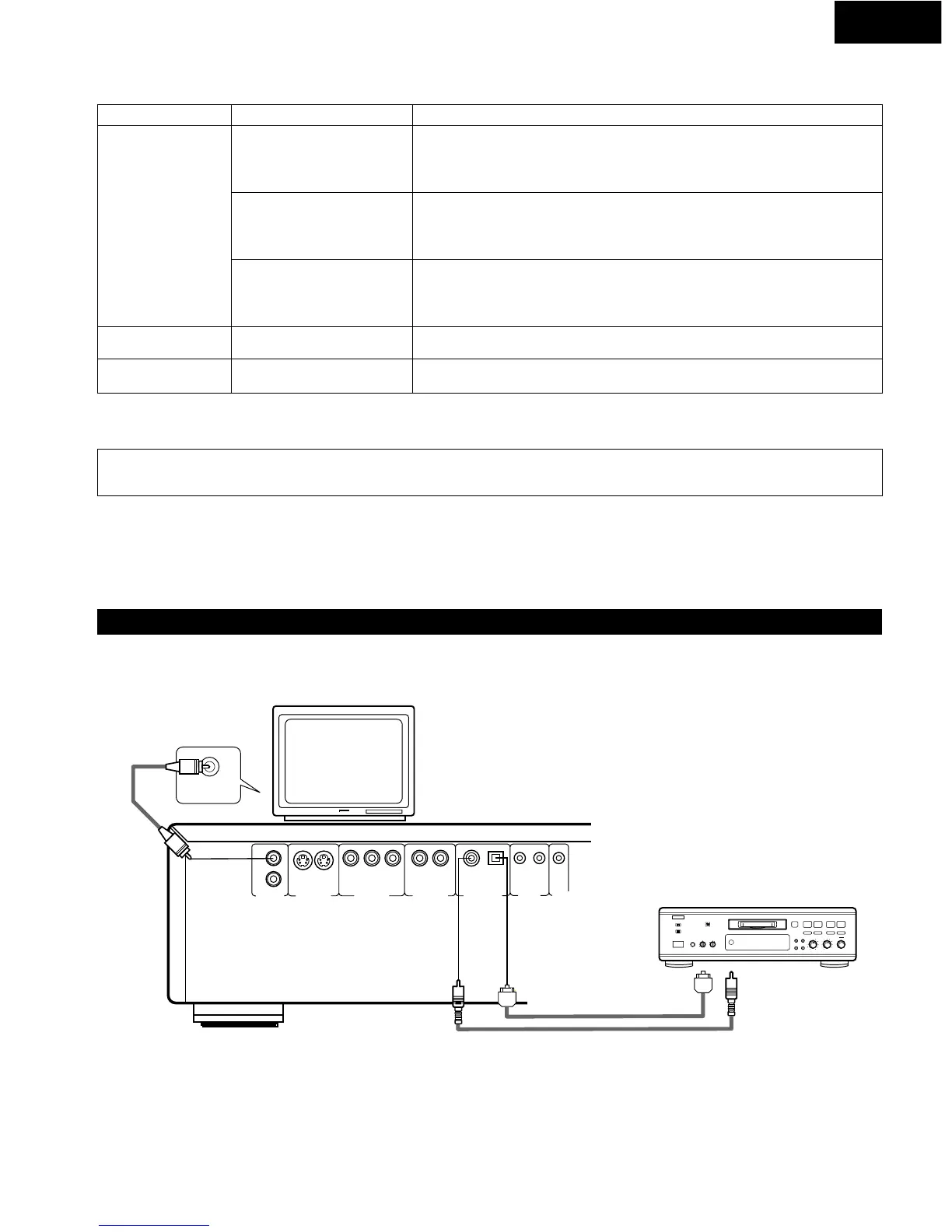
(4) Connecting to a Digital Recorder (MD Recorder, DAT Deck, etc.)
* Set the “Digital Audio Output” default setting as shown below.
(See page 56.)
• “LPCM 96k / 48k” / “NO”
• “Dolby Digital” / “PCM”
• “dts” / “OFF”
Playing DVDs with incorrect settings may result noise that could
damage your ears or the speakers.
DVM-3700
TV
Digital audio input
connector (OPTICAL)
Digital audio input
connector (COAXIAL)
NOTE:
• Some dts decorders which do not support DVD- dts interface may not work properly with the DVD video auto changer.


 To Next Page