36
ENGLISH
2
100 CD CHANGER CONTROL FUNCTION
14
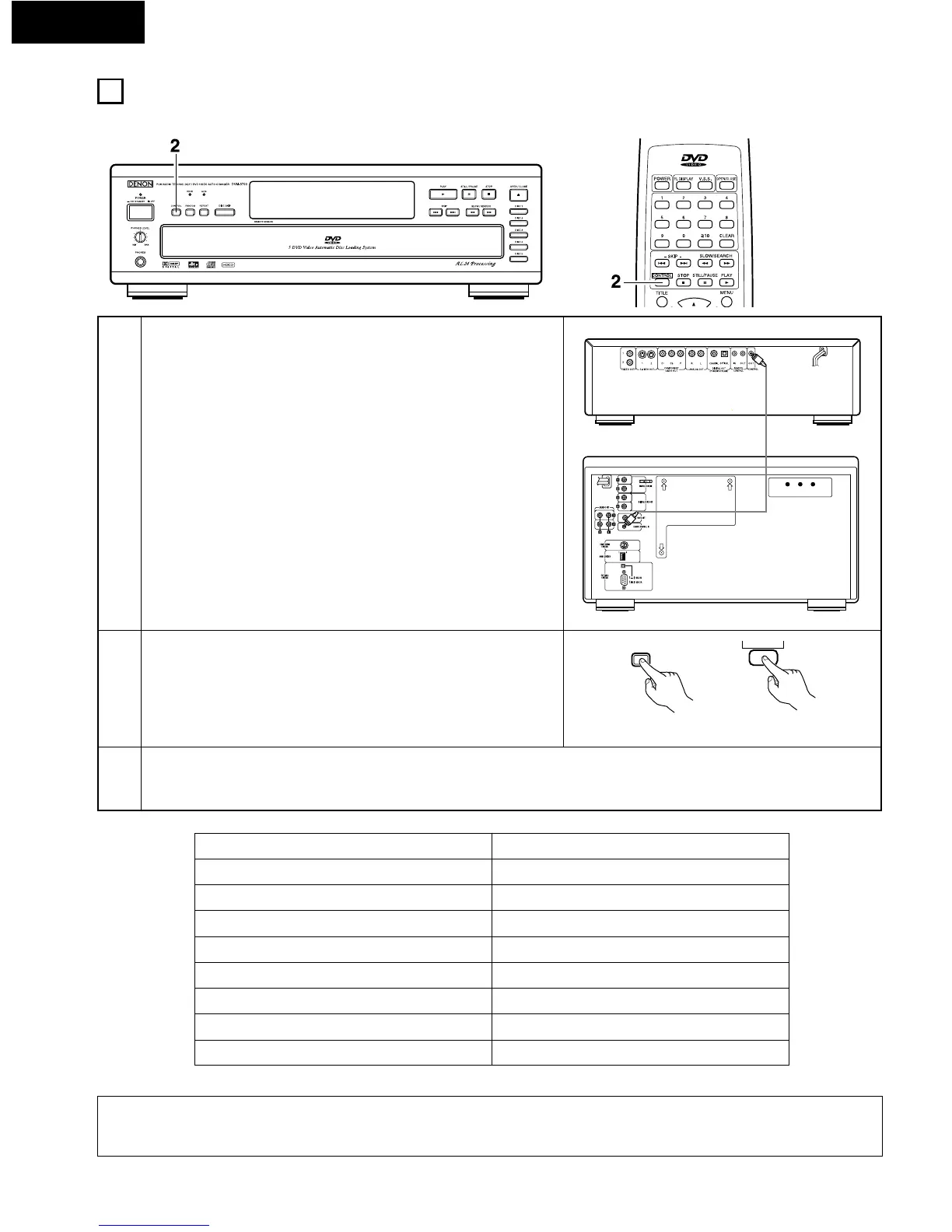
2 A separately sold 100 CD changer (DCM-5000/5001) can be connected to the DVM-3700 and operated from the DVM-3700.
1
Connect the DVM-3700’s CONTROL OUT connector to the REMOTE
CONTROL IN connector on the 100 CD changer (DCM-5000/5001).
• Use a commercially available mini-plug cord (monaural).
Press the CONTROL button.
• “CONTROL” appears on the display.
NOTES:
• Wait at least 15 seconds after turning on the power of the 100 CD changer (DCM-5000/5001) before performing this operation.
• Buttons not indicated on the above table do not operate.
Press the buttons on the DVM-3700 or the remote control unit.
• When one of the buttons on the DVM-3700 or the remote control unit shown on the table below is pressed, the DCM-5000/5001
operates in the same way as when the corresponding button on the DCM-5000/5001 is pressed.
3
DVM-3700
PLAY
STILE / PAUSE
STOP
8 , 9
DISC SKIP
SELECT
0 ~ 9
•
,
ª
, 0 , 1
DCM-5000/5001
PLAY
PAUSE
STOP
8 , 9
DISC SKIP +
ENTER
0 ~ 9
c , d , [, \
DVM-3700
DCM-5000/5001


 To Next Page