47
ENGLISH
4
5
6
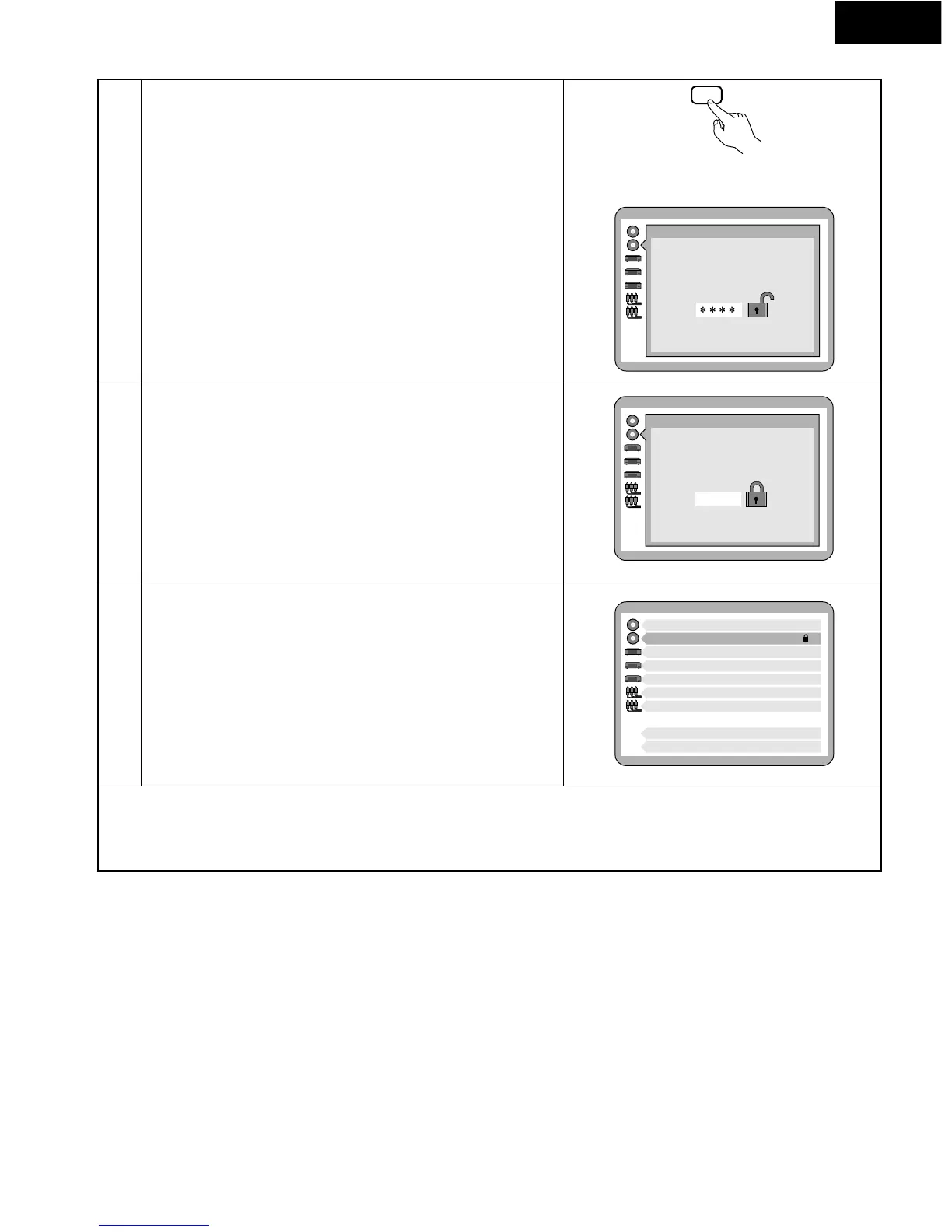
If a rating of Level 7 or lower has been selected, use the number buttons
to input a 4-digit password, then press the SELECT button.
* Do not forget the password.
* Once locked, the setting cannot be changed without inputting the
correct password.
Press the SELECT button.
The settings are completed, and the screen in step 1 on page 44
reappears.
* To return to the previous menu screen:
Press the RETURN button. (The RETURN button will not function after the SELECT button is pressed in step 5.)
* To exit the default settings:
Press the SET UP button or number button “0” at the default setting screen in step 1 on page 44.
Remote control unit
Example: When “Level 7” is selected
Ratings
Enter a 4-digit password,
then press SELECT
Press RETURN to cancel
Ratings
The player is locked.
Remember the password.
Press SELECT to contine
1 Disc Languages
2 Ratings Level 7
3 Menu Language English
4 On-Screen Messages
5 FL Display Bright
6 TV Aspect 4:3
7 Digital Audio Output
9 Other Settings
0 Exit
4 3 4 3


 To Next Page