EasyManua.ls Logo

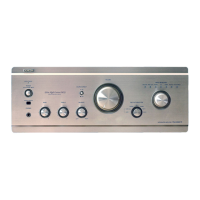
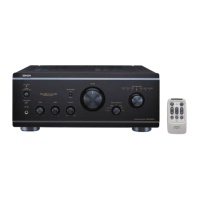
Denon PMA-2500NE - Service Manual

Denon PMA-2500NE
89 pages
Print Icon
To Next Page IconTo Next Page
Loading...
MODEL JP E3 E2 EK EA E1 E1C E1K
PMA-2500NE
P P
INTEGRATED AMPLIFIER
S1158DM/DG1512
Ver. 1
Please use this service manual with referring to the operating instructions without fail.
Some illustrations using in this service manual are slightly different from the actual set.
• For purposes of improvement, specications and design are subject to change without notice.
e
SERVICE MANUAL
e
D&M Holdings Inc.
Copyright 2015 D&M Holdings Inc. All rights reserved.
WARNING: Violators will be prosecuted to the maximum extent possible.

Table of Contents

Other manuals for Denon PMA-2500NE

Questions and Answers

  • T
    Tyler MartinezJul 26, 2025
    How to fix a Denon PMA-2500NE remote control that is not working?
    • C
      Caleb DyerJul 26, 2025
      If the Denon Amplifier remote control isn't working, first replace the batteries. If that doesn't solve the issue, make sure you're within 7 meters and 30 degrees of the unit, and that there are no obstacles blocking the signal. Also, check that the batteries are inserted correctly, observing the polarity markings. Strong light, like direct sunlight or certain fluorescent bulbs, can interfere with the remote sensor, so try moving the unit. Finally, if you're using a 3D video device, adjust the position and distance of other units to prevent interference with the Denon Amplifier's remote control.

Summary

SAFETY PRECAUTIONS

General Safety Guidelines

Essential safety checks, handling instructions, and precautions during servicing and inspection.

Important Safety Parts

Guidance on identifying and replacing critical safety components to maintain performance and prevent hazards.

SEMICONDUCTOR AND OPTICAL UNIT HANDLING

Electrostatic Discharge Prevention

Procedures for grounding personnel and equipment to prevent electrostatic discharge damage to sensitive components.

TECHNICAL SPECIFICATIONS

Power Amplifier Specifications

Detailed electrical and performance characteristics of the power amplifier stage.

Pre Amplifier Specifications

Input sensitivity, impedance, and RIAA deviation details for the preamplifier.

CAUTION IN SERVICING

Unit Initialization Procedure

Steps to initialize the unit after component replacement to restore factory settings.

Service Tools Required

Information on necessary jigs and tools, like the RS-232C conversion board, for firmware updates.

DISASSEMBLY

SPECIAL MODE

ADJUSTMENT

Idling Current Adjustment

Procedures for preparing and adjusting the idling current using a DC voltmeter.

PROCEDURE AFTER REPLACING COMPONENTS

PCB Replacement Procedures

Steps required after replacing printed circuit boards, including resistor changes and software updates.

Microprocessor Replacement Procedures

Steps following microprocessor or flash ROM replacement, including software writing.

FIRMWARE UPDATE PROCEDURE

Updating via USB-B

Detailed steps for updating firmware using a USB-B connection and PC software.

Updating via System u-com

Instructions for firmware updates using a system u-com connection and specific writing kit.

TROUBLE SHOOTING

Power Indicator LED Not Lit

Troubleshooting flowchart for issues where the unit does not power on and the LED is off.

Power Indicator LED Flashing

Troubleshooting flowchart for power-on issues where the indicator LED flashes.

No Sound Output

Troubleshooting guide for situations where the unit powers on but produces no audio output.

DIGITAL PCB SIGNAL PROCESSING

Digital Signal Check

Procedures for checking digital signal processing on the DIGITAL PCB, including power supply and waveforms.

DAC PCB CHECK

DAC PCB Signal Path Verification

Steps to verify signal operations and connections on the DAC PCB.

DIGITAL PCB DIR BLOCK

DIGITAL PCB USB-DAC BLOCK

MEASURING METHOD AND WAVEFORMS

SCHEMATIC DIAGRAMS - Power Amp, Diode

SCHEMATIC DIAGRAMS - Tone, Volume, Audio

SCHEMATIC DIAGRAMS - Input, CD, Phono

SCHEMATIC DIAGRAMS - SEL, FLD, P.SW, AC1, AC2, CON

SCHEMATIC DIAGRAMS - DAC

SCHEMATIC DIAGRAMS - Digital (1;4) - MCU

SCHEMATIC DIAGRAMS - Digital (2;4) - DIR

SCHEMATIC DIAGRAMS - Digital (3;4) - FPGA

SCHEMATIC DIAGRAMS - Digital (4;4) - USB-E

POWER AMP PCB ASSY - Component List

INPUT PCB ASSY - Component List

DAC PCB ASSY - Component List

DIGITAL PCB ASSY - Component List

Denon PMA-2500NE Specifications

General IconGeneral
Damping factor700
Amplifier class-
Frequency range20 - 20000 Hz
Audio output channels2.0 channels
Signal-to-Noise Ratio (SNR)110 dB
Total Harmonic Distortion (THD)0.01 %
RMS power output per channel (4 Ohm)160 W
RMS power output per channel (8 Ohm)80 W
Audio (L/R) in5
Audio (L/R) out1
Speaker selectorA / B
Phono audio in (L,R)Yes
USB 2.0 ports quantityUSB 2.0 ports have a data transmission speed of 480 Mbps, and are backwards compatible with USB 1.1 ports. You can connect all kinds of peripheral devices to them.
Digital audio optical in2
AC input voltage230 V
AC input frequency50 Hz
Power consumption (standby)0.2 W
Power consumption (typical)310 W
PurposeHome
MaterialMetal
Product colorSilver
Volume controlRotary
Connectivity technologyWired
CertificationCE, EAC
Weight and Dimensions IconWeight and Dimensions
Depth431 mm
Width434 mm
Height181 mm
Weight25000 g

Related product manuals