46
BHT-904B/BHT-914B
4.4.3
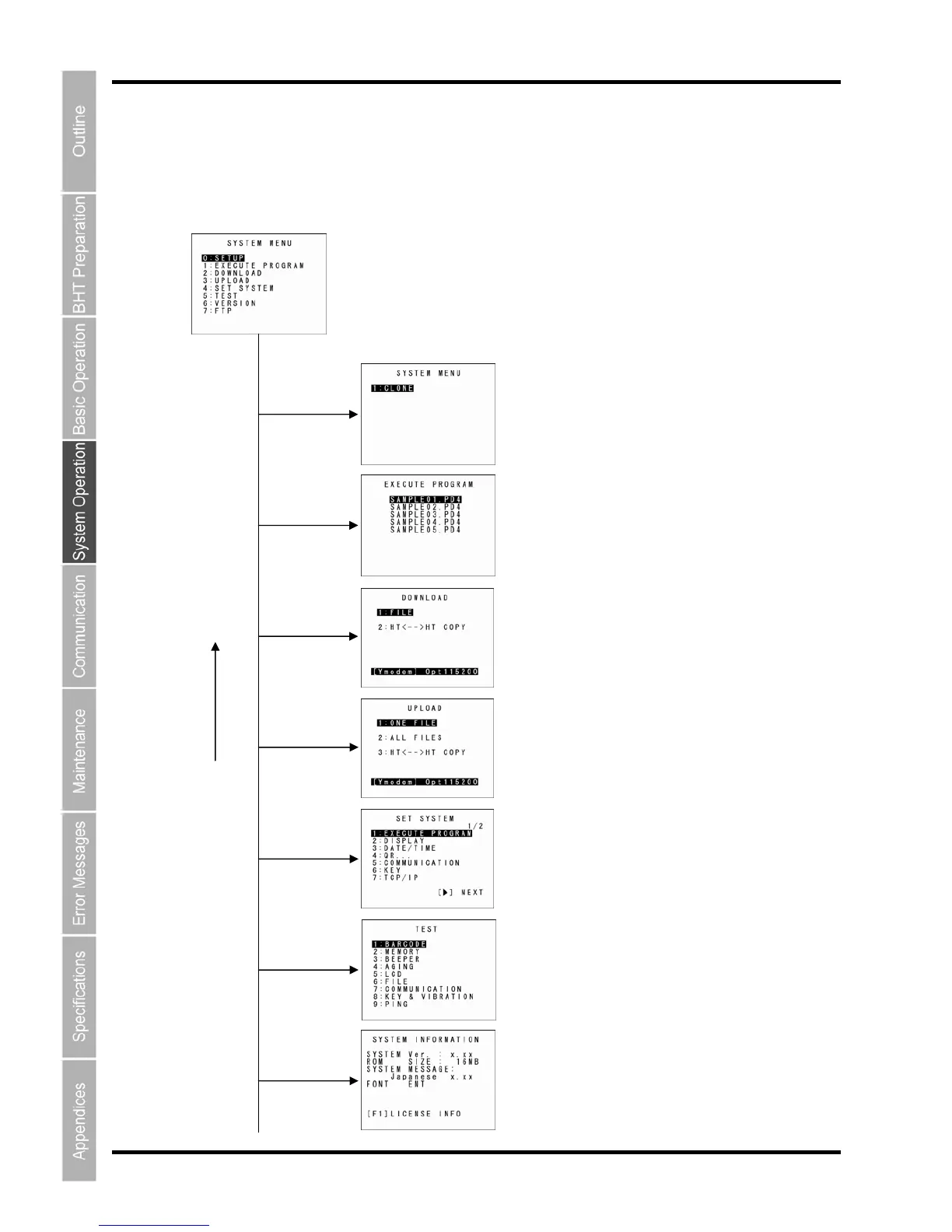
SYSTEM MENU Configuration
Menu Configuration for Items Displayed at the SYSTEM MENU Screen
Select the item with the numeric keys or cursor keys ([▲] [▼]) and press the ENT key.
SYSTEM MENU
[4] and ENT keys
[3] and ENT keys
[1] and ENT keys
[5] and ENT keys
[2] and ENT keys
[0] and ENT keys
SETUP menu
Refer to section “4.5.1 Executing Setup (“SETUP” menu)”.
Downloading
Refer to sectio
n “4.5.2 Execut
ing User Programs”.
Executing Programs
Refer to section “4.5.3 Dow
nloading Files”.
Uploading
Refer to section “4.5.4 Upl
oading Files”.
BS/C key
System
Environment Setting
Refer to section “4.5.6 System Environment
Settings”.
Testin
g
Refer to section “4.5.7 BHT O
peration Test”.
System Information Display
Refer to section “4.5.8 System Information”.
[6] and ENT keys



 To Next Page