48
BHT-904B/BHT-914B
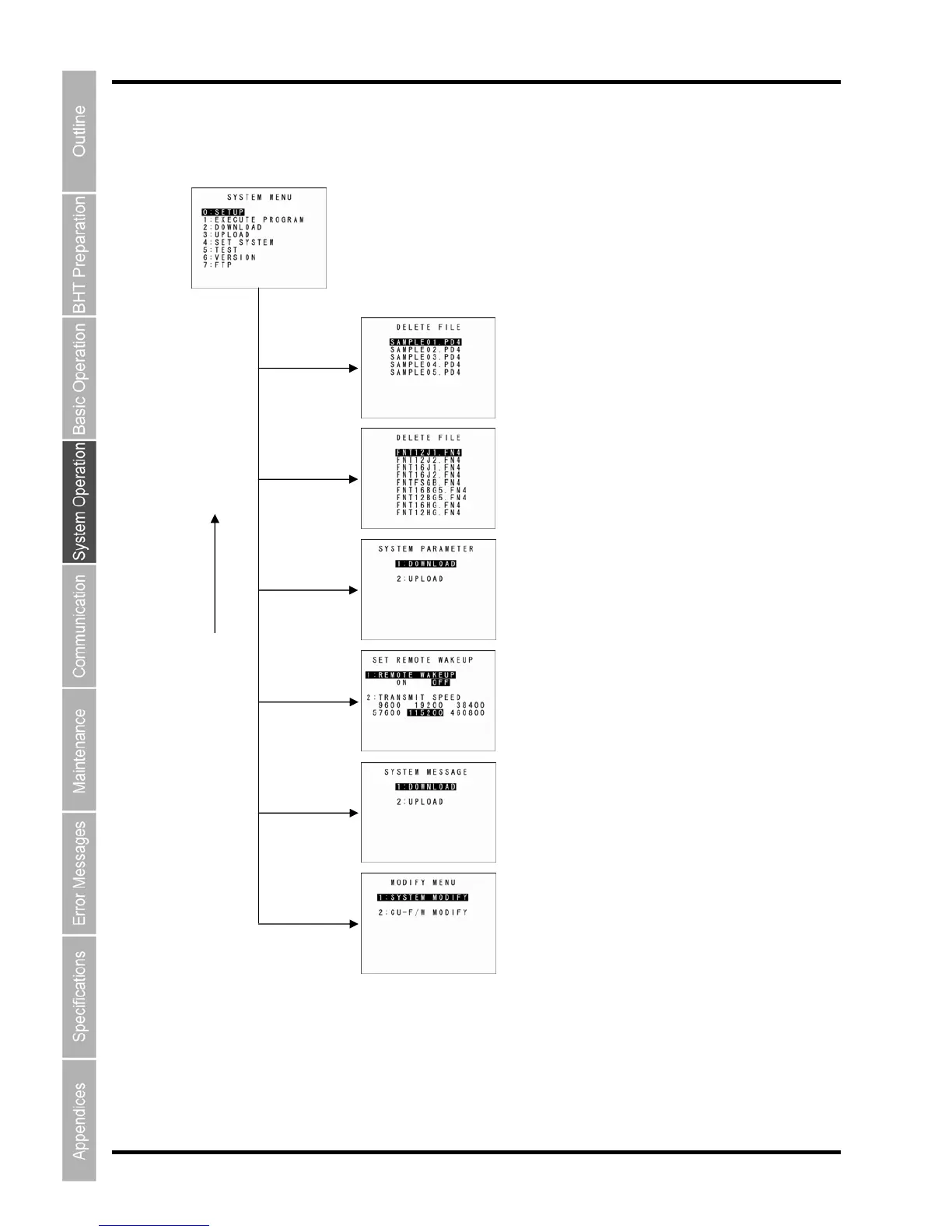
Menu Configuration for Items Not Displayed at the SYSTEM MENU Screen
Press the corresponding numeric key while holding down the SF key.
SYSTEM MENU
[3] wi
th SF
held down
[4] with SF
held down
[0] with SF
held down
Dele
ting Font Files
[2] with SF
held down
Refer to section “4.5.11 Deleti
ng Font Files”.
Dow
nloading/Uploading the BHT System Paramete
File
Refer to section “4.5.12 Do
wnloading/Uploading the BHT
System Parameter File”.
BS/C key
Setting Remote Wake-up
Refer to section “4.5.13 Setting Remote Wa
ke-up”.
Downloading/Uploading the System Message File
[6] wi
th SF
held down
Refer to section “4.5.14 D
ownloading/Uploading System
the Message File”.
Upd
ating the System
Dot [.] wit
h SF
held down
Refer to section “4.5.15 Up
dating the System”.



 To Next Page